
What? Did someone say packets? No, not sugar packets… network packets. TCP ACKs, SYNs, SYN-ACKS— the good stuff. As a former network engineer, I still drool at the thought of packet analysis and network detection and response (NDR). There is something undeniably cool about snooping all the electric signals on those fiber optic and ethernet cables, piecing together to understand what's really happening on your network, and detecting bad actors. Oh, and the best feeling was always shutting down the, “It’s the network!”, blame crowd.

Corelight is a leading NDR solution thanks to its robust network protocol support and deep security detection knowledge base. And now you can expand that visibility even further with the Cribl Search Pack for Corelight, available now in the Packs Dispensary.
This pack helps you analyze Corelight-generated network activity and identify candidates for a smart data-tiering strategy — where high-criticality events go to your SIEM while everything else lands in low-cost object storage like Cribl Lake, S3, or any compatible object store.
The power of Corelight data is expansive, so this pack is a strong starting point to help you gain actionable insights. The pack comes with 2 of the 8 dashboards pre-populated with sample data. Preview a quick walk-through of available dashboards here.
Setting up the Pack
Let's walk through the necessary setup and some of the dashboards. These instructions are also detailed in the pack README. The pack is compatible with Corelight data sent from Cribl Stream to Cribl Lake, Cribl Lakehouse, or any S3 bucket.
Ingesting Corelight Data
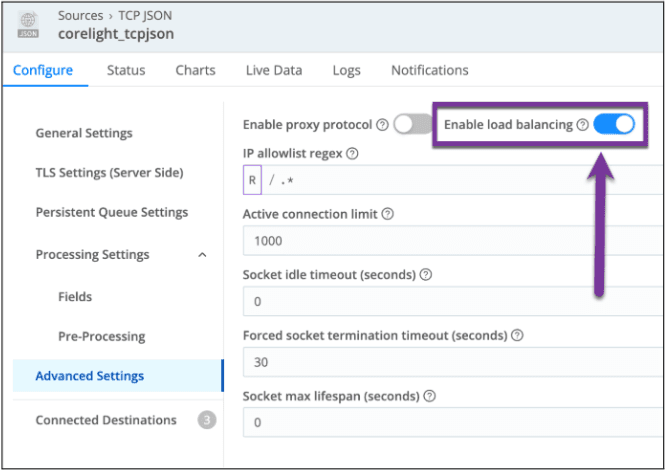
To get started, you need to collect Corelight data and store it somewhere for Cribl Search to access. Cribl Stream is the easiest way to reliably collect Corelight data using a TCP_JSON source.
Important: Make sure to enable 'TCP Load balancing' under advanced settings:
Creating a Cribl Lake Dataset
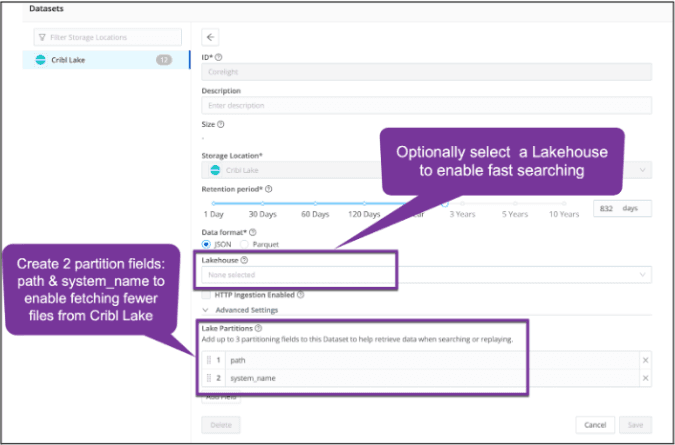
Next, let’s set up your target dataset in Cribl Lake:
Navigate to Cribl Lake → Datasets.
Create a new dataset named Corelight.
Set
pathandsystem_nameas partition fields.
These fields dramatically accelerate searching by reducing how many files need to be scanned when filtering on protocol or sensor. If you want even faster performance, attach a Lakehouse — it’s especially beneficial for searches over hundreds of gigabytes.
Sending Data to Cribl Lake
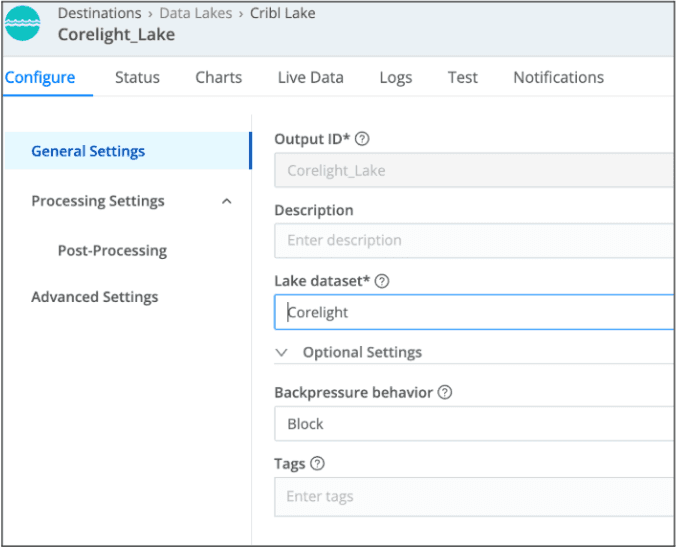
Once the dataset is ready, create a Cribl Stream destination that points to it.
Before sending data to the Corelight Lake destination, you’ll need to populate the two partition fields, path and system_name. For this, a simple pipeline with an eval function is required per the screenshot. This step is necessary, as Cribl Lake does not accept partition field names that start with _ (underscore).
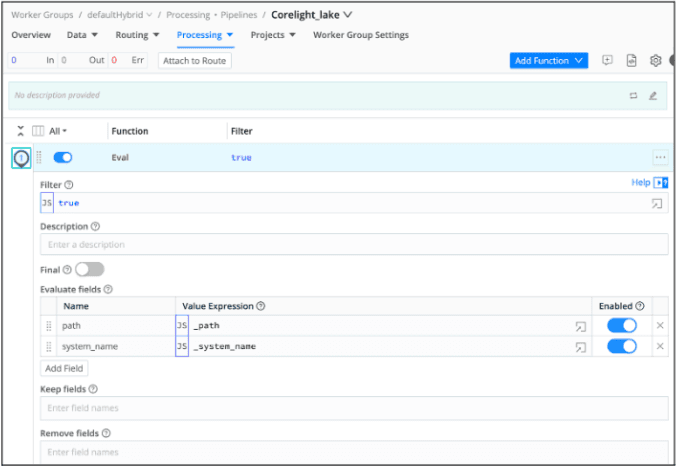
Here is the JSON export of the pipeline. You can import this to your Cribl Stream worker group as well.
{
 "id": "Corelight_lake",
 "conf": {
   "output": "default",
   "streamtags": [],
   "groups": {},
   "asyncFuncTimeout": 1000,
   "functions": [
     {
       "id": "eval",
       "filter": "true",
       "conf": {
         "add": [
           {
             "disabled": false,
             "name": "path",
             "value": "_path"
           },
           {
             "disabled": false,
             "value": "_system_name",
             "name": "system_name"
           }
         ]
       }
     }
   ],
   "description": ""
 }
}
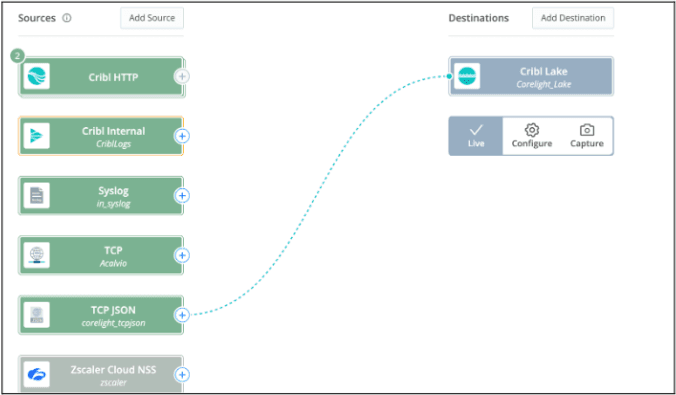
After that, create a route or QuickConnect to send the Corelight data to the Cribl Lake dataset:
Configuring the Search Pack
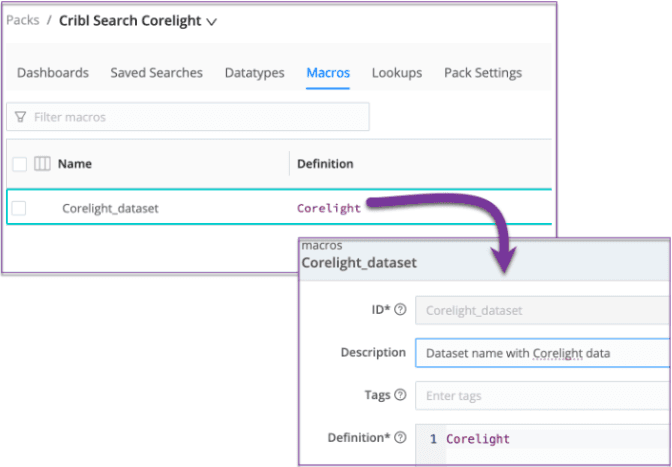
Once you install the Cribl Search Pack for Corelight, visit the Macros page and verify the dataset name. If you named it Corelight (capital C), you’re already good to go.
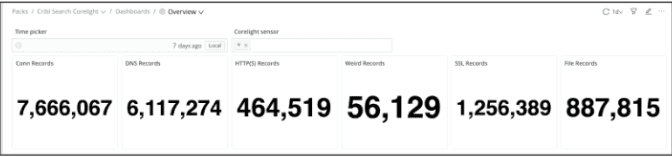
Now all dashboards will populate correctly — including the Overview dashboard:
All dashboards should now be accessible, such as this overview page:
Two Dashboards to Explore
The pack includes several dashboards, but two deliver especially high impact: Log Optimization Potential and Interactive IP Activity.
1. Log Optimization Potential for High-Volume Protocols
This dashboard helps you identify known, low-value traffic that doesn’t need to be shipped to your SIEM. This is perfect for data tiering and SIEM cost reduction.
To use it effectively:
Review the Top DNS Domains, HTTP Host URLs, and Top SSL Hosts charts.
Update the lookup files (known_dns_domains.csv, known_urls.csv, known_ssl_hosts.csv) with domains, URLs, IPs, etc. that are safe to exclude from SIEM ingestion.
These support regex if you want broader matches.Re-run the dashboard to quantify potential SIEM savings.
This feature alone can dramatically reduce SIEM license usage — and the bill that comes with it.
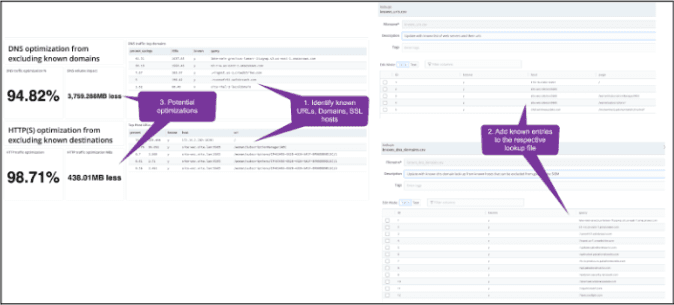
This can be extremely useful in quantifying SIEM optimization savings and associated costs.
2. Interactive IP Activity Dashboard
The other dashboard is the Interactive IP activity dashboard. Think of it as your NDR control board. It gives you a flexible way to filter down source IP addresses, destination IP addresses, destination ports, as well as network protocol, and Corelight sensor. This makes it easy to investigate traffic patterns, drill into suspicious activity, or simply understand baseline behavior.
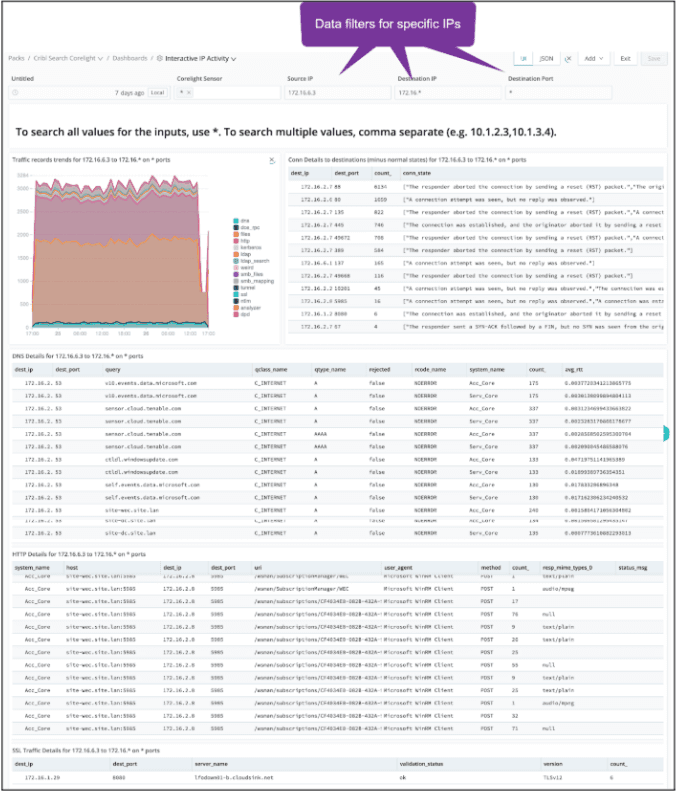
With Cribl Lakehouse, dashboards can render in seconds. Lakehouse is recommended for searches spanning more than a few hundred Gigabytes and can even be used for near-real-time searching.
Try the Corelight Pack Yourself!
Sign up for a free Cribl.Cloud account, access Cribl Search, and install the Cribl Search Pack for Corelight. You’ll get faster investigations, smarter data tiering, and better visibility — all powered by your existing Corelight data.