When you first start using AWS Identity and Access Management (IAM), it feels deceptively simple. You create a role, give it a few permissions, and you're good to go. But as systems evolve — more services, more personas, more shared resources — those simple roles start to fall short.
That was exactly the problem we ran into while building Cribl Lake's Bring-Your-Own-Storage (BYOS) feature. But before we get there, let's start with some context.
IAM Principals and Trust
At its core, IAM revolves around principals (who) and permissions (what). A principal, whether a user, service, or another AWS account, assumes a role defined by a trust policy. That trust policy decides who can assume the role and under what conditions. The permission policy for the role then determines what that session can do once it is assumed.
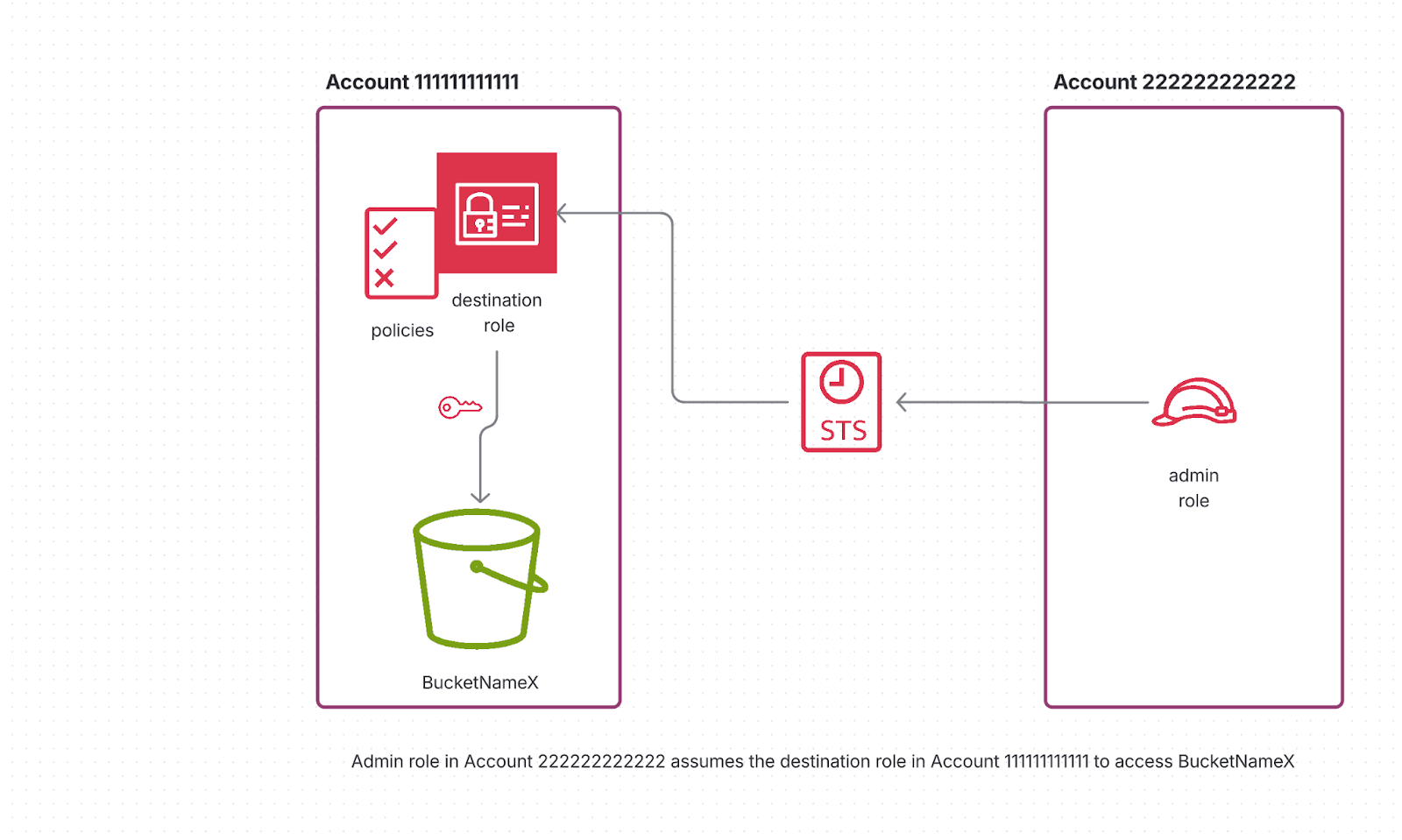
Let's assume there's a service in Account 111111111111 with IAM that wants to access a resource in Account 222222222222. The service in Account 111111111111 runs the role arn:aws:iam::111111111111:role/admin.
Now, to allow that admin role to access a resource in Account 222222222222, we create a new role in that account. That role needs to have a trust policy and a permission policy.
First, the Trust Policy
Principal": {
  "AWS": "arn:aws:iam::111111111111:role/admin"
},
"Action": "sts:AssumeRole",
"Condition": {
  "StringEquals": {
    "sts:ExternalId": "super-secure-external-id"
  }
}
This says:
“Role admin in account 111111111111 can assume me, but only if it knows this specific external ID.”
The External ID acts as a shared key, preventing what's called the confused deputy problem, where another party might accidentally use this role through the same permissions chain.
Next, the Permission Policy
Now let's say the admin role needs to manage lifecycle policies on an S3 bucket in Account 222222222222.
That capability is granted through the role's permission policy:
"Sid": "BucketAdminPermissions",
"Effect": "Allow",
"Action": [
  "s3:PutLifecycleConfiguration",
  "s3:GetLifecycleConfiguration"
],
"Resource": "arn:aws:s3:::bucketNameX"
This says:
“Once the admin role assumes me successfully, it can call PutLifecycleConfiguration and GetLifecycleConfiguration on the bucket bucketNameX.”
In other words, the trust policy controls who can wear the hat, and the permission policy defines what that hat lets them do.
Scaling Access
Now, imagine we introduce two more roles in Account 111111111111:
a reader role that needs to read objects from the S3 bucket, and
a writer role that needs to write objects into it.
To allow them, we update our trust policy in Account 222222222222 so all three roles can assume the same role:
"Principal": {
  "AWS": [
    "arn:aws:iam::111111111111:role/admin",
    "arn:aws:iam::111111111111:role/reader",
    "arn:aws:iam::111111111111:role/writer"
  ]
},
"Action": "sts:AssumeRole",
"Condition": {
  "StringEquals": {
    "sts:ExternalId": "super-secure-external-id"
  }
}
And we expand the permission policy to include both lifecycle and object-level actions:
{
  "Sid": "BucketAdminPermissions",
  "Effect": "Allow",
  "Action": [
    "s3:PutLifecycleConfiguration",
    "s3:GetLifecycleConfiguration"
  ],
  "Resource": "arn:aws:s3:::bucketNameX"
},
{
  "Sid": "BucketReaderPermissions",
  "Effect": "Allow",
  "Action": [
    "s3:GetObject"
  ],
  "Resource": "arn:aws:s3:::bucketNameX/*"
},
{
  "Sid": "BucketWriterPermissions",
  "Effect": "Allow",
  "Action": [
    "s3:PutObject"
  ],
  "Resource": "arn:aws:s3:::bucketNameX/*"
}
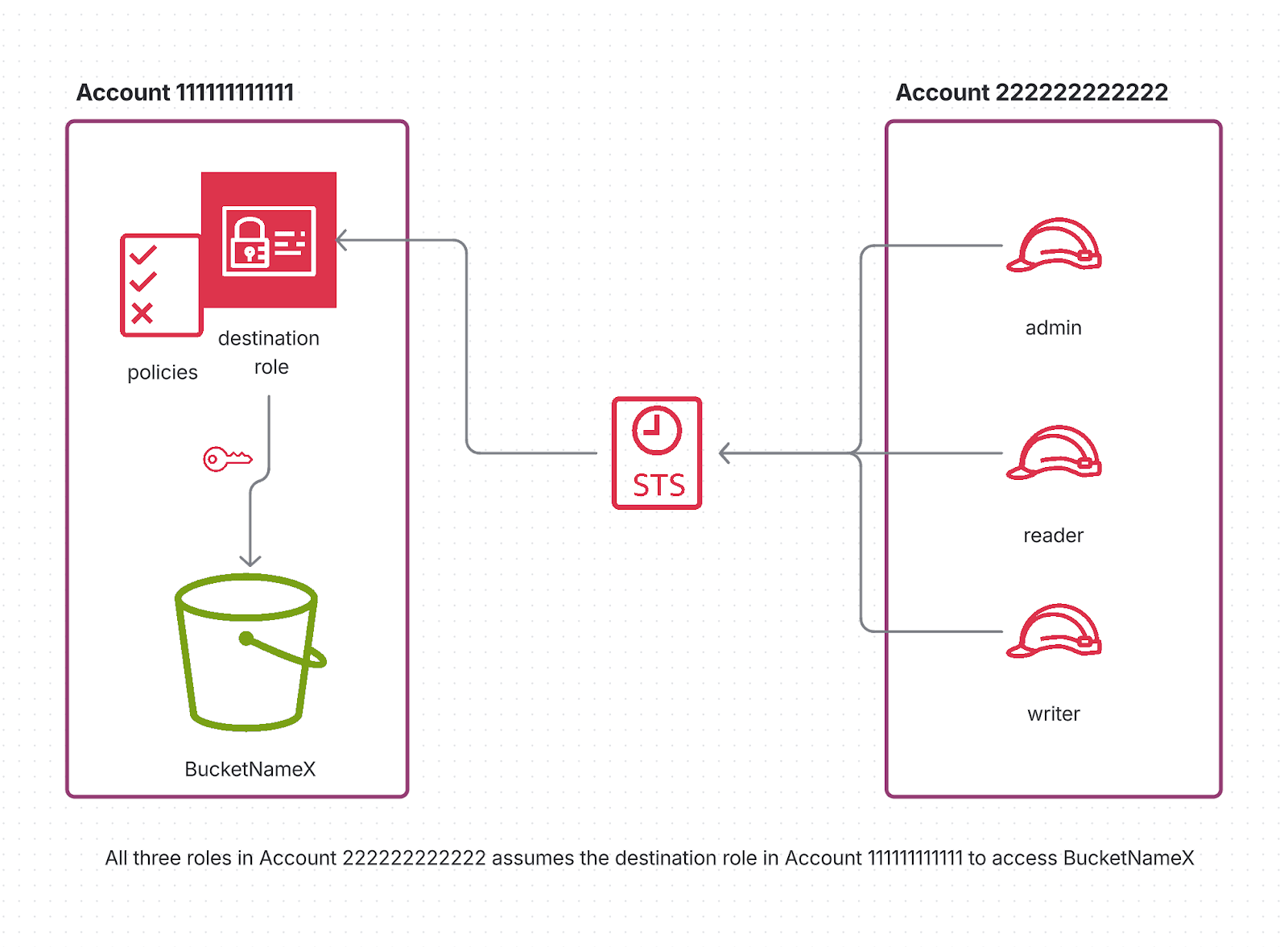
It works, but now all three roles — leader, reader, and writer — have the same permissions. We've just broken one of the fundamental security principles: least privilege. Our reader role, which should only be able to download objects, can now upload objects and even modify the lifecycle policy. Similarly, our writer role can tamper with bucket configurations — something they should never touch.
How do you grant them all different levels of permission without violating the principle of least privilege?
Option A: One Role per Permission Set
A straightforward fix is to create one IAM role per permission set in Account 222222222222:
BucketAdminRole – assumed by admin for configuration management
BucketWriterRole – assumed by writer for data ingestion
BucketReaderRole – assumed by reader for query access
Each role would have its own trust and permission policies, narrowly tailored to its function.
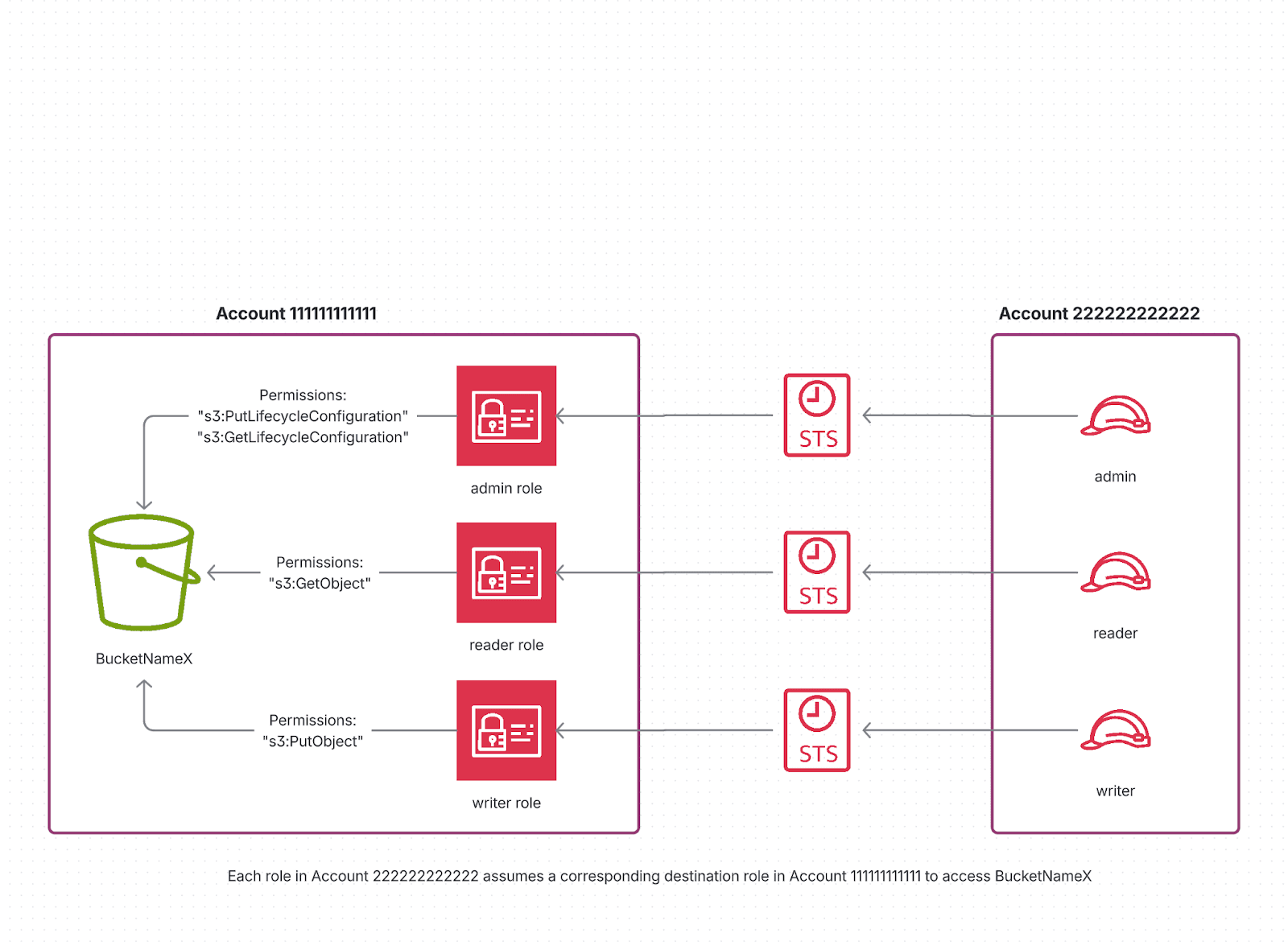
This pattern works well in environments you control: it's explicit, auditable, and perfectly aligned with least-privilege principles.
But there's a hidden management cost: now you have to create, manage, and audit multiple roles.
If you're an AWS admin doing this once, that's fine. If you're a Cribl Lake customer onboarding a BYOS (Bring-Your-Own-Storage) bucket, it's painful. We'd essentially be asking each customer to create and maintain three roles just so our service components — the control plane, Stream Worker Groups, and Search — can access the same bucket differently.
That's a bad customer experience.
We needed a way for the same role to offer different permissions based on who assumed it.
Option B: Attribute-Based Access with Session Tags
Enter Session tags! Instead of creating multiple roles, we let each calling role in Account 111111111111 tag its session when assuming the target role in Account 222222222222.
For example, when the admin role assumes the shared role, it includes a tag:
aws sts assume-role \
  --role-arn arn:aws:iam::222222222222:role/shared-bucket-role \
  --role-session-name admin-session \
  --tags Key=Actor,Value=admin
When the reader role assumes it, it adds a different tag:
--tags Key=Actor,Value=reader
The trust policy now simply controls who can assume the role and which tags they're allowed to attach:
{
  "Sid": "BucketAdminRole",
  "Effect": "Allow",
  "Principal": {
    "AWS": "arn:aws:iam::111111111111:role/admin"
  },
  "Action": "sts:AssumeRole",
  "Condition": {
    "StringEquals": {
      "sts:ExternalId": "super-secure-external-id",
      "aws:RequestTag/Actor": "admin"                        #### NEW
    }
  }
},
{
  "Sid": "BucketAdminRoleTagSession",                        #### NEW
  "Effect": "Allow",
  "Principal": {
    "AWS": "arn:aws:iam::111111111111:role/admin"
  },
  "Action": "sts:TagSession",
  "Condition": {
    "StringEquals": {
      "aws:RequestTag/Actor": "admin"
    }
  }
},
{
  "Sid": "BucketReaderRole",
  "Effect": "Allow",
  "Principal": {
    "AWS": "arn:aws:iam::111111111111:role/reader"
  },
  "Action": "sts:AssumeRole",
  "Condition": {
    "StringEquals": {
      "sts:ExternalId": "super-secure-external-id",
      "aws:RequestTag/Actor": "reader"                        #### NEW
    }
  }
},
{
  "Sid": "BucketReaderRoleTagSession",                        #### NEW
  "Effect": "Allow",
  "Principal": {
    "AWS": "arn:aws:iam::111111111111:role/reader"
  },
  "Action": "sts:TagSession",
  "Condition": {
    "StringEquals": {
      "aws:RequestTag/Actor": "reader"
    }
  }
}
## Similar update for the Writer role
The permission policy references those tags to decide what each session can do:
{
"Sid": "BucketAdminPermissions",
"Effect": "Allow",
"Action": [
"s3:PutLifecycleConfiguration",
"s3:GetLifecycleConfiguration"
],
"Resource": "arn:aws:s3:::bucketNameX",
"Condition": {
"StringEquals": {
"aws:PrincipalTag/Actor": "admin" #### NEW
}
}
},
{
"Sid": "BucketReaderPermissions",
"Effect": "Allow",
"Action": [
"s3:GetObject"
],
"Resource": "arn:aws:s3:::bucketNameX/*",
"Condition": {
"StringEquals": {
"aws:PrincipalTag/Actor": "reader" #### NEW
}
}
},
{
"Sid": "BucketWriterPermissions",
"Effect": "Allow",
"Action": [
"s3:PutObject"
],
"Resource": "arn:aws:s3:::bucketNameX/*",
"Condition": {
"StringEquals": {
"aws:PrincipalTag/Actor": "writer" #### NEW
}
}
}
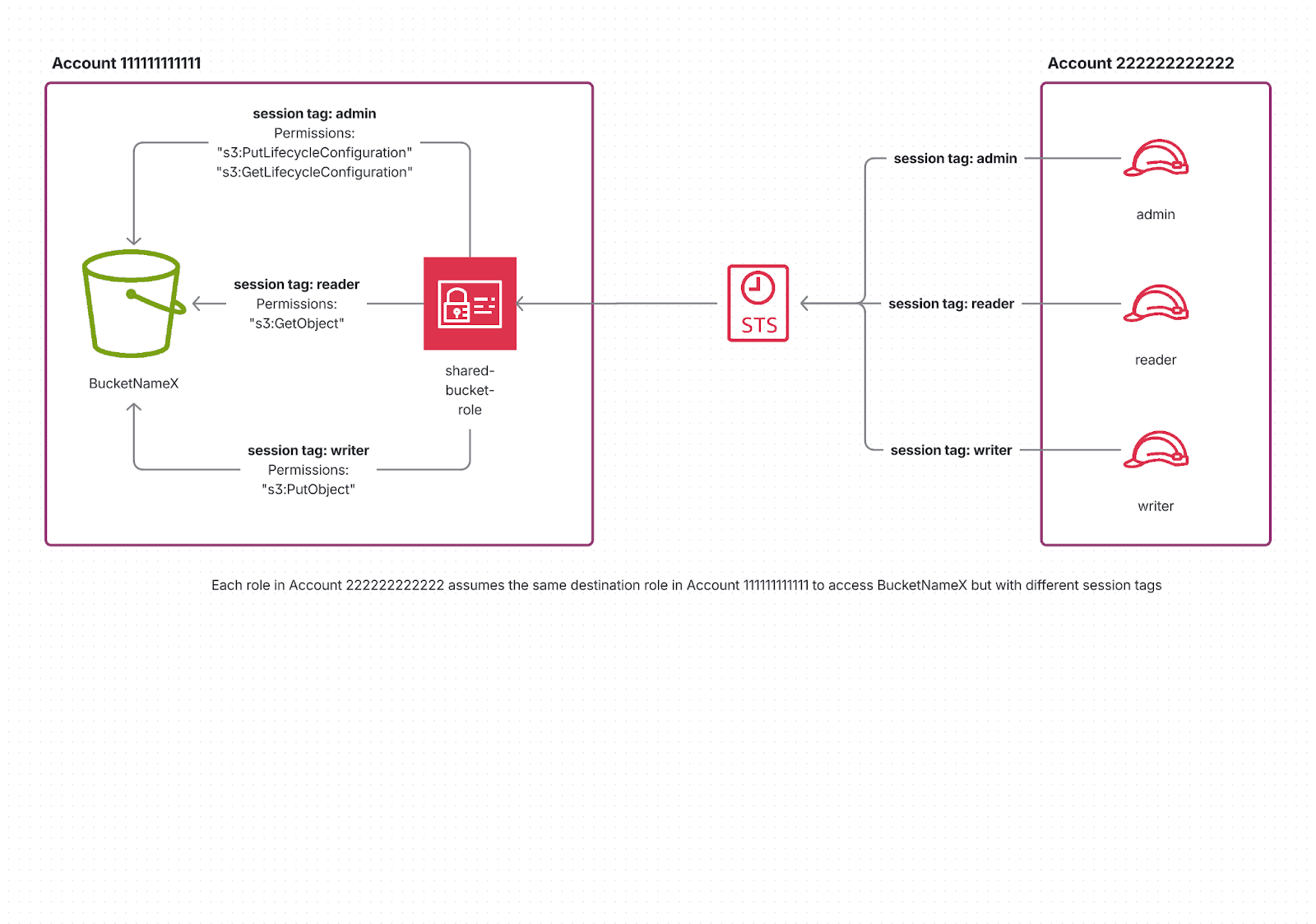
So, the admin can only read & update lifecycle configurations, the writer can only put objects,
and the reader can only read objects — all through the same IAM role!
Elevate Permissions with Single Session Tag
So far we have shown the general pattern where each caller attaches its own session tag to define its access level. In practice, you can simplify this even further. You don’t always need every service to tag its session. Sometimes only one privileged actor needs that extra context to elevate permissions safely.
Continuing the example above, it is possible that only the admin role needs the lifecycle and read/write access to the bucket, whereas other roles (say workerA and workerB roles) only need read/write access.
If we go the simplified single-tag route, the trust policy gives permission to only one role to attach the tag:
{
  "Sid": "BucketAdminRole",
  "Effect": "Allow",
  "Principal": {
    "AWS": "arn:aws:iam::111111111111:role/admin"
  },
  "Action": "sts:AssumeRole",
  "Condition": {
    "StringEquals": {
      "sts:ExternalId": "super-secure-external-id",
      "aws:RequestTag/Actor": "admin"
    }
  }
},
{
  "Sid": "BucketAdminRoleTagSession",
  "Effect": "Allow",
  "Principal": {
    "AWS": "arn:aws:iam::111111111111:role/admin"
  },
  "Action": "sts:TagSession",          #### Only Admin role gets this permission
  "Condition": {
    "StringEquals": {
      "aws:RequestTag/Actor": "admin"
    }
  }
},
{
  "Sid": "BucketReadWriteRoles",
  "Effect": "Allow",
  "Principal": {
    "AWS": "arn:aws:iam::111111111111:role/workerA",
    "AWS": "arn:aws:iam::111111111111:role/workerB"
  },
  "Action": "sts:AssumeRole",
  "Condition": {
    "StringEquals": {
      "sts:ExternalId": "super-secure-external-id",
    }
  }
}
The permission policy references tags only for the admin operations:
{
  "Sid": "BucketAdminPermissions",
  "Effect": "Allow",
  "Action": [
    "s3:PutLifecycleConfiguration",
    "s3:GetLifecycleConfiguration"
  ],
  "Resource": "arn:aws:s3:::bucketNameX",
  "Condition": {
    "StringEquals": {
      "aws:PrincipalTag/Actor": "admin" # admin tag must be passed,
                                        # which only admin has permission
                                        # to do so as per the trust policy
    }
  }
},
{
  "Sid": "BucketReadWritePermissions",
  "Effect": "Allow",
  "Action": [
    "s3:GetObject",
    "s3:PutObject"
  ],
  "Resource": "arn:aws:s3:::bucketNameX/*",
  # no tags are required. All three roles can perform these actions
}
This exact pattern powers Cribl Lake's Bring-Your-Own-Storage (BYOS) integration. We ask customers to create just one IAM role in their AWS account and share its Amazon Resource Names (ARN) with Cribl.
From there:
The Cribl Lake’s Control Plane assumes it with the Actor=admin session tag and manages the bucket lifecycle, notifications, and encryption settings.
Stream Worker Groups and Cribl Search services assume the same role without session tags, giving them only object-level permissions needed to read and write objects.
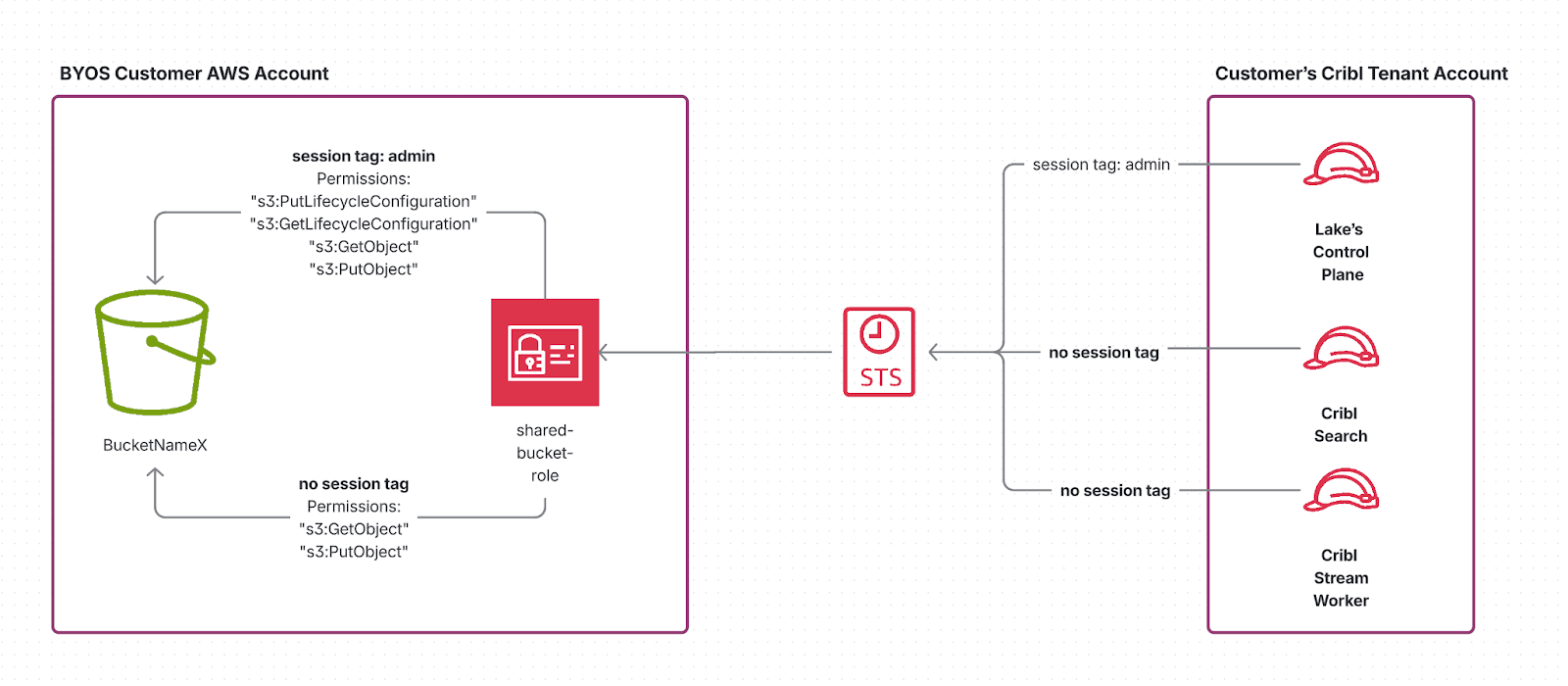
This model provides the best of both worlds:
Customers only need to create one role.
We still enforce strict separation of privileges internally.
And because tagging rights are limited to the Lake Control Plane, other services — Worker Groups and Cribl Search — cannot pass a session tag and hence cannot perform any actions on resources that require an admin session tag.
From the customer's perspective, it's incredibly simple to set up and audit. From our perspective, it's a secure and scalable solution that strictly enforces the principle of least privilege inside a single role, thanks to the session tags.
What started as a simple IAM problem turned into an opportunity to rethink how we handle access at scale. By leveraging session tags, we built a model that keeps things secure, flexible, and easy for customers — no endless role management required.
Want to see it in action? Spin up Cribl Lake with your own storage and experience how effortless secure access can be.