



REST and SaaS APIs are everywhere now, and most security and platform teams are drowning in them. Every new tool brings its own REST interface, schema, pagination quirks, throttling rules, and auth model.The default response is to build yet another one-off collector that pushes data into a single SIEM or log platform. That works for a while, but it’s fragile and hard to maintain.
It also quietly reinforces a single-destination pattern that makes it harder to change tools or add new analytics later.
REST Collector IO Packs in Cribl give you a different path. They’re opinionated, reusable configurations for popular REST and SaaS sources. Each Pack encapsulates the hard parts (auth, pagination, error handling, and normalization), so your teams can focus on which tools should receive the data, not how to pull it.
Because the Packs run on Cribl Stream, the same configuration can send those events to other SIEMs, new observability tools, and your own storage — all from one place. That way, you keep the speed of native collectors without giving up the choice and control of a vendor‑agnostic data engine.
Who picks up speed?
SOC and SIEM owners - Quickly onboard high‑value SaaS and cloud signals like identity, collaboration, and ticketing into a SIEM while simultaneously sending the same events to a backup SIEM or data store for longer‑term analytics and investigations.
Platform and observability teams - Use one pattern to bring REST data into your existing logging and metrics platforms, alongside Falcon, without deploying extra agents or maintaining bespoke collectors for each tool.
Architects and data owners - Standardize on versioned, reusable Packs instead of scattered custom scripts, making it easier to govern how REST data flows, avoid vendor lock‑in, and change destinations over time.
Start flowing with REST IO Packs
Once you know which REST or SaaS sources you want to bring in, getting started is straightforward. To create a custom REST collector, refer to this page. Otherwise, follow these steps to get started:
For prebuilt REST collector content:, Go to the Cribl Packs Dispensary and search for “rest-io”.
Download/import a REST IO Pack from the Dispensary: Pick a Pack for a REST or SaaS source you already depend on (like an IdP or SIEM) and add it to your Stream deployment.
Customize the Pack for your environment: Provide instance‑specific details like base URL, credentials or tokens, and collection schedules so the Pack can start pulling data from your tenant.
The Cribl Pack factory is constantly sprinting to help you manage your data. We're excited to announce that our REST Collector IO Packs have been updated, making it simpler than ever to process, transform and route complex REST based data streams with Cribl Stream. Our latest versions introduce Pack Variables, which consolidate your configuration journey into a streamlined configuration experience.
Find your REST Collector IO Packs with ease
All of these Packs are available from the in product dispensary page or by going to the Cribl Pack Dispensary.
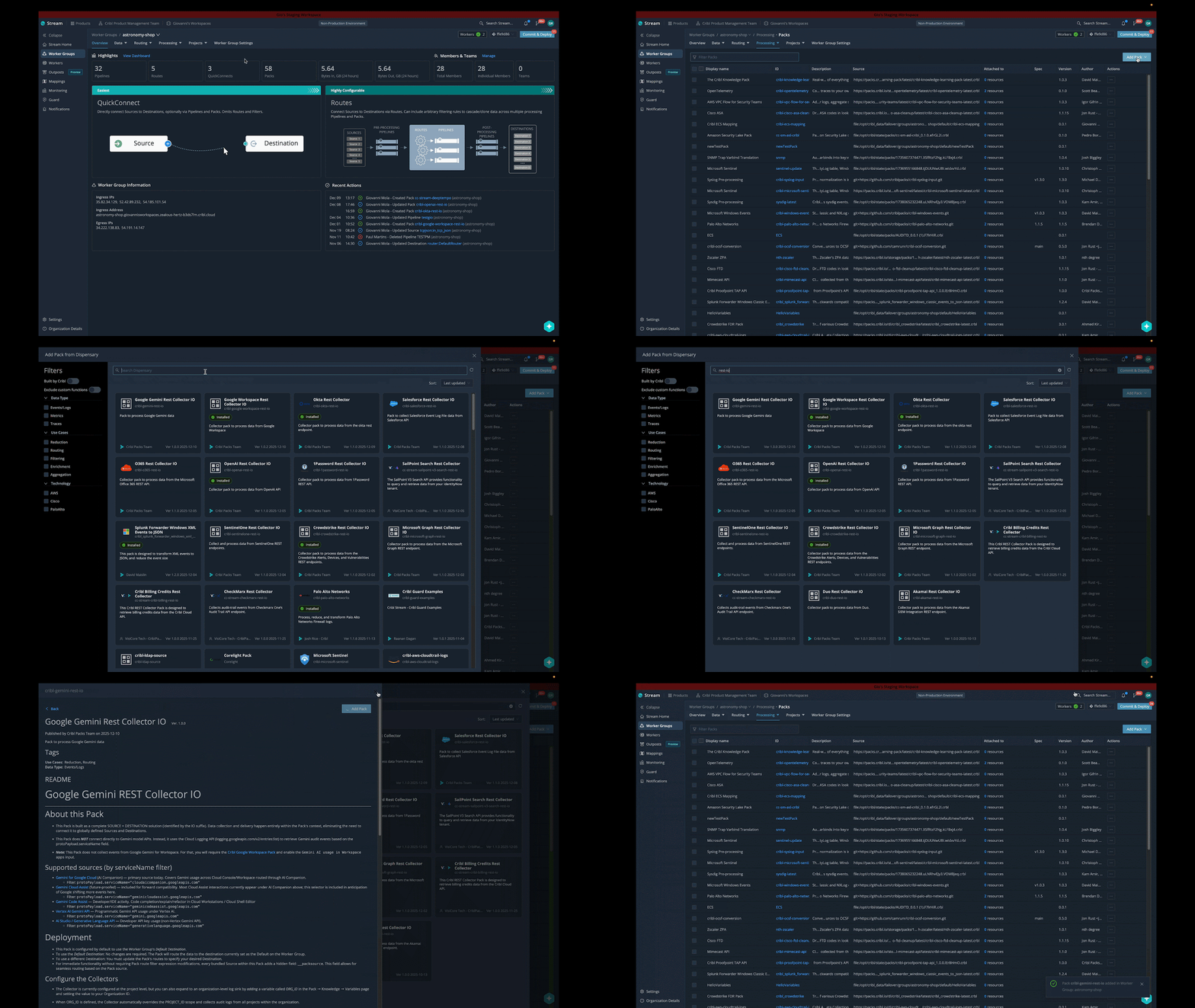
Here’s how you navigate there from inside the product.
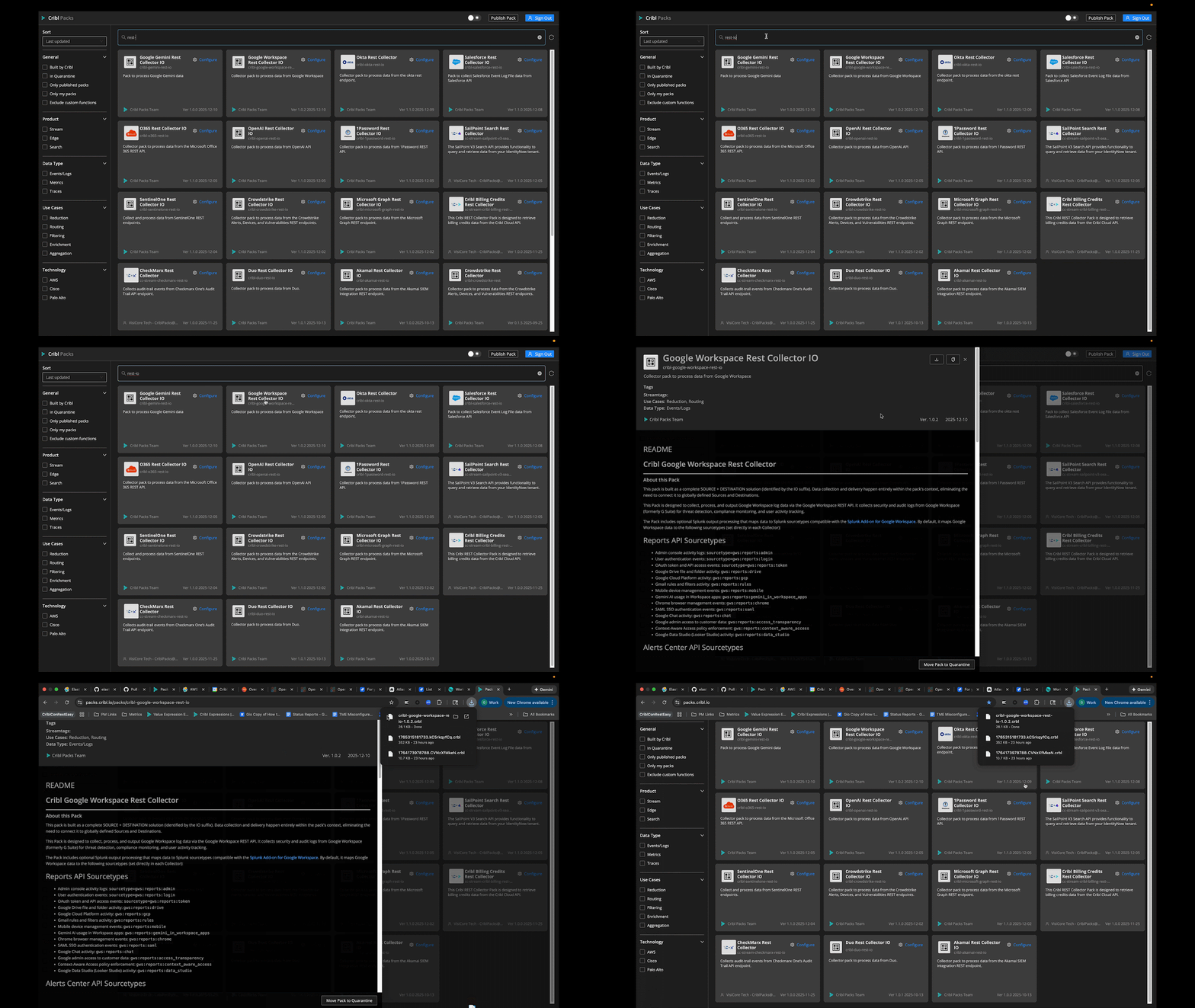
Here’s how you get there from the Cribl Pack Dispensary.
How to configure REST Collector IO Packs with Variables
For any REST Collector Pack to start working, it needs a couple of critical pieces of information like the endpoint URL and credentials (API key, token, etc.) which were placed directly in the configs requiring users to manually locate these fields. Now all you need to do is update the values for each Variable and you’re done! As always, don’t forget to Commit and Deploy before running tests to verify that data is flowing within your Pack’s REST Collector source.
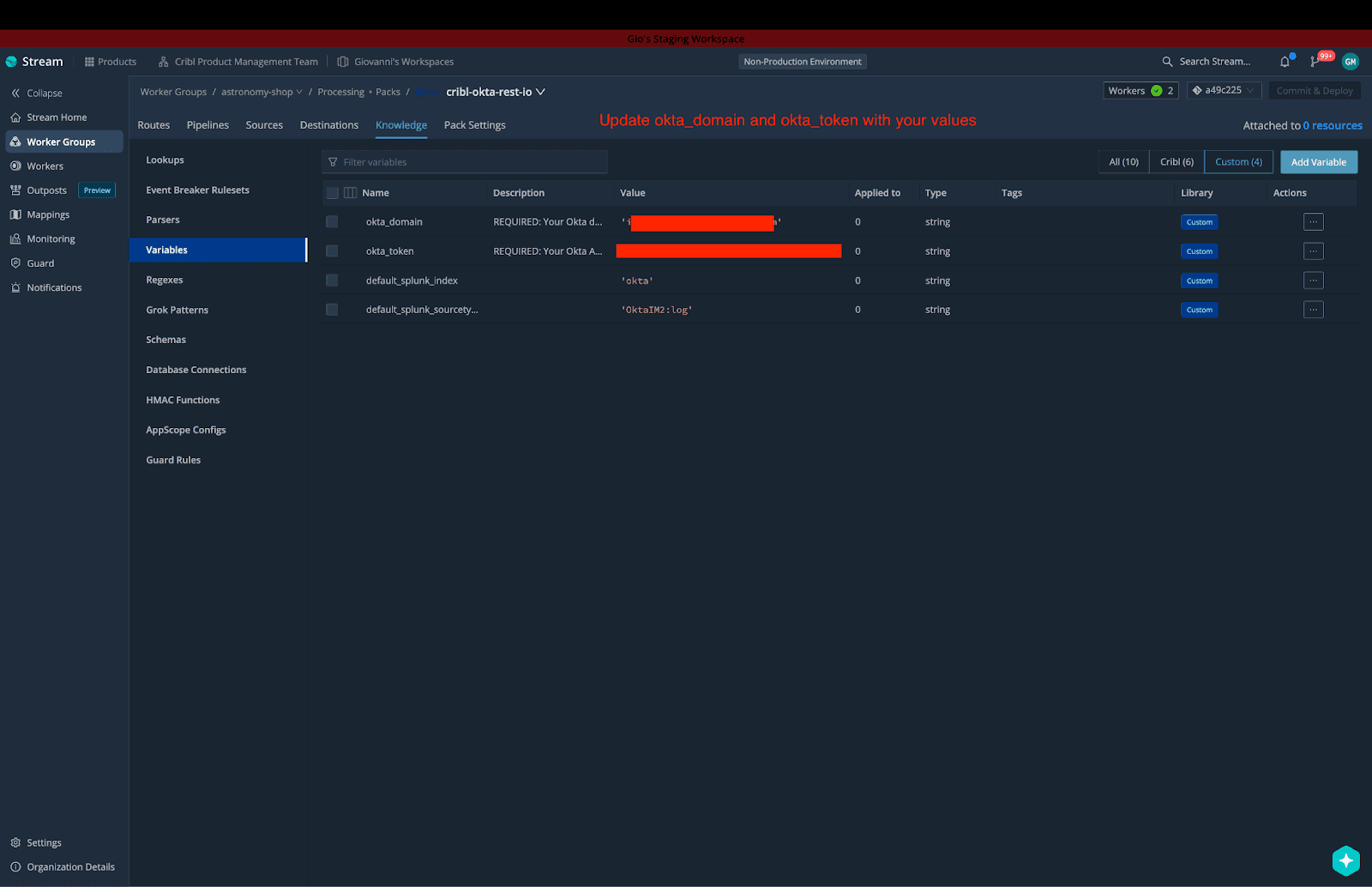
Here’s an example using the Okta REST Collector IO Pack.
Understanding the "IO" in REST Collector IO Packs
When you install a REST Collector IO Pack, you are getting an end-to-end telemetry stream within the Pack, including:
Source(s): A fully configured REST Collector Source tailored to the vendor's API (handling pagination, rate limiting, and state tracking).
Pipeline: A pre-built set of functions for parsing, enriching, and transforming the data.
Route: A preconfigured routes table which sends data from each configured source to the proper pipeline for processing. For each source there is a field called __packsource which tags the data coming from each source collector so that if the Pack ID is ever changed this tag can still be used for ensuring route filter expressions accurately get the data to the correct pipeline. An example would be:
__packsource == 'cribl-okta-rest-io.okta-api-logs'Destination: Every REST Collector IO Pack includes a Default Destination set as the target for each route.
An Important Reminder on Destinations
When an IO Pack is installed, its Route is configured to send data to the Destination named Default, which references the Worker Group Default Destination. This means if your Worker Group Default destination is set to Devnull, then your data from this Pack will also be sent there. So it is very important to determine which option works best for you.
Option 1: Add Destination within the Pack
If you need data from one of these specific APIs to go to a unique place (e.g., an S3 bucket only for Okta logs), you can add a Destination directly within the Pack's Destination tab and then update the Pack's Route to send the data to that newly configured Destination.
Option 2: Use Your Worker Group's Output Router
Ensure your Worker Group's global Output Router is defined as the Default Destination. This allows the Pack's data to flow into your existing global routing logic and destinations (Splunk software, S3, Snowflake, etc.). Afterwards, it’s important that your output router contains all of the required expressions to handle the data flowing from these Packs to the output router in order to get to the correct destination. Refer to this blog post for more information on this option.
What is happening with the -rest Packs?
There are several Packs on the Dispensary that contain extensions -rest rather than -rest-io which means they only include pipelines and routes for specific api sources. For REST-based Packs, keep an eye on the Packs that contain -rest-io as these will be the Packs that continue to be maintained going forward. The -rest-io Packs allow us to bundle the end-to-end configuration objects (event breakers, database connections and HMAC functions) within the Pack, which limits the amount of copy-and-pasting required to operationalize a REST-based Pack.
Recently added and updated REST Collector IO Packs
We have significantly expanded our collection of ready-to-deploy REST Collector IO Packs, all of which use the new, simplified Variables approach. Get started today with the following Packs, all in the Cribl Dispensary:
Next Steps: Streamline your data ingestion
Ready to simplify how REST and SaaS data flows into your tools? Start with a Cribl Pack instead of another one-off collector:
Head over to the Packs Dispensary in Cribl Stream or at packs.cribl.io.
Search for rest-io in the desired REST Collector IO Pack.
Install the Pack, open it then navigate straight to the Variables tab within that Pack for rapid configuration.