
The Cribl Search Pack for Palo Alto Strata Logging gives security and network teams a faster path to insight by visualizing and analyzing logs generated from Palo Alto Networks' Strata Logging Service (SLS). Designed to support traffic, threat, system, and configuration logs,this pack provides fully customizable dashboards and saved searches— helping to streamline log analysis and investigations, making it easier to monitor firewall behavior.
This pack includes saved searches for more efficient querying, alerting, and notification setup. Whether your Strata logs are stored in object stores like Amazon S3 or in Cribl Lake, you can run searches directly against it — no data migration, rehydration, or complex indexing required.
Why This Matters
Managing high volumes of Strata logs can be time-consuming, especially when teams are also tasked to build visualizations and searches from scratch. The Cribl Search Pack for Palo Alto Strata Logging Service eliminates the overhead with
Prebuilt dashboards: visualize key metrics and trends instantly, no setup required.
Saved searches for investigation and alerts: quickly find critical entries, investigate anomalies, and trigger notifications where needed.
Flexible data access: query Strata logs in S3 or Cribl Lake using the same workflows.
With this pack, teams can spend less time parsing JSON and managing datasets, and more time acting on what matters.
Dataset Setup Instructions
Logs are ingested from Palo Alto SLS into Cribl Stream using the HEC source. The data can be processed by Stream before landing it in Cribl Lake or a cloud object store, such as S3. The format the data is stored is the original JSON with optional IP data enrichment using a MindMap database.
If your SLS data is already stored in an S3 bucket, you can simply point your Search dataset to that location. This pack is designed to work immediately with messages in the structure below:
{
  "_time": 1752332382.344,
  "_raw": "...",
  "source": "Palo Alto Networks FLS LF",
  "host": "logfwd20-abc-5437-4bf4-a1b1-xyz-taskmanager-8vwwk",
  "sourcetype": "httpevent",
  "index": "default",
  "TimeReceived": "2025-07-12T14:59:35.000000Z",
  "DeviceSN": "025501000976",
  "LogType": "TRAFFIC",
  "Subtype": "end",
  "ConfigVersion": "11.1",
  "TimeGenerated": "2025-07-12T14:59:33.000000Z",
  "SourceAddress": "10.44.19.153",
  "DestinationAddress": "142.251.221.74",
  "NATSource": "130.194.237.253",
  "NATDestination": "142.251.221.74",
  "Rule": "GP_SOE_to_EXTERNAL",
  "SourceUser": "dubdub\\nhannah",
  "Application": "quic-base",
  "VirtualLocation": "vsys1",
  "FromZone": "GP-SOE",
  "ToZone": "EXTERNAL",
  "InboundInterface": "tunnel.25",
  "OutboundInterface": "ethernet1/41",
  "LogSetting": "Glenel-syslog-ng-LFP",
  "SessionID": 9230853,
  "RepeatCount": 1,
  "SourcePort": 54663,
  "DestinationPort": 443,
  "NATSourcePort": 54098,
  "NATDestinationPort": 443,
  "Protocol": "udp",
  "Action": "allow",
  "Bytes": 16811,
  "BytesSent": 7580,
  "BytesReceived": 9231,
  "PacketsTotal": 44,
  "SessionStartTime": "2025-07-12T14:57:24.000000Z",
  "SessionDuration": 7,
  "URLCategory": "any",
  "SequenceNo": 7460057136831996000,
  "SourceLocation": "10.0.0.0-10.255.255.255",
  "DestinationLocation": "US",
  "PacketsSent": 21,
  "PacketsReceived": 23,
  "SessionEndReason": "aged-out",
  "DGHierarchyLevel1": 415,
  "DGHierarchyLevel2": 0,
  "DGHierarchyLevel3": 0,
  "DGHierarchyLevel4": 0,
  "VirtualSystemName": "",
  "DeviceName": "CRR-VPN-FW1",
  "ActionSource": "from-policy",
  "IMSI": 0,
  "ParentSessionID": 0,
  "ParentStarttime": "1970-01-01T00:00:00.000000Z",
  "Tunnel": "N/A",
  "EndpointAssociationID": 0,
  "ChunksTotal": 0,
  "ChunksSent": 0,
  "ChunksReceived": 0,
  "RuleUUID": "03c3df25-8c6d-4e55-9863-0ec77427055b",
  "HTTP2Connection": 0,
  "LinkChangeCount": 0,
  "TimeGeneratedHighResolution": "2025-07-12T14:59:34.462000Z",
  "dst_country_names_en": "United States",
  "dst_location_latitude": 37.751,
  "dst_location_longitude": -97.822,
  "cribl_pipe": "pan_sls_to_lake",
  "datatype": "cribl_json",
  "data_source": "Palo Alto Networks FLS LF",
  "data_dataset": "pan_sls_processed"
}
A sample Stream pipeline is provided to help guide data processing, including:
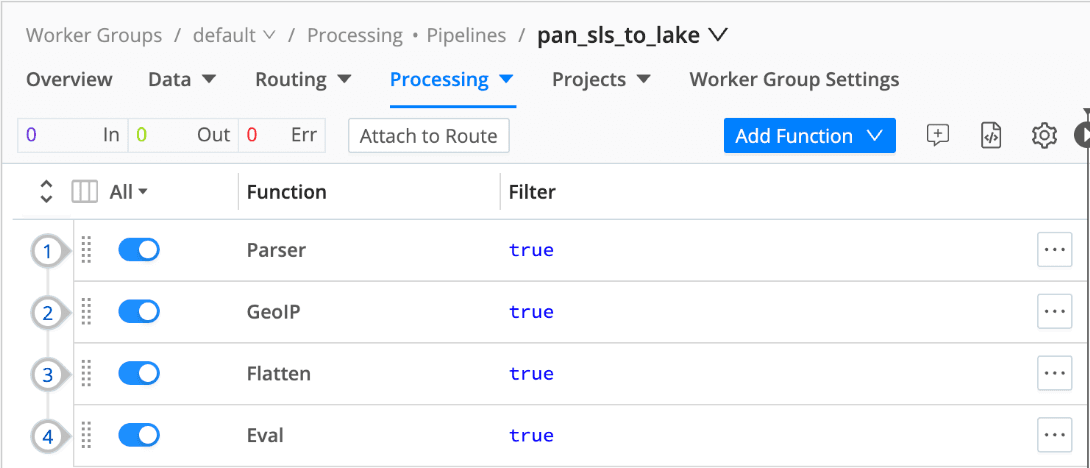
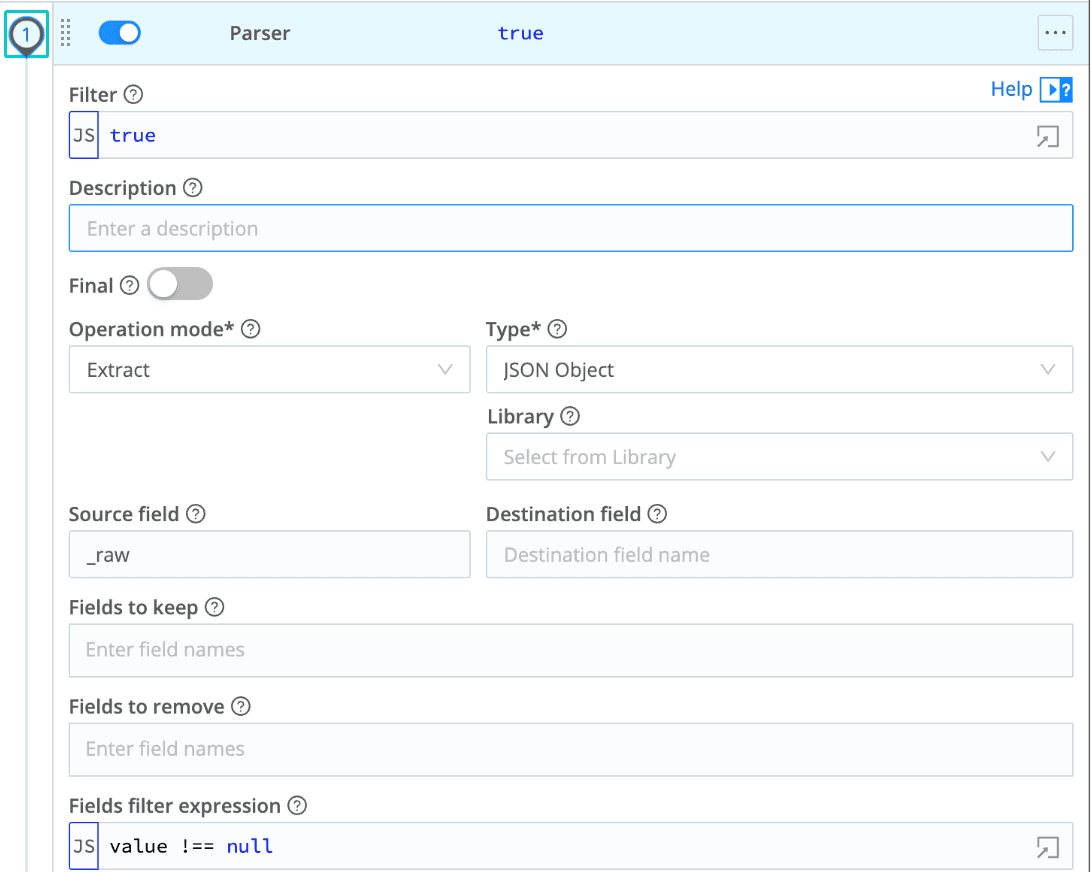
Parser config with optional cleanup of empty values (Fields filter expression value !== null ):
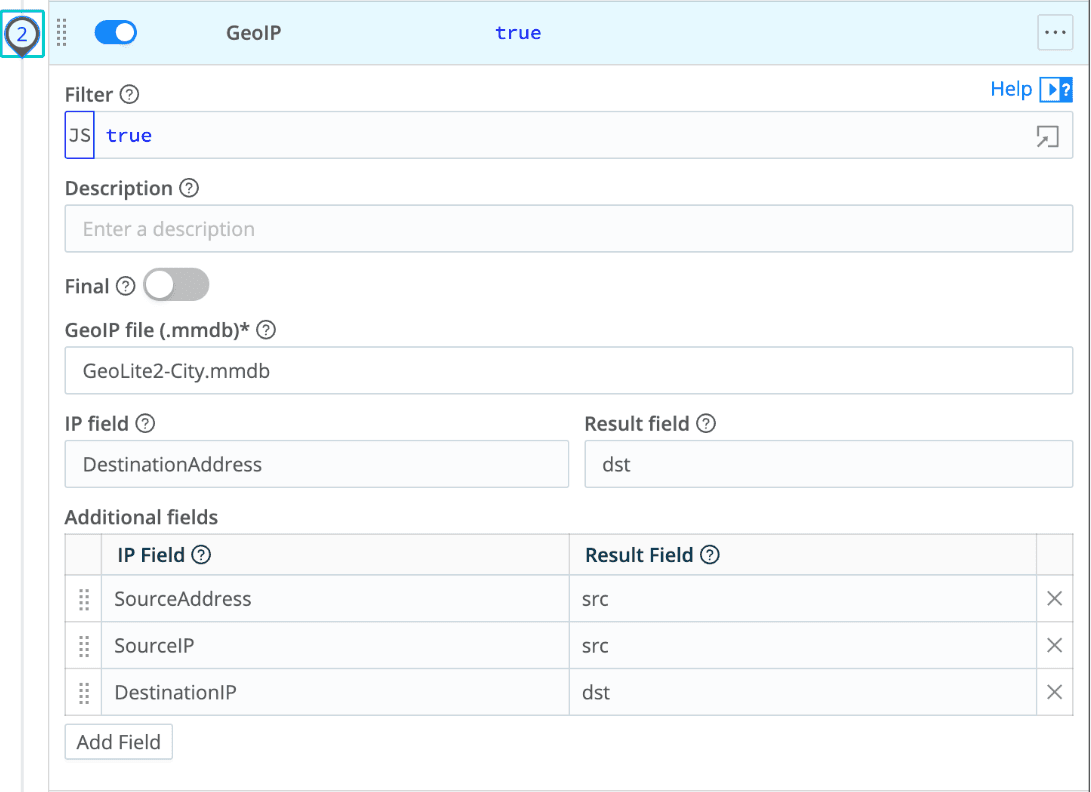
GeoIP config for source/destination IP metadata:
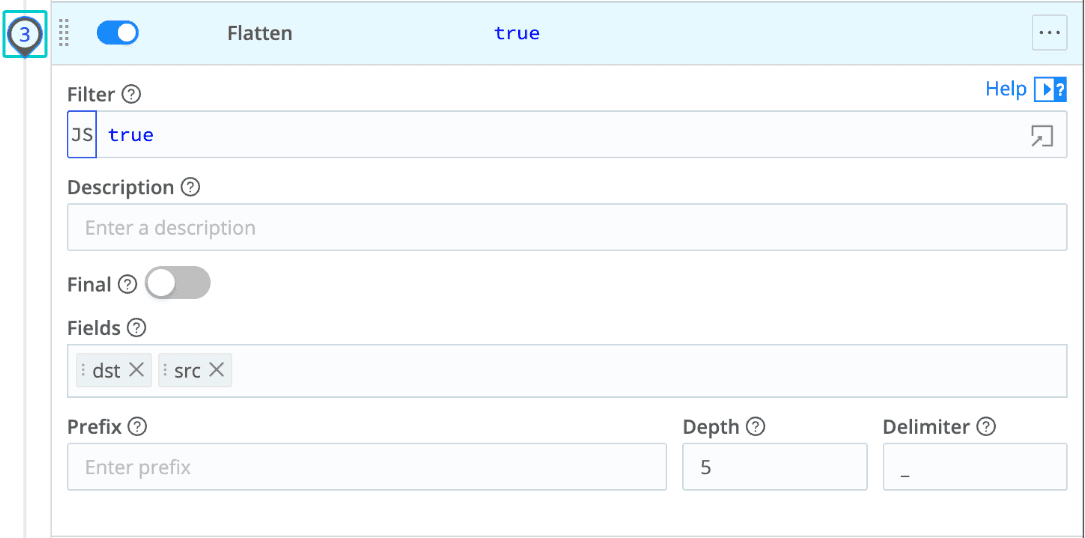
Flatten config for easier field access:
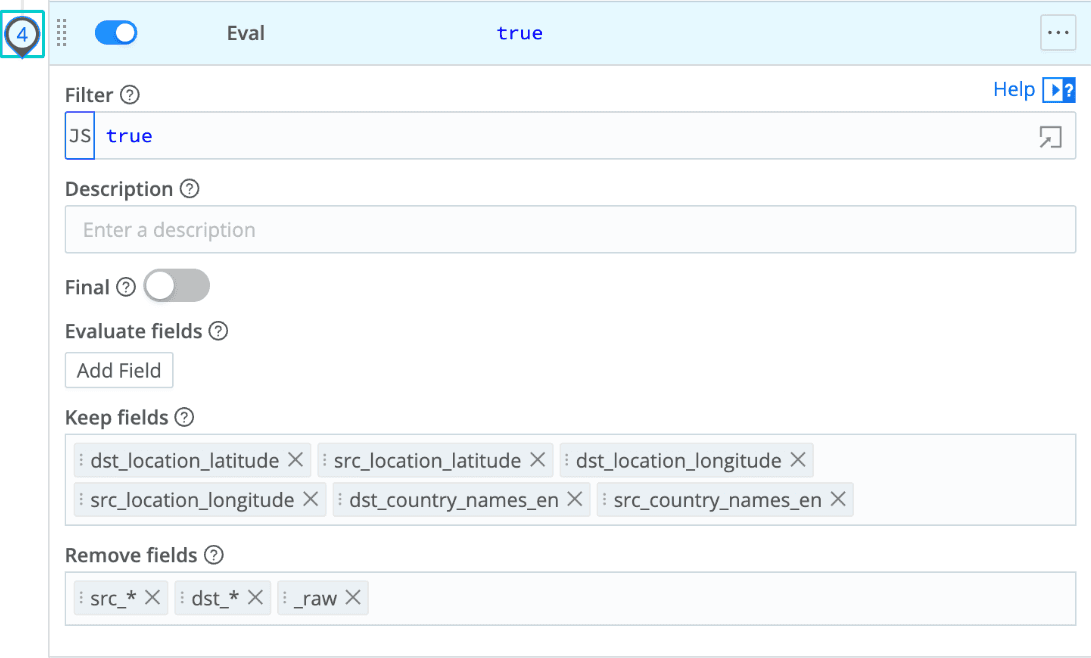
Eval config for final cleanup and field management:
The source:
{
  "id": "pan_sls_to_lake",
  "conf": {
    "output": "default",
    "streamtags": [],
    "groups": {},
    "asyncFuncTimeout": 1000,
    "functions": [
      {
        "id": "serde",
        "filter": "true",
        "conf": {
          "mode": "extract",
          "type": "json",
          "srcField": "_raw",
          "remove": [],
          "fieldFilterExpr": "value !== null"
        }
      },
      {
        "id": "geoip",
        "filter": "true",
        "conf": {
          "inField": "DestinationAddress",
          "outField": "dst",
          "outFieldMappings": {},
          "file": "GeoLite2-City.mmdb",
          "additionalFields": [
            {
              "extraInField": "SourceAddress",
              "extraOutField": "src"
            },
            {
              "extraInField": "SourceIP",
              "extraOutField": "src"
            },
            {
              "extraInField": "DestinationIP",
              "extraOutField": "dst"
            }
          ]
        }
      },
      {
        "id": "flatten",
        "filter": "true",
        "conf": {
          "fields": [
            "dst",
            "src"
          ],
          "prefix": "",
          "depth": 5,
          "delimiter": "_"
        }
      },
      {
        "id": "eval",
        "filter": "true",
        "conf": {
          "remove": [
            "src_*",
            "dst_*",
            "_raw"
          ],
          "keep": [
            "dst_location_latitude",
            "src_location_latitude",
            "dst_location_longitude",
            "src_location_longitude",
            "dst_country_names_en",
            "src_country_names_en"
          ]
        }
      }
    ],
    "description": ""
  }
}
These steps ensure normalized, enriched logs ready for high-speed querying and dashboard visualization.
Installation Instructions
Open Cribl Packs Dispensary from your Cribl environment or visit the Packs site.
Install the "Cribl Search Palo Alto Strata Logging" pack by clicking the install button or using the Git clone/import feature.
Configure the pack to connect to your data source:
If your Strata logs are stored in an S3 bucket, provide the appropriate bucket details and access permissions.
For Cribl Lake integration, link the pack to your Cribl Lake dataset containing Strata logs.
Update the
slsDatasetmacro with the name of the Search dataset to activate the live dashboards. Consult the underlying Search queries for more information about how the dashboards can be enhanced.
Once data sources are configured, load the predefined dashboards and explore the saved searches.
Customize dashboards and searches as needed to suit your monitoring, alerting, and analysis needs.
That’s it — within minutes you’ll have Palo Alto Strata logs rendered into clear dashboards, deep search capability, and fast investigation workflows.
Final Thoughts
This pack gives you visibility, speed, and control over Palo Alto SLS data—without operational heavy lifting. With instant dashboards, ready-to-run searches, and flexible data access from object stores or Cribl Lake, your team can accelerate analysis, streamline monitoring, and significantly reduce response time.
If you're managing Palo Alto Strata logs, this pack lets you stop searching for answers—and start seeing them.