

Freshening up our Sandbox
Cribl Sandboxes (https://sandbox.cribl.io/) are a fun, engaging, and interactive way to learn more about Cribl capabilities through step-by-step, hands-on learning.
They're also a really powerful source of engagement and revenue for us. Since the start of 2025, Cribl sandboxes have generated thousands of registrations and have been tied to millions of dollars of revenue! Simply put, sandboxes are valuable to our users, and to our business.
I share that to explain why Cribl makes it a priority to ensure sandboxes are not only up and running, but that they're up to date.
And the latest sandbox to get a little TLC is our REST sandbox: https://sandbox.cribl.io/course/rest.
In this blog, I'm going to share a few of the updated lessons in that sandbox, just to give you a taste and hopefully whet your appetite to try your hand at all 9 sections (which doesn't count the introduction or conclusion).
Show me the data!
Before digging into specific lessons, I wanted to explain one of the biggest changes. The old version ran both a self-contained version of Cribl and also a custom-built REST server that created output specifically geared to the sandbox lessons.
The refreshed version connects directly to an enterprise instance of Cribl cloud, ensuring you see all the latest and greatest features. It also was rebuilt using publicly available REST sources, so that you can test out the same steps in your own instance of Cribl. Some of the sources are ones you'd expect, including https://dummyjson.com. Some are in the "huh, I didn't know they had an API" category, like https://haveibeenpwned.com/api/v3/. Some are just fun and funny, like https://rickandmortyapi.com/api/. And finally, we wanted to make sure you could use Cribl's REST collector capabilities on Cribl itself, so some lessons use the Cribl API!
Along with ongoing enhancements like REST collector diagnostics (https://cribl.io/blog/rest-collector-diagnostics-now-easier-than-ever/) this sandbox demonstrates our commitment to meeting users where they're at and helping solve the challenges faced daily.
LESSON 0: An API refresher
Everyone comes to tech from a different direction, and I don't want to make too many assumptions before getting into the details. If this is your first (or even second, or third) foray into REST and API responses, here's some quick tips.
1. The command line is your friend. While it might not be your first choice, a good rule of thumb is that if you can't
get an API endpoint working at the command line, it's probably going to give you trouble in the GUI.
For that reason, pop open your terminal window and type curl --version. If it doesn't work, make sure you get curl installed before proceeding.
If it DOES work, then we'll warm up with a couple of light curls (#seewhatididthere): Try:
curl https://icanhazdadjoke.com/
Yes, that's a REST API that throws out random Dad jokes. You're welcome.
How about this one:curl https://pokeapi.co/api/v2/pokemon/ditto
That's... a lot of information. So we'll pretty it up by adding jq (short for JSON query):
curl https://pokeapi.co/api/v2/pokemon/ditto | jq
It's still a lot of information, but it's far more readable. AND IT'S POKEMON!!
2. Pretty Print is also your friend. One step up from the command line is throwing an API endpoint (without the
curl command) and seeing what it gives you.
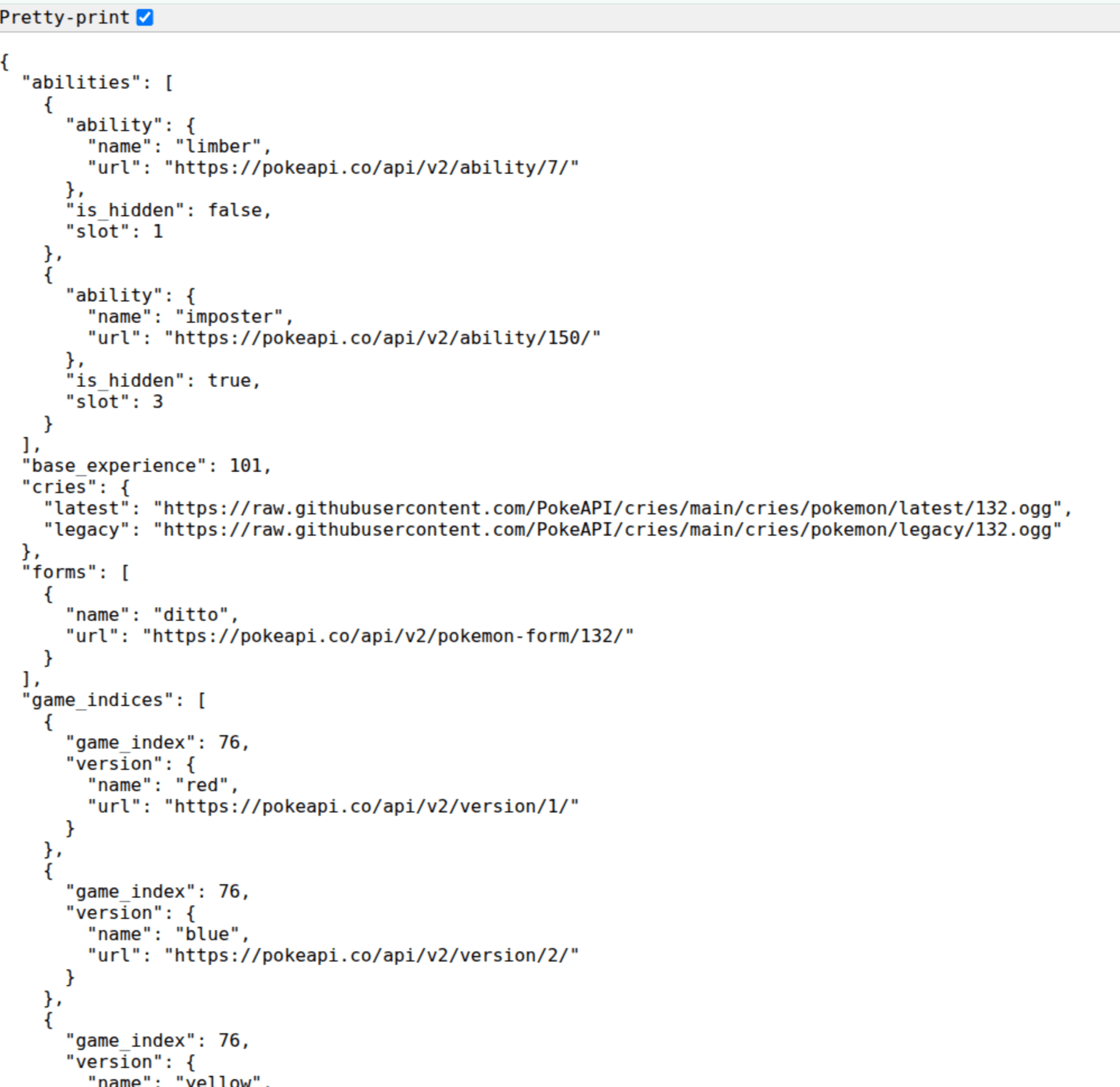
There are a few other troubleshooting tips I could dig into - like REST Collector Diagnostics, but I want to get to the sandbox stuff before I hit 500 words, so let's just move to the first lesson.
(yeah, I just did a word count. Too late.)
LESSON 1: Start simple
In the first lesson of the sandbox, we get our bearings - how to get to the REST collector screen (Products > Stream > Worker Group > Default > Data > Sources, select the REST collector tile, and click Add Collector. Whew! I promise, it's easier in real life than that makes it sound.)
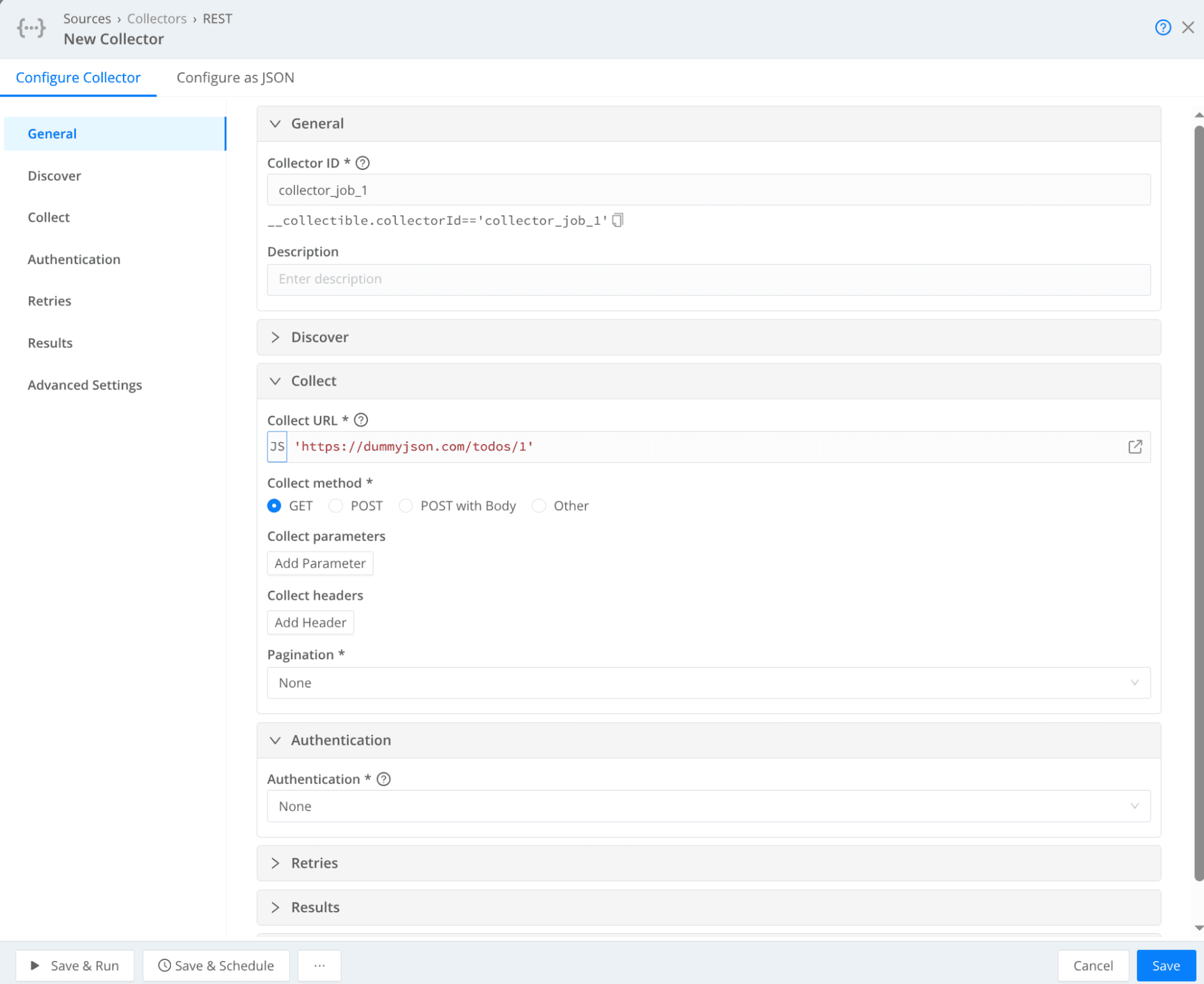
Our first collector, which we add to the "Collect URL" field, is'https://dummyjson.com/todos/1'
One immediate 'gotcha' are those single-quotes. Collector URL is looking for a javascript expression. While the course digs deeper into how that works functionally, for the purpose of this blog you just have to know that it's not a typo in our blogging system.
But the cool part is - THAT'S IT! You don't need anything else. You can literally put that URL in and hit "Save & Run" and see some sweet sweet REST data.
...OK, you also need a name ("Collector ID"). But who goes around not naming things? Not you, that's for sure!
LESSON 2: Play with parameters
Later in the course (yes, I've skipped a couple of lessons. I have to leave some surprises for the actual sandbox!) we look at parameters. If you were using them on the command line or in a browser, they'd look like this:
https://dummyjson.com/users?limit=5&select=firstName,lastName,age&sortBy=lastName&order=desc
But using them in Cribl's REST collector offers benefits including:
You can set parameters that use variables pulled from other parts of the system, process, etc. So your collector can have programmatic elements.
Those same parameters become elements you can use to sort, filter, or sample your dataset.
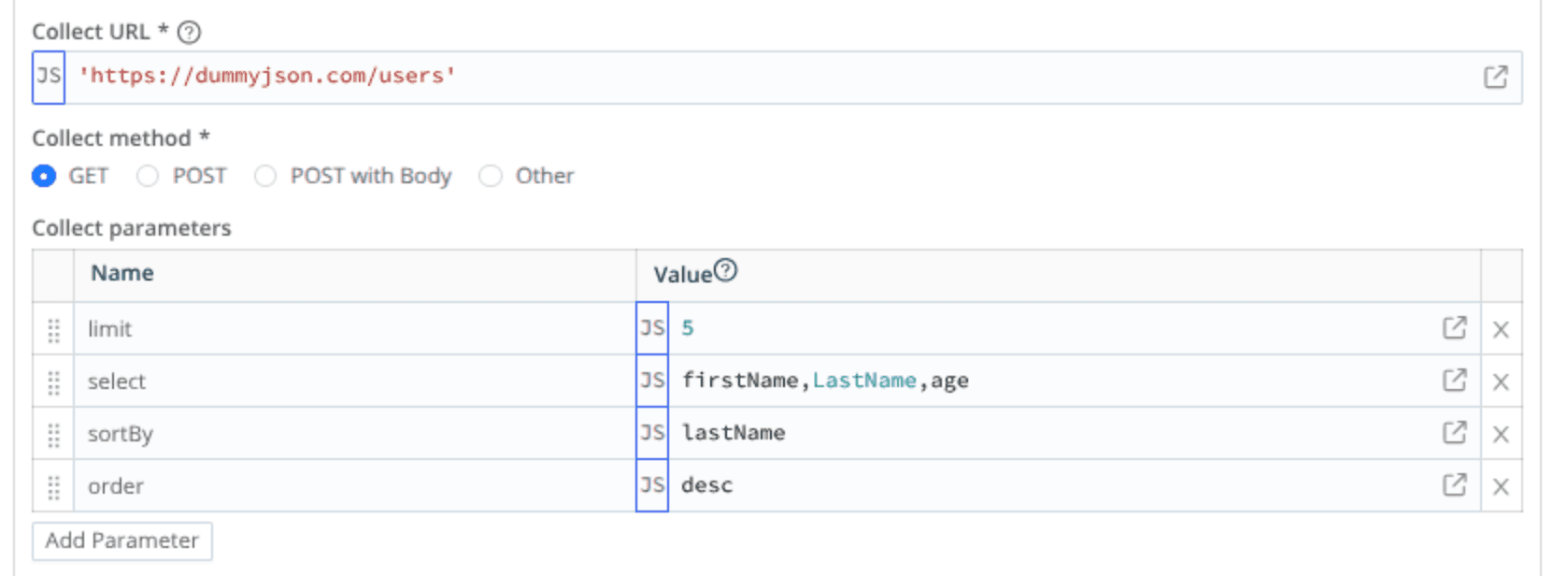
So, step 1: enter the Collector URL:'https://dummyjson.com/users'
(Once again, those quotes are necessary)
Then, add a Collect Parameters entry for each of the options we need
limit=5
select=firstName,lastName,age
sortBy=lastName
order=desc
LESSON 3: Breakers
MUCH later in the course we discuss the fact that sometimes REST data doesn't come back clean or well-organized. Sometimes multiple records get smushed together. And other times a single record gets broken up into multiples in weird places. And sometimes, both.
For that reason, you can specify what Cribl calls "event breakers" - instructions on how the data is formatted and how it should be split (i.e. "broken") up.
Consider the following REST URL:'https://dummyjson.com/recipes'
At the commandline, it's a whole lot of data (30 recipes, in fact). But in Cribl's REST collector, it's a single record:
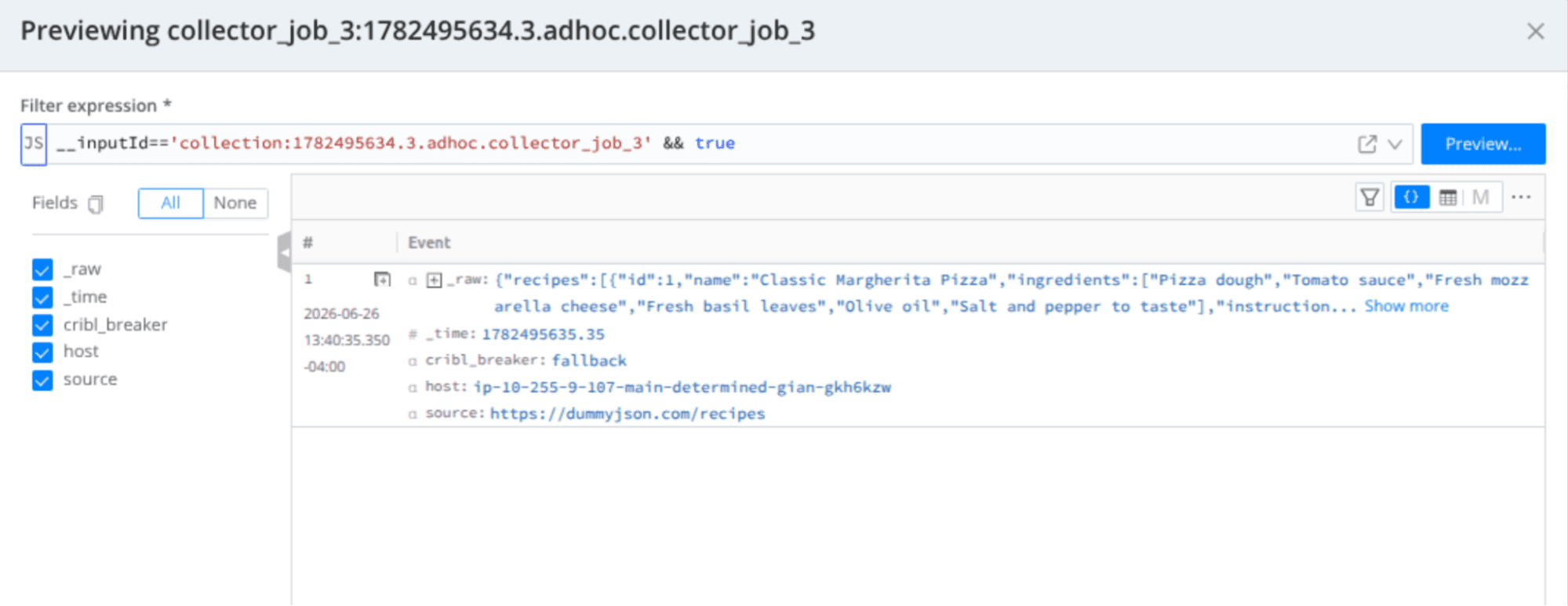
This is because Cribl doesn't understand where and how to break it up.
First, we need to create a breaker rule. Head over to:Stream > Manage > Processing > Knowledge.
Then, select Event Breaker Rules from the left-hand tabs.
Finally, click Add Ruleset
In the ruleset pop-up, we'll give it a name and then add a rule. Give the rule a name (because you can never have too many names). Then set up the important stuff:
Set Event Breaker type to "JSON Array"
Set Array Field to "recipes"
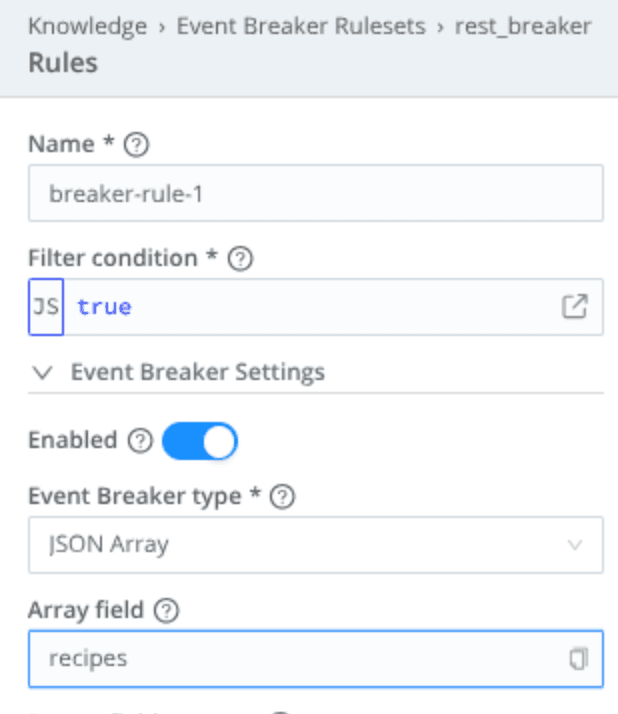
That's it! Not everything in this world has to be a struggle.
If you've used Cribl at all, for even a few minutes, you know that clicking the friendly blue "Commit & Deploy" button is almost like a reflex. If you are playing along in your own Cribl instance as you read this blog, you should go ahead and flex that muscle (i.e. click Commit & Deploy) now.
Then head over to your REST collector and scroll down to the "Results" area on the popup.
Click Add Ruleset
Select the breaker rule you just created from the list.
Click "Save & Run" and let 'er rip!!
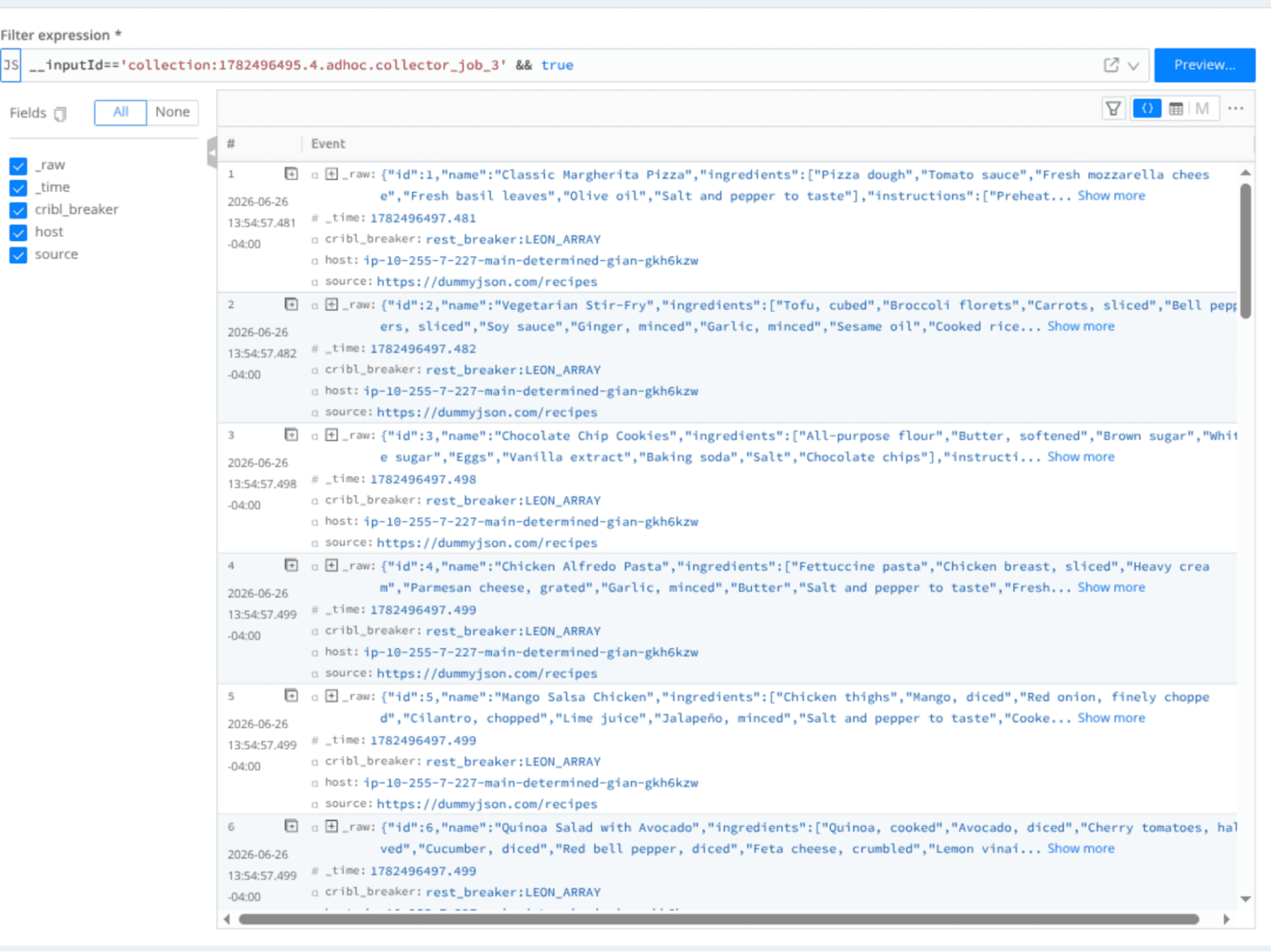
The mostly un-necessary summary
(Somewhat) obviously, this only scratches the surface of the lessons you will find in the REST sandbox. And it only hints at the amazing amount of (completely free!) learning that waits for you in the entire catalogue of Cribl sandboxes.
But I hope this has been enough to entice you to get REST - or one of the other courses - a look.
If sandboxes aren't your speed, not to worry! Here at Cribl we want to meet folks where they are and help them learn in ways that fit their style. You can also find out more about our company, capabilities, and weird sense of humor by checking out:
Cribl's YouTube channel: https://www.youtube.com/@Cribl
Cribl University: https://university.cribl.io/
Cribl Documentation: https://docs.cribl.io/
Cribl Knowledgebase: https://knowledge.cribl.io/
Or skip all of that and jump in with both feet! Use this link to sign up for a Cribl.Cloud account and try out what you just did with your own data. Up to 1TB / day of ingest at absolutely no cost! Neat! And no need to use valuable resources or infrastructure getting Cribl up and running. We’ll take care of that. And the updates. And feeding the goats. Just bring your own data (BYOD)!