
How do federated search and unified search differ?
Federated search sends a query to multiple sources or indexes and combines the results at query time. It can reduce duplication, but latency depends on the participating sources, network paths, query execution, and result-merging model.
Unified search moves data into a shared index or search service before users query it. This model can provide predictable performance and centralized relevance tuning. It also requires ingestion, indexing, storage, permissions, and lifecycle management.
Many products support a mix of both models. Microsoft, for example, distinguishes between synced connectors that index external content and federated connectors that retrieve content in real time without indexing it into Microsoft 365, according to Microsoft Learn documentation accessed in 2026.
The practical question is which data should stay in place, which data benefits from indexing, and which workloads need faster native storage.
Which top federated search tools should you compare?
The seven federated search tools below cover telemetry, enterprise content, application search, and vector retrieval. Don't treat them as direct substitutes.
1. Cribl: search telemetry without forcing one data path
Cribl Search is an AI-powered search and investigation experience. It gives teams one interface and one query experience across telemetry wherever it lives—whether data is ingested into Cribl Search for high-speed analysis or queried in place in external systems. Cribl Search is powered by two engines:
The Federated Engine: queries supported data in its original storage location, which can help you investigate telemetry without unnecessary rehydration or central indexing.
The Lakehouse Engine: provides native-ingest storage and high-speed search for data brought into Cribl Search. Use it for workloads that benefit from faster access and a storage model designed for search.
Cribl Stream and Cribl Edge complement Search by collecting, transforming, enriching, and routing telemetry. Together, these components help you decide what to collect, how to process it, where to store it, and how to search it later.
Deployment model: Cribl supports cloud, hybrid, and on-premises deployments. Its architecture is designed for environments where telemetry spans multiple clouds, on-premises infrastructure, and object storage tiers simultaneously.
Hybrid cloud support: Yes. Cribl is built for hybrid and multi-cloud environments. You can route, store, and search telemetry across cloud providers and on-premises systems without forcing data into a single destination.
Real-time query support: Yes. The Federated Engine supports real-time queries against a large amount of supported sources in place. The Lakehouse Engine supports high-speed search for natively ingested data.
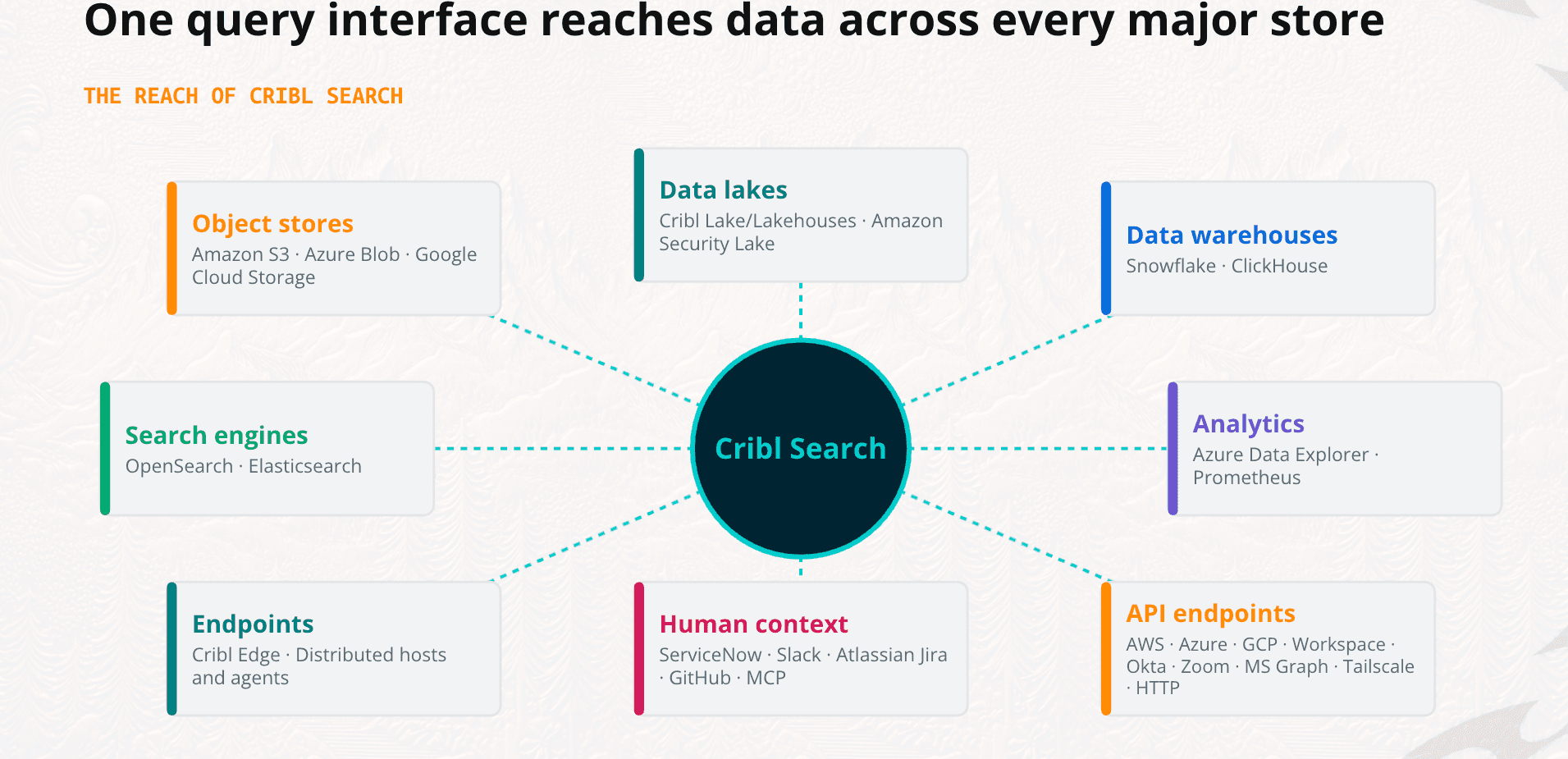
Performance and scale: Performance varies by engine and workload. The Federated Engine depends on source system responsiveness and network paths. The Lakehouse Engine is optimized for faster access to ingested telemetry. Test both engines with representative datasets and query patterns before assuming a single latency profile.
What can Cribl help you do?
Cribl can search supported cloud, object storage, and observability sources through federated engines. With auto-parsing, it can easily ingest selected telemetry into the Lakehouse Engine, normalize data before routing or storage, and support investigations that correlate logs and metrics.
Cribl helps you manage telemetry across sources, tools, clouds, and SIEMs while keeping choice and control over the data path.
Where does Cribl fit best?
Cribl is a strong fit when you need to search distributed telemetry while controlling data movement, storage placement, and observability costs. It is especially relevant in hybrid environments where some data stays in object storage, some flows to security or analytics platforms, and some benefits from native high-speed search.
What should you test?
Test each engine with representative datasets, query patterns, retention periods, and concurrency levels. Federated Engine and Lakehouse Engine queries have different operating characteristics, so avoid assuming one latency profile across every workload.
2. Splunk: extend search across supported Splunk environments
Splunk provides machine-data search, security analytics, and observability capabilities. Its federated search features are most relevant when you already operate multiple Splunk environments or need to query a supported remote provider.
Deployment model: Splunk supports cloud, hybrid, and on-premises deployments. Federated search capabilities apply within supported Splunk deployment types and provider combinations.
Hybrid cloud support: Yes, within supported Splunk deployments and providers. Federated search can span Splunk Cloud and Splunk Enterprise environments, but the scope is defined by which providers and deployment types Splunk supports at the time of implementation.
Real-time query support: Yes, for supported providers and deployment types. Real-time behavior depends on the provider, the deployment architecture, and any scan or query limits in effect.
Performance and scale: Splunk scales well within its ecosystem for security and operational workloads. Data Scan Unit limits, provider support boundaries, and licensing constraints can affect query capacity and throughput. Validate current limits directly with Splunk before sizing a deployment.
Where does Splunk fit best?
Splunk is a natural choice for teams standardized on Splunk dashboards, alerts, security content, and operations workflows. It can extend familiar search experiences across supported Splunk deployments without requiring users to leave their existing ecosystem.
What should you validate?
Splunk Federated Search is designed around supported Splunk deployments and providers. Do not assume it provides a universal, cross-vendor query layer for arbitrary data sources.
Amazon S3 federation can introduce implementation and catalog requirements, including AWS Glue configuration for supported architectures. Complex data structures may also require extra preparation. Splunk documentation describes distinct requirements and limitations by provider, deployment type, and product version, so confirm the current architecture before buying capacity.
Licensing and scan limits can also vary. Validate current Data Scan Unit requirements, query limits, provider support, and capacity guidance directly with Splunk. Splunk documentation also describes the transition from Hybrid Search to Federated Search, so check the requirements that apply to your version and cloud environment.
3. Elastic: combine centralized indexing with cross-cluster search
Elastic supports centralized indexing and distributed search patterns, including cross-cluster search. Its observability capabilities cover logs, metrics, traces, and application performance data.
Deployment model: Elastic supports cloud, hybrid, and on-premises deployments. Elastic Cloud provides a managed option, while self-managed deployments give teams direct control over cluster topology and configuration.
Hybrid cloud support: Yes. Cross-cluster search allows queries to span clusters running in different environments, including cloud and on-premises. Cluster connectivity, security boundaries, and network configuration must be planned deliberately.
Real-time query support: Yes, for indexed data. Ingestion pipelines affect how quickly new data becomes searchable. Near-real-time behavior depends on refresh intervals, shard configuration, and indexing throughput.
Performance and scale: Elastic can scale to large data volumes with proper cluster design. Performance depends on shard count, mapping quality, tier configuration, and query complexity. Cross-cluster search distributes query execution but requires capacity planning at every participating cluster.
Where does Elastic fit best?
Elastic works well for teams that want a broad search and observability platform and have the expertise to design and operate clusters, integrations, and data tiers across environments.
Cross-cluster search lets a query search remote clusters without requiring all searchable data to reside in one cluster, according to Elastic documentation. The model still relies on indexed data and deliberate cluster architecture.
What should you validate?
Plan for cluster topology, query fan-out, remote-cluster connectivity, security boundaries, data lifecycle, and operational ownership. Cross-cluster search distributes the work, but capacity planning still matters.
Test how slow or unavailable clusters affect result completeness and latency. Your pilot should also measure the operational effort required to tune shards, tiers, mappings, and integrations at the expected scale.
4. OpenSearch: keep control with open-source search
OpenSearch is an open-source search and analytics platform commonly used for logs, security data, and observability workloads. Depending on the deployment and configuration, teams can implement searches across domains or clusters.
Deployment model: OpenSearch supports cloud, hybrid, and on-premises deployments. Managed options are available through AWS and other providers. Self-managed deployments give teams full control over configuration, extensions, and operations.
Hybrid cloud support: Yes, with self-managed cross-cluster configuration. Teams can connect clusters across environments, but the architecture, network paths, and security controls are the organization's responsibility to design and maintain.
Real-time query support: Yes, for indexed data. Latency depends on cluster design, ingestion pipeline configuration, and the network paths between clusters in a cross-cluster setup.
Performance and scale: OpenSearch scales with the cluster resources your team provisions and operates. There is no vendor-managed ceiling, but there is also no vendor-managed floor. Capacity planning, shard management, and performance tuning remain the organization's responsibility.
Where does OpenSearch fit best?
OpenSearch suits organizations that value open-source flexibility and want control over deployment, extensions, and operating models. It can support teams that prefer to assemble and manage their own search architecture rather than rely entirely on a managed vendor platform.
What should you validate?
Your organization remains responsible for cluster operations, upgrades, capacity planning, security configuration, and lifecycle management. Flexibility is valuable, but somebody still has to carry the pager.
Test cross-cluster designs with realistic query fan-out, network latency, permissions, and failure scenarios. Confirm how the chosen implementation handles unavailable domains, partial results, and version compatibility.
5. Datadog Federated Logs: Search historical archives without rehydration
Datadog Federated Logs allows teams to query historical log archives in place without rehydrating them into the Datadog platform first. This extends search to logs stored in connected archives, such as cloud object storage, at query time.
Deployment model: Datadog Federated Logs is a cloud-based capability within the Datadog platform. It is designed for teams already operating within the Datadog ecosystem and connecting to supported archive destinations.
Hybrid cloud support: Limited. The capability is cloud-based and designed around Datadog-connected archive sources. It does not provide a general-purpose federated query layer for arbitrary on-premises or multi-vendor data sources outside the Datadog ecosystem.
Real-time query support: Yes, for supported archive sources at query time. Federated Logs queries data in place rather than requiring rehydration, but performance depends on the archive source, data volume, and query scope.
Performance and scale: Designed for Datadog-connected environments querying historical log archives. Performance depends on archive source responsiveness, data organization, and query complexity. It is not designed as a general-purpose telemetry search layer for environments outside the Datadog platform.
Where does Datadog Federated Logs fit best?
Datadog Federated Logs is most relevant for teams already standardized on Datadog that want to extend search to historical log archives without the cost and delay of full rehydration. It fits naturally into existing Datadog workflows for log investigation and compliance review.
What should you validate?
Federated Logs operates within the Datadog ecosystem. Confirm which archive sources and storage destinations are supported, how access controls and permissions are enforced across archives, and how query costs are calculated for large-scale historical searches. Do not assume it provides federated access to data sources outside the Datadog platform.
6. Query.ai: Investigate across security tools without centralizing data
Query.ai provides federated search across security tools and data sources. It is designed to let security teams investigate across multiple platforms at query time without requiring data to be centralized into a single SIEM or data lake first.
Deployment model: Query.ai supports cloud and hybrid deployments. It connects to security tools, SaaS platforms, and data sources through integrations, querying them at investigation time rather than ingesting their data into a central store.
Hybrid cloud support: Yes. Query.ai is designed to span security tools and data sources across cloud and on-premises environments. The breadth of hybrid support depends on which source integrations are available and how those sources are configured.
Real-time query support: Yes. Query.ai queries connected sources at query time without requiring centralized indexing. Performance depends on the responsiveness of each connected source and the number of sources involved in a given investigation.
Performance and scale: Query.ai is designed for cross-tool security investigation rather than high-volume telemetry ingestion or indexing. Query latency depends on the connected source systems, network paths, and the complexity of the federated query. It is not designed as a replacement for high-throughput log ingestion platforms.
Where does Query.ai fit best?
Query.ai suits security operations teams that need to investigate across multiple tools, such as SIEMs, endpoint platforms, cloud services, and identity providers, without duplicating data into a central store. It is particularly relevant for teams managing tool sprawl who want unified investigation without a full data consolidation project.
What should you validate?
Confirm which source integrations are available and whether they cover your specific tool versions and deployment configurations. Test realistic investigation workflows, including multi-source queries, access control enforcement, and result latency, before assuming the platform fits your security operations model. Also validate how the platform handles source unavailability and partial results during active investigations.
7. CrowdStrike Falcon NG-SIEM: Unify security investigation across endpoint and log data
CrowdStrike Falcon NG-SIEM provides federated search and investigation capabilities within the Falcon platform, combining endpoint telemetry with log data from connected sources. It is designed to give security teams a unified investigation experience across CrowdStrike-native data and third-party log sources.
Deployment model: Falcon NG-SIEM is a cloud-based capability within the CrowdStrike Falcon platform. It is designed for organizations already operating within the CrowdStrike ecosystem and connecting third-party log sources through supported integrations.
Hybrid cloud support: Limited. The platform is cloud-based and centered on the Falcon architecture. It can ingest logs from on-premises and cloud sources through supported connectors, but the search and investigation experience runs within CrowdStrike's cloud environment.
Real-time query support: Yes, for supported sources within the Falcon platform. Real-time behavior depends on log ingestion latency, connector configuration, and the scope of the federated query across connected sources.
Performance and scale: Designed for CrowdStrike-centered security operations at enterprise scale. Performance and capacity are tied to the Falcon platform architecture and the ingestion model for connected third-party sources. It is not designed as a general-purpose telemetry search layer for environments outside the CrowdStrike ecosystem.
Where does CrowdStrike Falcon NG-SIEM fit best?
Falcon NG-SIEM is most relevant for security teams already standardized on CrowdStrike that want to extend investigation across endpoint telemetry and third-party log sources without operating a separate SIEM platform. It fits naturally into CrowdStrike-centered security operations workflows.
What should you validate?
Confirm which third-party log sources and connectors are supported, how data ingestion and retention are priced, and how federated queries behave across CrowdStrike-native and third-party data. Validate access controls, role-based permissions, and audit capabilities before assuming the platform meets your compliance and governance requirements. Do not assume it provides a vendor-agnostic federated query layer for environments not centered on the Falcon platform.
Choose the search model that fits your data
There is no single federated search tool for every hybrid and multi-cloud environment. Cribl, Splunk, Elastic, and OpenSearch address machine-data environments through different storage, search, and operating models. Meilisearch supports indexed application search, Microsoft connects workplace content, and Pinecone focuses on vector retrieval.
The most reliable selection process starts with the data path. Decide what must remain in place, what benefits from indexing or native storage, what users need to search, and which team will operate the system.
How should you evaluate federated search tools?
Start with your data and workload, not the product category. A useful evaluation makes the data path, performance requirements, governance model, and total operating cost explicit.
Step 1
Inventory the data you need to search
Classify each source by data type, location, volume, retention, sensitivity, and query pattern. Logs and metrics have different performance and governance requirements from workplace documents, product catalogs, or embeddings.
This inventory also prevents false comparisons. A workplace search connector and a telemetry query engine may both use federated search language, but they solve very different problems.
Step 2
Decide which data should move
Determine whether each workload needs data-in-place search, centralized indexing, native-ingest storage, or a combination. Data residency, migration effort, egress cost, retention, and expected query frequency often determine the answer.
Frequently searched operational data may benefit from indexed or native storage. Older or infrequently accessed telemetry may be better left in lower-cost object storage until an investigation needs it.
Step 3
Test realistic queries and failures
Use representative data and real query patterns. Measure time to first result, complete-result latency, concurrency, timeout behavior, and the effect of slow or unavailable sources.
Avoid comparing vendors using generic labels such as fast or real time without a shared test method. Define the same datasets, query complexity, source count, and success criteria for every platform.
Run the three-legged test. Issue a single query that spans object storage in two clouds, plus a SaaS or identity API, simultaneously. This is where federated search succeeds or fails. Splunk reaches Snowflake. Microsoft reaches Databricks. Datadog reaches across three stores. None has a published path to Okta, Microsoft Graph, or Google Workspace. If a vendor cannot demonstrate this query pattern against your actual environment, treat that gap as a hard constraint, not a roadmap promise.
Step 4
Ask for the supported-target list in writing
This is the most important step in any evaluation, and the one most buyers skip. Request a complete, written matrix of every supported source and destination before you enter a proof of concept. Note: every major competitor in this space has failed this test at some point, and several have published no compatibility matrix at all.
A verbal assurance that a connector exists is not the same as a documented, maintained, production-ready integration. Get the list. Verify it against your inventory from step one. If a source you depend on is missing, absent from the documentation, or listed as "coming soon," that is your answer.
Step 5
Validate permissions and governance
Confirm how each platform handles source permissions, role-based access, authentication, auditability, encryption, and regional controls. For telemetry, determine whether policies apply at the dataset, workspace, index, cluster, or tenant level.
Also verify what happens when source permissions change. Search results should not become a shortcut around the controls protecting the original data.
Step 6
Ask whether the search capability survives replacing the platform
Platform-native federated search dies with the platform. If the search layer is built into a SIEM, an observability tool, or a cloud-native service, your ability to query across sources disappears the moment you migrate, consolidate, or renegotiate that contract. That is not a theoretical risk. It is a migration tax that compounds over time.
Before committing, ask directly, if we move away from this platform in three years, what happens to our federated search capability? Can queries, saved searches, and access policies be exported and reused elsewhere? A vendor-agnostic search layer that separates compute from storage and operates independently of any single destination gives you a genuine answer. A platform-native feature does not.
Step 7
Compare total operating cost
Include ingestion, indexing, storage, query compute, data transfer, licensing, administration, and migration work. A federated architecture may reduce duplication while increasing query-time compute. A unified index may improve predictability while increasing ingestion and storage costs.
Model more than the happy path. Account for growth, retention changes, investigation spikes, unavailable sources, and the people required to operate the platform.
How can you implement federated search successfully?
A successful deployment starts with clear goals, standardized data, realistic testing, and continuous monitoring. Treat federated search as an operating model, not just a connector project.
Plan and assess sources: Inventory every system, cloud, and storage tier that must be searchable. Define latency, connector, compliance, and budget requirements before implementation.
Standardize metadata: Normalize fields and naming conventions across sources. Cribl Stream can transform and enrich telemetry before you route or store it.
Tune performance and security: Test realistic data, enforce least-privilege access, and configure encryption, audit trails, network controls, timeouts, and resource parallelism.
Monitor and optimize: Track query latency, success rates, connector health, and result quality. Review metadata regularly and apply the same standards as new sources come online.
Clear ownership matters too. Decide which team manages connectors, schemas, access policies, cost controls, and incident response before the platform reaches production.
How Cribl can help with telemetry federated search
Cribl is the AI Platform for Telemetry: an AI-native, shared telemetry foundation for IT and Security. Cribl helps you collect, shape, route, store, search, and analyze telemetry wherever it lives—so humans and AI agents can work from the data and context they need without locking you into one vendor or duplicating infrastructure for every solution.
With Cribl, teams can use the solutions they need, replace the ones they have outgrown, and build workflow-fit apps on the same foundation. The result is faster investigations, lower cost and complexity, and the choice, control, and flexibility to build what comes next.
With Cribl Search, you can use the Federated Engine for supported data that should remain in place. Cribl Stream and Cribl Edge give you additional control over how telemetry enters, moves through, and leaves your environment.
That flexibility lets you choose the data path rather than a vendor's default. You can keep telemetry portable, interoperable, and searchable for investigations and automated workflows, with the option to change the approach as your infrastructure changes.
Federated Search Tool FAQs
Is federated search always faster than unified search?
No. Federated search can avoid indexing and data movement, but performance depends on source systems, network distance, query execution, and result merging. Unified search can provide more predictable performance when its index is well designed and maintained.
Is Cribl Search limited to federated search?
No. Cribl Search is powered by two engines. The Federated Engine queries data in place, while the Lakehouse Engine provides native-ingest storage and high-speed search.
Does federated search mean data never moves?
No. Some federated designs query data in place, while others use pipelines, caches, indexes, or native-ingest stores. Confirm the data path for each source and workload.
Should you compare workplace search with observability search?
Only when the categories are clearly labeled. Workplace search, application search, vector retrieval, and telemetry search solve different problems. A useful comparison explains those boundaries instead of presenting every tool as a direct substitute.
What should your Federated Search pilot include?
Include representative sources, realistic queries, expected concurrency, access controls, retention requirements, and failure scenarios. Measure the operating cost of both data movement and query execution.