Two jobs, one team
Running telemetry is really two jobs. The first job is using the data: finding the silent drop before someone downstream does, keeping teams working when a tool goes dark, and answering the question someone asked at the end of the day. The second job is running the deployment that moves the data: keeping the Leader current, managing Worker capacity, sitting through security reviews, and rebuilding the spreadsheet that shows finance where the spend went.
Your team may be good at both jobs. But only the first one is why you bought Cribl.
Cribl.Cloud gives you more ways to do the first job, and a choice about how much of the second job you keep. Cribl runs the Leader for you. You choose, Worker Group by Worker Group, whether Cribl runs the Workers too, or whether you keep them next to your data.
Moving the Leader gives you access to consumption-based pricing, FinOps, Insights, and more of the Cribl platform. Moving Worker Groups to Cribl-managed Workers hands off more of the infrastructure and security work behind them. Your sources, destinations, routes, and access rules stay yours.
This guide includes the day in the life of a security engineer who also owns the Cribl deployment through one working day. The telemetry might be security, observability, or IT operations data, but the two jobs are the same.Then we cover what a year of Cribl.Cloud adds up to, the ways to get there, and how to make the case to your leadership.

Why take another look at where Cribl runs?
Self-managed Cribl works, and many teams run it well. You don’t need a platform problem to have a reason to move. Sometimes the reason is getting more from the deployment you already trust.
Your team needs more visibility.
When a source goes quiet, you need to know when the volume changed and where to investigate. When finance asks about consumption, you need a view you can share without rebuilding it from several sources. More history and clearer usage reporting help you answer both questions.Your needs may have outgrown the original agreement.
A deployment that started with Stream and one destination may now serve security, IT operations, and application teams across several tools. A credit model gives you another way to plan consumption across products and environments. The right comparison is your current agreement against the workloads and capabilities you want next. Don’t assume that moving to the cloud must cost more.Operational and security responsibilities still need an owner.
Patching, hardening, access controls, and audit evidence all need attention. Cribl takes on the security work for the cloud service, including the Leader and any Cribl-managed Workers. Your team keeps responsibility for the hybrid Worker hosts it runs and for the data controls it configures.More of the platform is available in the cloud.
Cribl Search, Cribl Lake, Cribl Apps, and additional AI capabilities give your team more ways to use its telemetry. Many of those capabilities arrived one release note at a time, so they’re easy to miss.
None of this means you need to move every workload this quarter. It means there may be more value available than your current deployment shows.
How Cribl.Cloud fits in
Cribl.Cloud changes who runs parts of the platform, not who decides what happens to your data. Think of it as delegation with control, not a surrender of control.
Hybrid Workers are Workers you manage, on-prem or in your own cloud. You can keep them close to your sources while Cribl manages the Leader.
You can mix both kinds of Workers under one Cribl.Cloud Leader. Some teams start with hybrid Workers, which are Workers you manage, for data that has to stay where it lives. Then they move other Worker Groups to Cribl-managed Workers as they go.
Cribl secures the cloud service. That work includes patching, threat detection, and infrastructure security for the Leader and for Cribl-managed Workers, and Cribl.Cloud is SOC 2 Type II and ISO 27001 certified. On hybrid Workers, you keep securing the hosts, including encryption on those machines. You keep the controls for your own environment:
Private Link connects your cloud environment to Cribl-managed resources over your cloud provider's private network.
Cloud identity event logs show authentication and admin activity, and you can forward them to your own tools.
Role-based access for Insights lets you delegate across teams without making everyone an admin.
When your security team needs the details, the Cribl Trust Portal at trust.cribl.io has the assurance evidence to support the review. Start with the deployment model you’re considering, so the discussion covers the responsibilities that actually change.
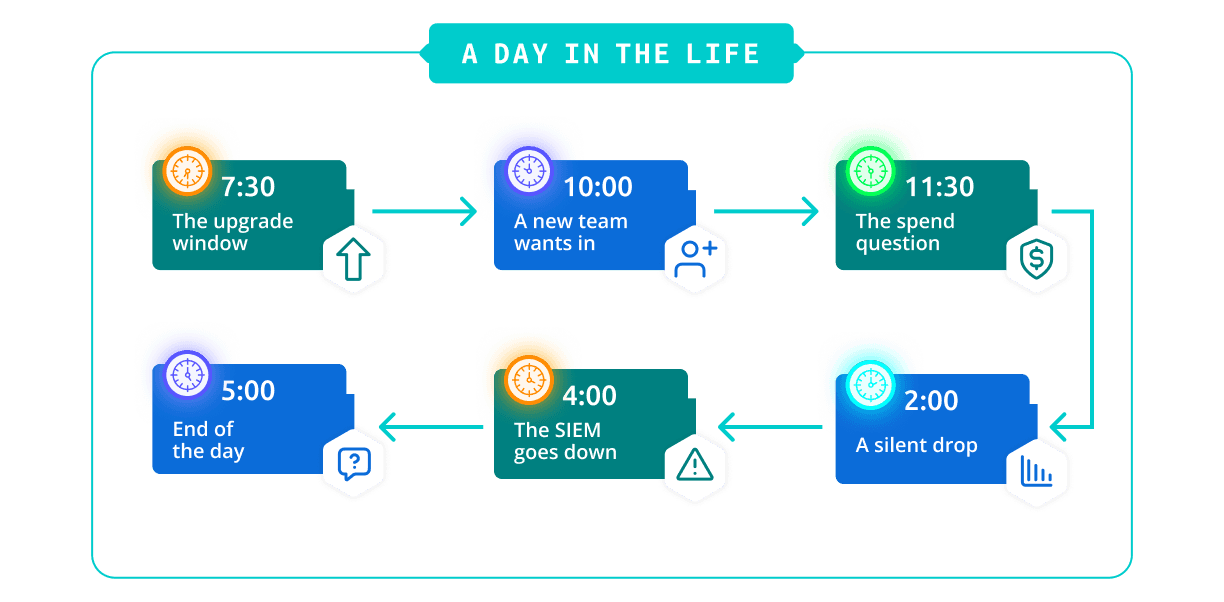
A day in the life: Casey, security engineer
Casey is a security engineer at a large financial services company. Casey's team runs Cribl Stream for the whole business: three Worker Groups on-prem, one of them collecting files from systems in the company's data center.
The deployment feeds a SIEM for the SOC, an observability tool for the application teams, and an object storage archive that nobody likes to query.
Before Cribl.Cloud, Casey's day split between keeping the platform alive and helping people use it. Here's what a day looks like now.
7:30 a.m.: The upgrade window
Casey used to start the week by patching and upgrading Worker Groups, one at a time, hoping no restart went sideways. Capacity planning came next: would the current nodes hold through the end-of-quarter spike?
Now the Leader runs in Cribl.Cloud, and Cribl keeps it current. Two of Casey's Worker Groups run on Cribl-managed Workers, so Cribl handles the networking, compute, memory, and capacity behind them, along with scaling, restarts, and upgrades. The third group stays on hybrid Workers in the data center, next to the file sources it reads. Casey’s team still owns those hosts, but no longer runs the Leader or the infrastructure behind the other two groups. Casey spends the first hour reviewing pipeline changes and checking that the SOC is getting the data it needs.
10:00 a.m.: A new team wants in
The fraud analytics team wants its own pipelines. In the old setup, Casey would have added them to the shared environment and hoped nobody stepped on anybody else's configuration.
Now Casey creates a Workspace for the team. The fraud team builds and tests on its own, and Casey still administers everything from one place. Role-based access for Insights lets the team see its own pipeline health without admin rights.
11:30 a.m.: The spend question
Finance asks what Cribl costs by product and environment, and what another security workload would add. Casey used to answer that question with a spreadsheet stitched together from three sources.
Now one credit pool supports consumption across Cribl products and environments. Casey opens the FinOps Center, reviews usage by product and environment, and shares that view with finance.
They still need to plan for the new workload. But they can start with a shared view of consumption instead of a spreadsheet built just for the meeting.
2:00 p.m.: A silent drop
The SOC reports missing authentication logs from a payments service. On-prem, Insights history only went back 48 hours, and the drop had started four days earlier. Casey would have spent the afternoon reconstructing a timeline from the destination side.
Now Casey has Insights history well past 48 hours. Casey scrolls back, finds the day the volume fell off, and narrows the investigation to a slowdown in one pipeline. The team has a timeline to work from and a clearer place to start troubleshooting.
4:00 p.m.: The SIEM goes down
The SIEM vendor has an outage, and it lasts two hours.
Casey’s team already routes a full-fidelity copy of selected high-value security sources to Cribl Lake and has tested searching that data with Cribl Search. When the SIEM goes dark, the SOC has another place to look.
It doesn’t replace every SIEM workflow. But the team can keep investigating the data it retained while the vendor works on the outage.
5:00 p.m.: A question at the end of the day
An analyst wants to know whether a suspicious login pattern showed up anywhere else last month. That question used to start with a blank query and a lot of guessing about field names.
Now the data lands in a lakehouse engine that parses and types it as it arrives, so the analyst can query it the same day with no manual schema work. The analyst asks the KQL assistant to draft the first query, follows a Search investigation through the results, and saves a notebook summary for the morning handoff.
End of day
Casey didn’t move everything to get here. The team moved the Leader and one Worker Group first, proved the model, and moved the next group a quarter later. The data center group stays on hybrid Workers, next to the sources it serves.
Some infrastructure work still belongs to Casey’s team. Cribl takes on the Leader and the two managed Worker Groups. Casey’s team keeps its data controls and has more history, clearer consumption reporting, and another way to reach security data.
Moving only the Leader would have been a valid choice too. Casey’s team handed off more infrastructure because it fit the deployment, and not because every move to Cribl.Cloud requires it.
What a year of Cribl.Cloud adds up to
One good Tuesday is nice. A year of Tuesdays changes what your team can take on. The value shows up in four places.
Get your engineering time back
Upgrade windows, capacity planning, and restarts stop eating your week, for every Worker Group you hand to Cribl. Workspaces keep new teams from crowding your shared environment, and longer Insights history means you find problems before a downstream team finds them for you. The time you get back goes to reliability, modernization, and the projects that have been waiting in your backlog.One pool, one view
A fixed license makes you buy for the peak and buy again when priorities change. With Cribl.Cloud, one credit pool covers every product and environment. You can try a new capability, or shift credits between products, without a separate purchase. Search and Lake are part of the same pool, so you can move data you rarely query into lower-cost storage and still search it. The FinOps Center gives you, your finance team, and your leadership the same view of where the credits go.Secure more, with less to own
Cribl takes on patching, threat detection, and infrastructure security for the cloud service, including the Leader and any Cribl-managed Workers. You keep the controls that define where your data goes and who can see it. A searchable copy of your data in Lake or your own object storage means a tool outage costs you an afternoon, not a compliance finding.Keep AI from becoming another blind spot
AI workloads bring familiar questions, like what happened? Where did the data go? What did it cost?
StreamAI gives engineering and platform teams a governed way to route, control, observe, and troubleshoot AI workloads without building a separate control layer into every application. That gives IT and security a clearer place to start when an AI application fails, behavior changes, or someone needs to investigate.
AI assistance in Search helps with the investigation work itself. The KQL assistant and visualization assistant help draft queries and charts. Search investigations and agent guidance help teams work through the data, while notebook summaries capture findings for the next person.
Those are two different benefits: help using your telemetry, and more control over the AI workloads producing it.

The ways to get there
Moving to Cribl.Cloud doesn’t have to mean handing off all your infrastructure. Start with who runs the Leader, then decide who runs each Worker Group.
Move the Leader to Cribl.Cloud. This is the recommended starting point. Cribl runs the Leader, and you choose a home for each Worker Group:
Keep your Workers with Cribl.Cloud and hybrid Workers - Your team manages the Workers and their hosts, on-prem or in your own cloud. The Leader moves, the Workers don’t have to.
This fits sources that need to stay close to the data, along with residency rules, egress considerations, network requirements, and infrastructure you already have.
Some features require customer-managed Workers, including the Script Collector, File System Collector, Filesystem Destination, Exec Source, and Tee Function. Include those dependencies when you decide where each Worker Group belongs.
Moving the Leader gives you the cloud-managed deployment and its FinOps and Insights capabilities without requiring you to move the Worker infrastructure.Hand off more with Cribl-managed Workers - Cribl also runs the infrastructure behind these Worker Groups. Your team keeps control of the sources, destinations, routes, and pipelines.
Choose this model where handing off the Worker infrastructure makes sense for your sources, requirements, and operating costs.
You can use both kinds of Workers under one Cribl.Cloud Leader. Neither choice commits every Worker Group to the same model.
Connect first, then move at your own pace. Connected Environments and Universal Subscription provide another starting point when your Stream Leader needs to remain self-managed.
You connect your self-managed environment to Cribl.Cloud and use a credit model to support your existing deployment and additional Cribl products. Your Leader and Workers remain your responsibility until you migrate them.
Connecting first is not the same as moving the Leader. It does not give your self-managed Stream deployment the same FinOps and Insights experience as a cloud-managed Leader. Additional cloud products also need to be configured and consume credits when used.
If the Leader has to stay where it is, ask your account team what connecting first would make available, and what would still require a move.
Compare your options
A few questions will point you to the right path. If you run a distributed Stream deployment on 4.8.2 or newer, both paths are open to you. If some of your data has to stay where it lives, move to Cribl.Cloud and keep those Worker Groups on hybrid Workers. If the Leader itself has to stay on-prem for now, connect first. If you work under public sector compliance requirements, read the Cribl.Cloud Government section at the end of this guide.
Get help with the cost of moving
The AWS Workload Migration Program (WMP) funding and promotional credits may help offset migration costs for qualifying workloads.
Ask your Cribl account team about eligibility while you plan the move. Any available support should be part of the business case.
Confirm which costs and workloads qualify before including funding or credits in your budget. Moving the Leader, retaining hybrid Workers, or connecting an environment should not be assumed to qualify on its own.
Getting started
The best approach isn’t a big-bang migration. Start with an outcome that matters, prove the model, and then expand.
Moving the Leader can be the first step. Moving Worker infrastructure can be a separate decision.
Choose a pilot that shows you something useful:
Investigate a pipeline problem with more history. After moving the Leader and configuring the appropriate Insights retention, look back at a known drop or slowdown. Check whether your team can find the timeline it needs.
Create another investigation path. Add a Lake or cloud storage destination to a Stream route, retain a copy of selected security data, and test searching it independently of the SIEM.
Try a lakehouse engine. Create an engine, configure a Stream destination, and route a representative data set to it. Check how the data is parsed and what your team needs to query it.
Use the AI assistance in Search. Ask the KQL assistant to draft a query, review the result, and use investigation and summary capabilities to prepare a handoff.
Pick the pilot that fits your proposed deployment. Not every step applies to a self-managed Leader that has only been connected to Cribl.Cloud.
When you’re ready to migrate, the work follows four stages. Cribl Professional Services and Customer Success can help you plan the scope and the support you need.
Stage 1: Take inventory
List everything you run today, and flag anything that needs special handling, like legacy or proprietary integrations. Check connector compatibility and migration dependencies. Your inventory should cover:
Inventory checklist:
Sources and destinations
Routes and Direct Connects
Packs
Knowledge objects
Worker Groups
Edge Fleet configurations
SAML and SSO configurations
Notifications
Step 2: Plan and design
Build a roadmap that maps your architecture, risks, and business case. Set timelines, milestones, and sign-offs. Break the plan into phases to limit disruption.
Decide where each Worker Group will run: on Cribl-managed Workers, or on hybrid Workers next to the data. Hybrid Worker hosts need outbound access to the Cribl.Cloud Leader on ports 4200 and 443, so loop in your network team early. Pick a few success measures, such as uptime, engineering hours saved, or spend visibility.
Bring your security, procurement, and legal teams in early. The word "cloud" can trigger a generic vendor review before anyone understands the Cribl.Cloud model.
Answer five questions together first, and the review gets much more predictable:
What workload and outcome are we evaluating?
Where will data be processed?
Who will run the data plane and the infrastructure behind it?
What is retained, where, for how long, and under whose control?
What evidence and commercial terms apply to this model?
Step 3: Test and cut over
Set up your Cribl.Cloud account and organization, and test your network connection with small transfers. Rebuild or import your pipelines. Copilot can help you spot configuration issues early. Then run a pilot in an environment that mirrors production. Compare latency, throughput, and data fidelity against your baselines. When your tests pass and stakeholders sign off, cut your production data flows over. Watch latency, throughput, error rates, and resource use closely for the first few weeks.
If you connect first: On your on-prem Leader, go to Distributed Settings > Cloud Connection. This generates the information you need to set up the data flow to Cribl.Cloud. Then convert to Universal Subscription, and move workloads one at a time.
Step 4: Run it and keep improving
Check health and performance regularly, and use Insights to see how your data flows. Keep your team current as new features ship. Cribl Customer Success and Professional Services stay with you after go-live, and the Cribl Community is there when you want to compare notes with other teams.
For the full technical walkthrough, read Migrate from an On-Prem Deployment to Cribl.Cloud in the Cribl Docs.
Cribl.Cloud Government
Your mission has rules. Cribl.Cloud Government follows them.
OMB M-26-14 reorganizes federal logging around two objectives: continuous event monitoring (CEM), and threat hunting, investigation, response, and forensics (THIRF). It also lets agencies decide where data lives. That makes visibility an architecture and cost question, not just a policy one.
Cribl gives you a vendor-neutral control plane. You collect at the edge, shape and route data in flight, keep full-fidelity copies affordably, and search across them without moving the data first.
Cribl.Cloud Government is FedRAMP Certified at Class C (formerly Moderate) for Cribl Stream, Edge, Search, and Lake. If you need a customer-managed deployment, that option remains available.
How Cribl maps to M-26-14
The same two paths apply. Connected Environments and Universal Subscription are available in Cribl.Cloud Government, so you can connect first and move workloads at your own pace. When you move, Cribl runs the Leader and any Cribl-managed Workers, and your team patches and upgrades less.
AWS promotional credits - AWS promotional credits may help offset migration costs for qualifying workload migrations to Cribl.Cloud Government.
Customers who made the move
Pegasystems
Pegasystems didn’t start in the cloud, they started with on-prem data complexity. Cribl helped the team see its full data footprint and make strategic reductions. Then, they migrated to Cribl.Cloud.
For teams already running Cribl on-prem, that’s the useful part of the story. Getting value from Cribl and deciding where to run it aren’t the same decision. The move can build on what you already have.
In this video, Pegasystems walks through what drove their decision, how the migration worked, and the benefits and obstacles they encountered along the way.
Watch the video: Hear the story straight from Pegasystems
Making the business case
The fair comparison isn't license against license. Cribl.Cloud can cost more on the Cribl line item, because Cribl now carries work your team used to carry. Compare the added investment against the added value, and make the case in four parts.
Total cost. Start with your current Cribl agreement and the cost of running the deployment. Some costs won’t appear on the Cribl invoice:
Servers, load balancers, firewalls, and networking
Power and cooling
Non-Cribl software licenses
Bandwidth and cloud egress
People hours for operating systems, patching, capacity planning, and upgrades
Then separate what stays from what moves.
If you keep hybrid Workers, their infrastructure and operating costs stay in the calculation. If you move Worker Groups to Cribl-managed Workers, include the work and infrastructure you hand off. Moving the Leader changes that part of the operating model even if the Workers stay put.
Compare your existing agreement with the proposed credit model using expected workloads, consumption rates, and growth assumptions. Include migration services and internal transition work. Account for any confirmed funding or promotional credits separately from ongoing costs.
Risk. Moving to Cribl.Cloud shifts patching, threat detection, and infrastructure security for the Leader, and for any Cribl-managed Workers, to Cribl. A searchable copy of your data in Lake or your own object storage keeps your visibility when a tool fails.
Standardization. One platform and one credit pool across environments make it simpler to bring more teams onto Cribl and adopt more products over time.
Timing. Budget cycles make off-cycle spend hard, so most moves land at renewal. Start the conversation about six months before yours.
The real opportunity
Your telemetry will keep growing, and the questions your team needs to answer will keep changing.
Cribl.Cloud gives you more ways to use that telemetry, a clearer view of consumption and pipeline health, and a choice about how much infrastructure you keep.
You don't have to move everything to start. Pick one workload, and see what changes.
If you lead the team: Schedule a value realization assessment with your Cribl account team.
If you run the platform: Watch the Cribl.Cloud demo, or ask your account team to walk through your first workload with you.
If you're not sure which path fits: Take the migration readiness quiz, or reach out to your Cribl account team.
Spend your time using telemetry, not running it.
FAQ
What are the advantages of migrating to Cribl.Cloud from on-prem?
You get your engineering time back, because Cribl runs the Leader and, if you choose, the Workers behind your Worker Groups. You also get one credit pool and one view of spend, less security work to own, and AI assistance in Cribl Search. Some products, like Cribl Search and Cribl Lake, are available only in Cribl.Cloud. For engineering and platform teams, StreamAI adds a governed way to route, control, observe, and troubleshoot AI workloads without building those capabilities into every application.
Do I have to move everything at once?
No. You can move the Leader to Cribl.Cloud and keep Workers in your environment as hybrid Workers. You can also mix hybrid Workers and Cribl-managed Workers under the same Leader. If the Leader needs to remain self-managed for now, ask about Connected Environments as an interim option.
What do I need to connect first?
A distributed on-prem Stream deployment on 4.8.2 or newer, and a Cribl.Cloud Enterprise plan with credits.
What happens to my on-prem Worker Nodes if I connect first?
They keep running. The connection generates the information you need to set up the data flow between your on-prem Worker Nodes and Cribl.Cloud Worker Nodes when you're ready.
Can I keep some Workers on-prem after I move?
Yes. When you move to Cribl.Cloud, you can keep any Worker Group on hybrid Workers, which are Workers you manage on-prem or in your own cloud. One Cribl.Cloud Leader can run hybrid Workers and Cribl-managed Workers side by side.
What is Universal Subscription?
Universal Subscription is a credit model that converts your on-prem Stream and Edge license into credits. You can spend those credits on any Cribl product and keep your self-managed deployments.
Which parts of the Cribl platform are available only in Cribl.Cloud?
Cribl Lake, Cribl Search, Cribl Apps, and Insights retention past 48 hours.
Is Cribl.Cloud secure enough for regulated data?
Cribl.Cloud is SOC 2 Type II and ISO 27001 certified. For U.S. federal and other public sector needs, Cribl.Cloud Government is FedRAMP Certified at Class C (formerly Moderate).
Can I try something before I commit?
Yes. The first steps above work on either path, and a lakehouse engine gives you a query on your own data the same day.