
In Claude: “Why is this code failing?” “Summarize my 40-page divorce settlement.” “How long should I cook this chicken?”
AI tools are quickly becoming part of how we write code, troubleshoot systems, investigate incidents, automate everyday work, and even manage our personal lives.
Now, you can add questions about your Cribl environment to that growing list of what we use AI assistants for. With the Cribl 4.19 release, Cribl MCP Server is now a native capability embedded directly in the Cribl Leader. It gives teams a secure, managed way to connect MCP-compatible AI clients and agents, such as Claude Code, Cursor, and the OpenAI Codex CLI, directly to their Cribl environment.
From the AI tools they already use, teams can ask questions about their Cribl environment, inspect configurations, review system health, investigate telemetry, work with Search Notebooks, and build custom AI-powered workflows. And because Cribl MCP Server is built into the Leader, there is no separate service or container to deploy and manage. That means no additional MCP infrastructure to stand up, no new permissions to maintain, and no more copying and pasting Cribl context into an AI tool by hand.
Wait, what is MCP?
Model Context Protocol, or MCP, is an open standard that allows AI clients to connect to external tools and systems. Think of it as the connection between an AI assistant and the applications where your actual work happens. The AI client understands what you are asking. MCP gives it a consistent way to retrieve information or perform supported actions in another system.
With Cribl MCP Server, those actions can include retrieving Sources, Destinations, Worker Groups, Pipelines, metrics, alerts, Search Notebooks, and more. Instead of finding that information yourself and pasting it into an AI assistant, you can let your approved AI client retrieve it directly from Cribl.
From self-managed to native
Cribl already offers a standalone MCP Server through Docker. It gave early adopters a way to start connecting AI clients to Cribl, but it also requires teams to deploy a separate container, manage additional credentials, and maintain another service. That approach still works, but not everyone wants a promising AI experiment to become another piece of production infrastructure.
The new embedded MCP Server removes that extra work as MCP clients can connect directly to the Leader endpoint, and every tool call runs with the identity and existing role-based permissions of the person making it. The standalone Docker option remains fully supported, but the embedded MCP Server is the recommended approach for new deployments.
Ways to put Cribl MCP Server to work
Inspect Cribl without clicking through every menu
Platform and operations teams can ask about Sources, Destinations, Worker Groups, Pipelines, metrics, alerts, and configurations directly from their AI client. For example: “Which Destinations are configured in this Worker Group?” or “Show me the Pipelines attached to this Source and summarize what they do.” This makes it faster to understand an unfamiliar environment or find the configuration that needs attention.
Troubleshoot your Cribl deployment faster
Teams can use AI clients to inspect Cribl configurations, identify potential inconsistencies, and review the status of Worker Groups, Sources, Destinations, and Pipelines. That means less time moving between configuration pages and manually comparing settings when something is not behaving as expected.
Investigate telemetry with your preferred AI client
Teams can also connect their AI client to Cribl Search to generate and refine queries, retrieve results, and build Search Notebooks. A security analyst could ask: “Create a Notebook that investigates repeated failed authentication attempts, includes the supporting queries, and adds a Markdown section summarizing what we find.” This gives less experienced users a useful starting point without requiring them to know every piece of KQL syntax. It also helps experienced analysts move through repetitive investigation steps faster.
Build runbooks and security playbooks
Because MCP clients can create and update Notebooks, SRE and security teams can turn natural-language requests into reusable operational content. An SRE team could create a Notebook-based runbook for troubleshooting an application outage. A security team could build an investigation playbook that brings queries, notes, findings, and recommended next steps together in one place.
Create your own AI-powered workflows
Cribl MCP Server can also serve as the tool layer for custom agents and automated workflows.
For example, an agent could:
Query Cribl for signs of an issue.
Summarize what it finds.
Enrich the results with information from another system.
Notify the right team.
Draft a ticket or incident update.
Trigger the next approved action.
Teams can also combine Cribl MCP Server with the Cribl SDK to build management, validation, and deployment workflows across Cribl environments. Cribl provides the supported connection to telemetry and operational context. You decide which clients, models, and workflows sit around it.
Keep the controls you already have
Granting an AI tool access to operational systems should not require sacrificing control or visibility. Access to the embedded MCP Server is currently limited to Cribl admins. MCP clients authenticate using a Cribl bearer token, and every tool call runs with the identity and existing Cribl permissions of the connected user.
Before Cribl exposes or executes a tool, it checks whether the user has permission to access the underlying resource. There is no separate MCP permission model to configure or keep in sync. That lets teams use approved AI clients and models while maintaining existing Cribl authentication, RBAC, administrative controls, and auditability.
Getting started
Setting up the embedded Cribl MCP Server takes only a few steps. First, an administrator enables MCP Server under Settings > AI Settings.
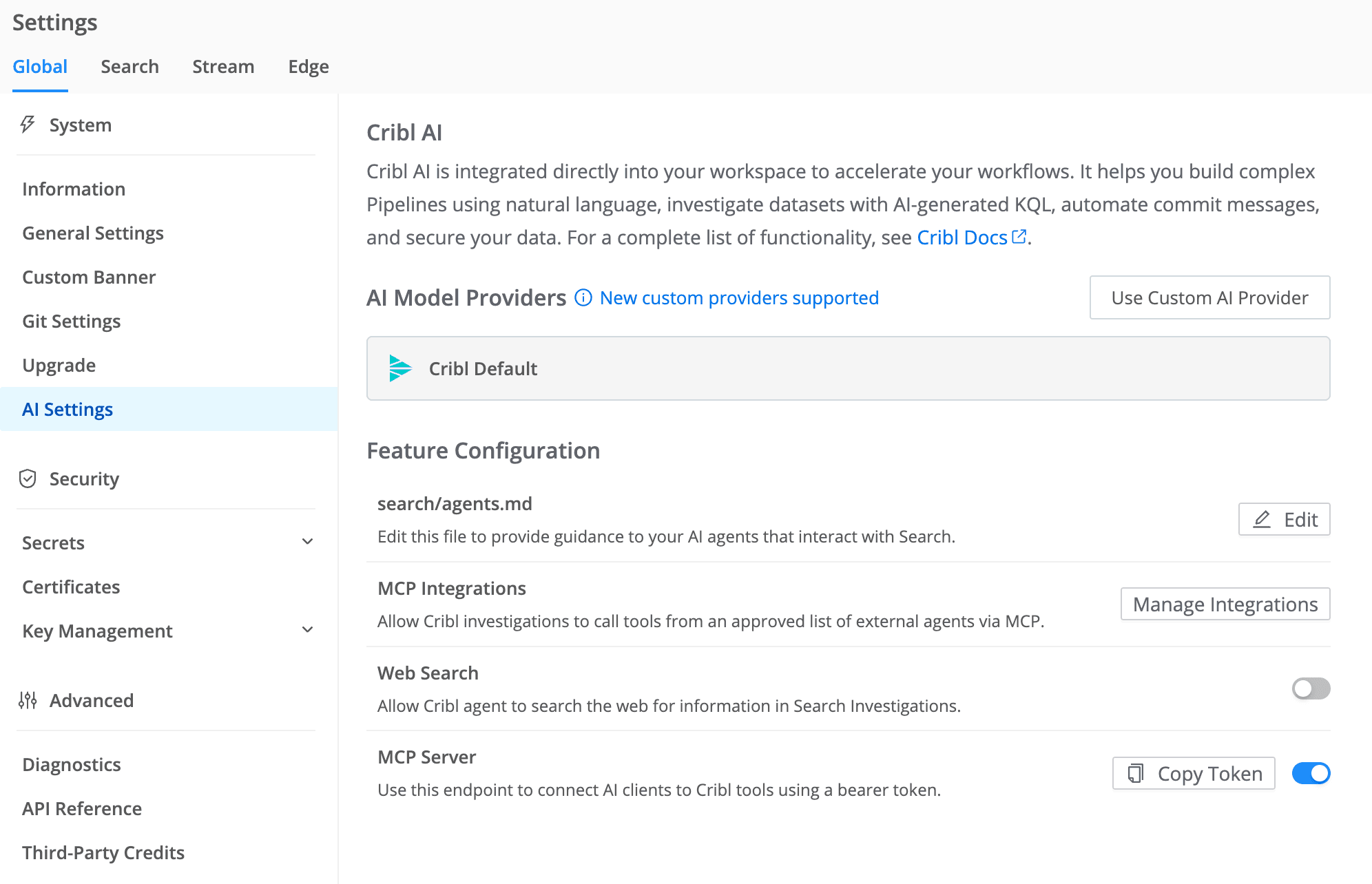
Next, copy or generate the bearer token for your deployment and add the Cribl MCP endpoint and token to your client configuration. Restart the client, then confirm that the Cribl tools appear and the server shows as connected.
Cursor, Claude Code, and the OpenAI Codex CLI support remote HTTP MCP servers directly, so there is no additional proxy to install. Cribl.Cloud, on-prem, and hybrid environments are supported, although endpoint and token details vary by deployment. For complete setup instructions, client configuration examples, supported tools, token guidance, and steps for moving from the standalone Docker server, check out the Cribl MCP Server documentation.
One example: Investigating your Cribl environment with Claude
Cribl MCP Server works with MCP-compatible AI clients such as Claude Code, Cursor, the OpenAI Codex CLI, and others. The following example uses Claude Code to show one possible workflow, but teams can use whichever supported MCP client best fits their tools and requirements.
Say an SRE notices that data does not appear to be flowing as expected. Normally, they might open Cribl, move between Worker Groups, check Sources and Destinations, review metrics, and try to piece together what changed. With Cribl MCP Server connected to Claude Code, they could begin by asking:
“Focus on the Worker Groups showing the largest drop in throughput. Review its Source and Destination configurations and identify anything that looks misconfigured.”
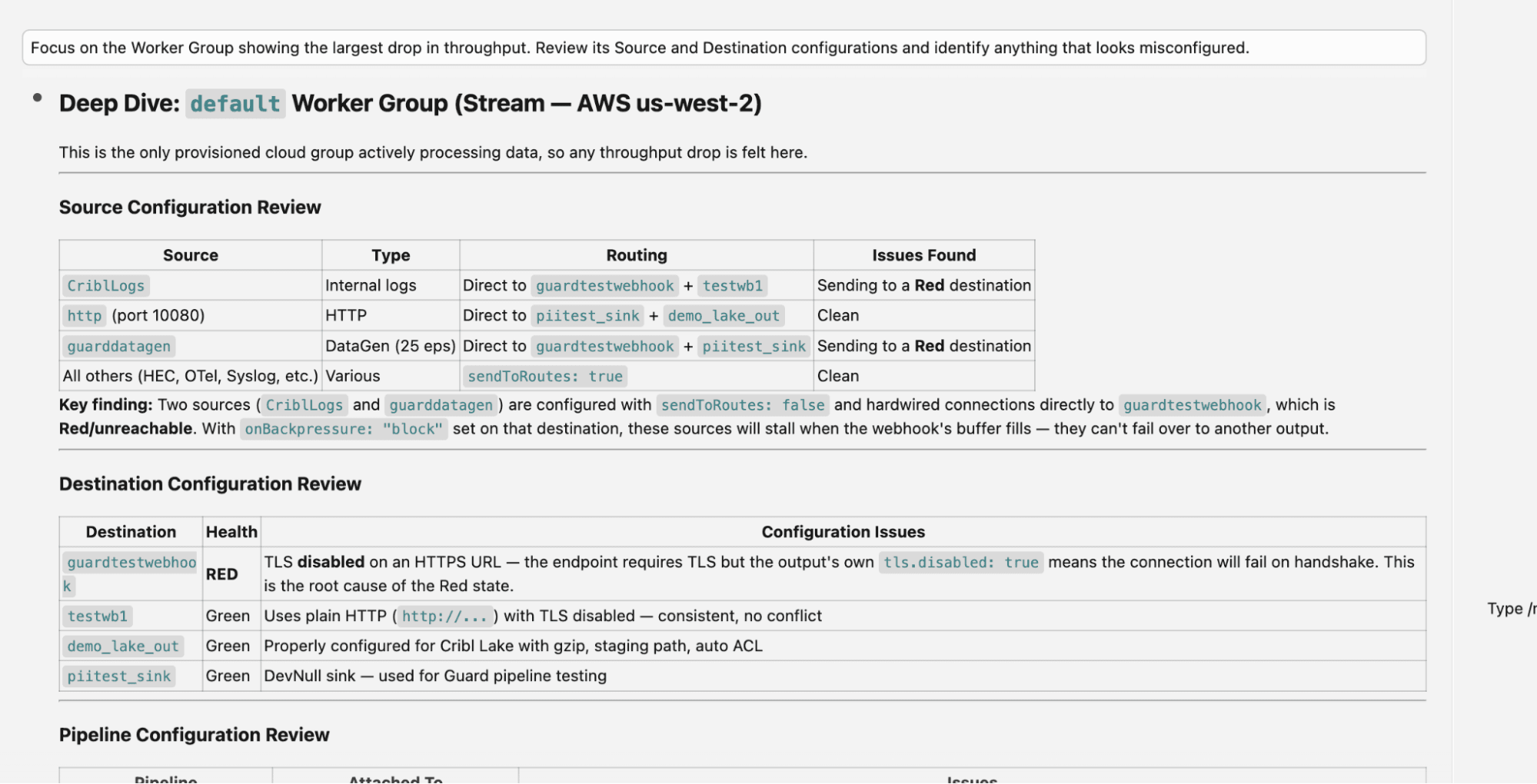
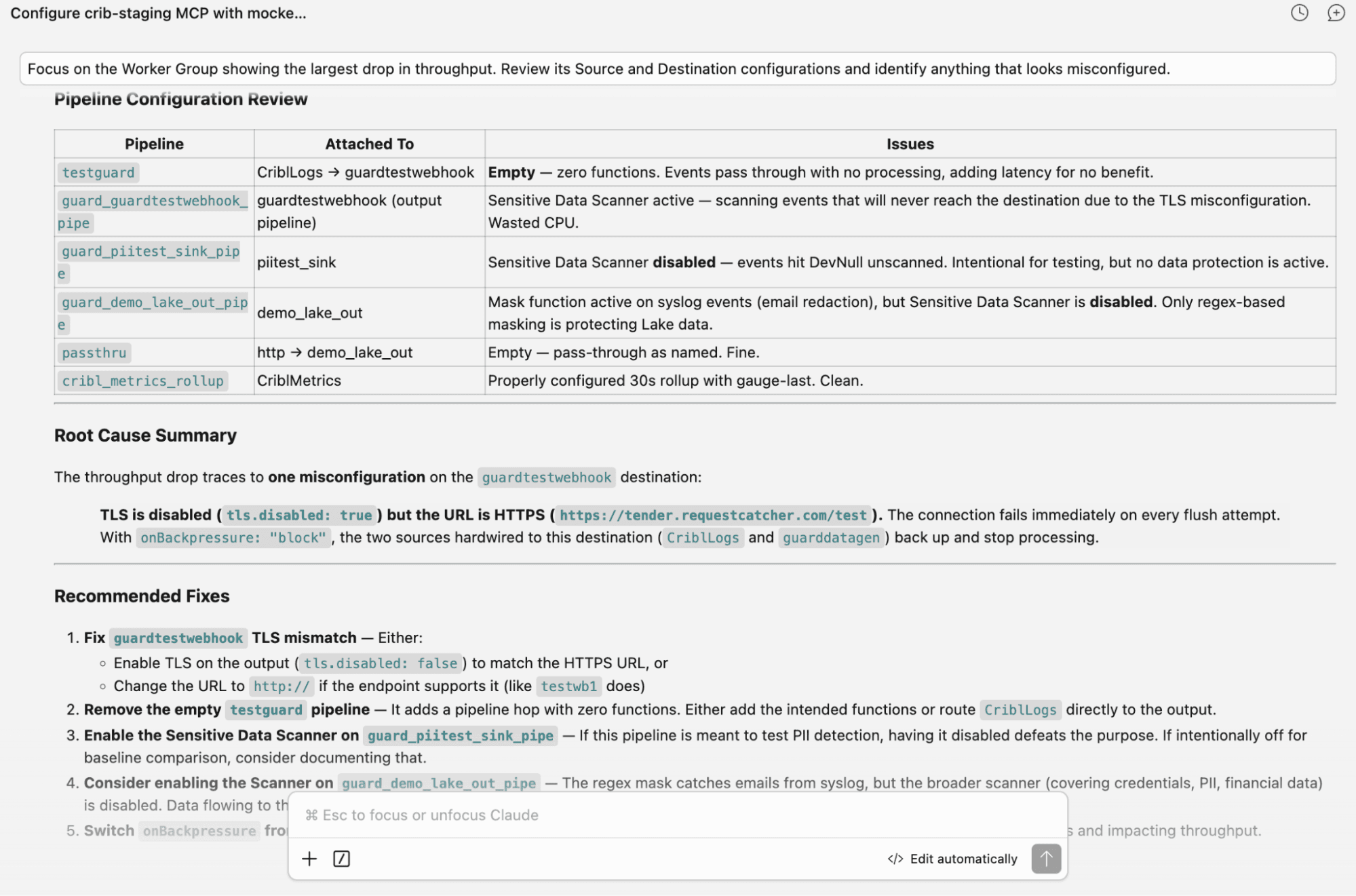
Instead of manually navigating through each part of the environment, the SRE can investigate conversationally while their chosen AI client retrieves the underlying information from Cribl. The goal is not to replace the Cribl UI or the person doing the investigation. It is to make it faster and easier to get from “something looks wrong” to “here is where I should look next.”
Bringing Cribl into your AI workflow
AI is quickly becoming another way teams interact with their tools, data, and infrastructure. But useful AI needs more than a chat window and needs access to the right context, supported tools it can use, and clear controls over what it can see and do. Cribl MCP Server brings Cribl into the AI ecosystem your teams are already building. It gives AI clients and agents a managed way to interact with telemetry, configurations, and Cribl workflows.
Use the AI tools your teams prefer. Use the models that meet your requirements. Build the workflows that make sense for your organization. Cribl MCP Server provides the connection. Get started today.