


When customers operationalize persistent queues (PQ), they are usually trying to solve a straightforward problem: don't lose data when their destination system slows down or stops accepting traffic. But in production, there is usually a second problem hiding behind the first one. It is not just destination failure. It is destination failure plus infrastructure churn.
A Stream Worker can be doing the right thing by buffering data into PQ, but if that queue lives only on the local disk of that Worker, then the backlog is still tied to the life of one machine. If that Worker goes down before the queue drains, the data remains stranded until that same Worker comes back.
That is exactly why shared PQ storage matters.
With shared PQ storage, Worker nodes within the same Worker Group point to the same backing store using NFS or S3. Because all Workers can see the same queue paths, a surviving Worker can recover and drain queue data that belonged to a Worker that is no longer active. This changes PQ from "buffered on one" into "recoverable by many."
The bigger operational problem shared PQ solves
The biggest pain shared PQ addresses is not simply backlog. It is a backlog that builds during a surge, gets spread across additional Workers brought online to absorb that spike, and then becomes operationally inaccessible when those extra Workers are scaled back down before their queues have finished draining.
In the shared-storage model, all Workers in the group point at the same backing store, and the on-disk layout is namespaced by Worker and Worker Process so writes do not collide:
<root>/<workerNodeId>/state/queues/<workerProcessId>/inputs/<sourceId>/...<root>/<workerNodeId>/state/queues/<workerProcessId>/outputs/<destId>/...
That means the data can outlive the original Worker identity that wrote it.
An orphan is queued data that remains on shared storage after the Worker GUID that owned it disappears from the Leader's active set. That can happen when a Worker node terminates and a new node comes up with a fresh GUID, when a node is replaced, or when a Worker can no longer reach the Leader.
Once that happens, orphan management gives the Leader a way to detect the abandoned queue directories, decide when the Worker is truly gone versus just restarting, and assign those directories to a surviving Worker for drain.
That is the real customer value: shared PQ storage reduces the risk that buffered data becomes stranded during worker loss, autoscaling events, or infrastructure replacement.
What does not create an orphan
A simple Worker process restart, or a container restart that preserves the same Worker GUID, does not produce an orphan. The same identity reconnects, takes ownership of its existing subtree, and resumes draining its own queues normally. Orphan handling is specifically for the case where the data outlives the identity that wrote it.
How revival works (at a glance)
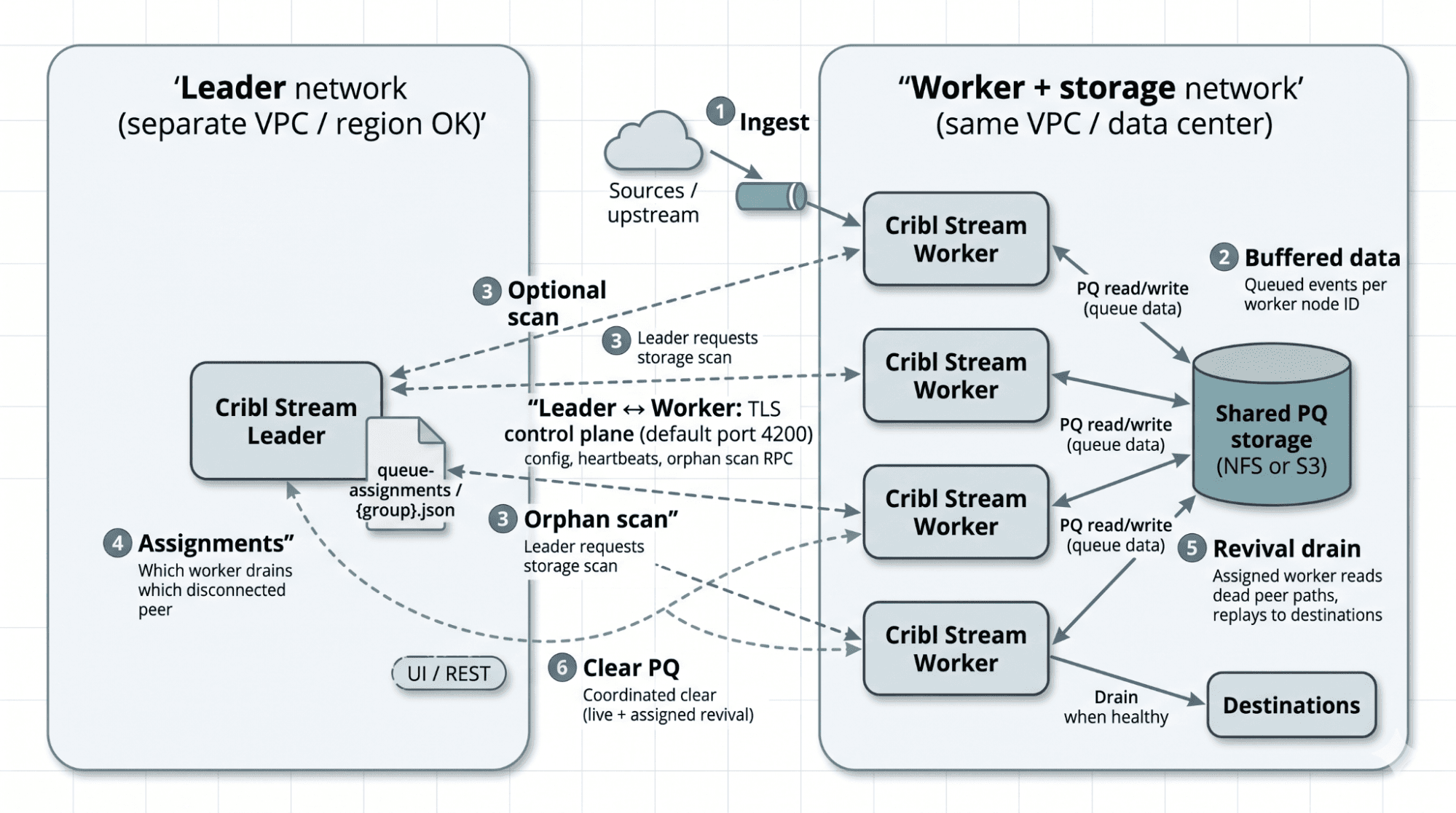
Architecture diagram showing Leader orphan detection, surviving Workers, failed Worker (dashed), and shared PQ storage (NFS or S3).
When a Worker GUID disappears long enough, the revival flow is:
The Leader notices the Worker is missing from the active set.
After the configured orphan detection window (evaluated when the Leader runs a storage scan at your scan interval), the Leader scans shared storage and confirms the missing Worker still owns non-empty queue directories.
The Leader round-robin assigns those directories to surviving Workers and writes the assignment to disk.
Each surviving Worker polls the Leader for its assignments and, if a non-empty assignment exists, spawns a temporary auxiliary process called PQ Worker.
The PQ Worker reads slices from shared storage and replays them through live Routes and Pipelines into live Destinations. When all assigned queues are empty, it exits.
If the original Worker comes back before assignment, it is removed from the dead set and no reassignment runs. If it comes back after assignment, the Leader clears stale assignment rows on the next pass so the original owner can reclaim its queues.
Why this matters in real environments
The Leader scans shared storage on an interval and waits for an orphan detection threshold before reassignment, which helps distinguish a true orphan from a routine restart. That distinction is important.
Defaults are tuned for fleets that scale automatically. Increase orphanDetectionThreshold for long maintenance windows, or set disabled: true during planned downtime when Workers may be offline for extended periods.
A concrete example: Syslog to Elasticsearch during an outage
Let's walk through an example where a Stream Worker Group is ingesting high-volume logs through a Syslog source and routing that data into Elasticsearch. On a normal day, the flow is simple. Syslog traffic arrives continuously, Workers process it, and Elasticsearch indexes it for search and analysis. During an outage or performance event, Elasticsearch can slow down or stop accepting data. PQ begins to grow while the destination is unavailable.
Now add the more realistic production wrinkle: while the queue is building, one Worker is also replaced, restarted with a new identity, or disappears from the Leader's active set. In a local-disk PQ model, this is where customers can get trapped. The queue exists, but it is attached to a Worker that is gone.
Shared PQ storage solves that exact operational pain.
The queue directories live on shared storage, not just on one Worker's local disk. If a Worker truly disappears and stays gone long enough to be treated as an orphan, the Leader can detect those queue directories and assign them to surviving Workers for recovery.
That means customers are no longer depending on one specific Worker to come back before they can recover buffered data.
Walkthrough: for demonstration purposes
The steps below walk through the key UI configuration, API calls, and validation checks for a lab or proof-of-concept. In order to walk through this exercise you will need:
Cribl Lab environment running on prem or Hybrid worker group
Lab instance of ElasticSearch that you can start/stop without affecting production data flow
1) Configure shared PQ storage for the Worker Group
Shared PQ storage is configured per Worker Group using either NFS or S3.
In the UI: Select your Worker Group → Worker Group Settings → PQ Storage → choose Network filesystem (NFS) or AWS S3, configure mount point or bucket settings, then Save, Commit, and Deploy.
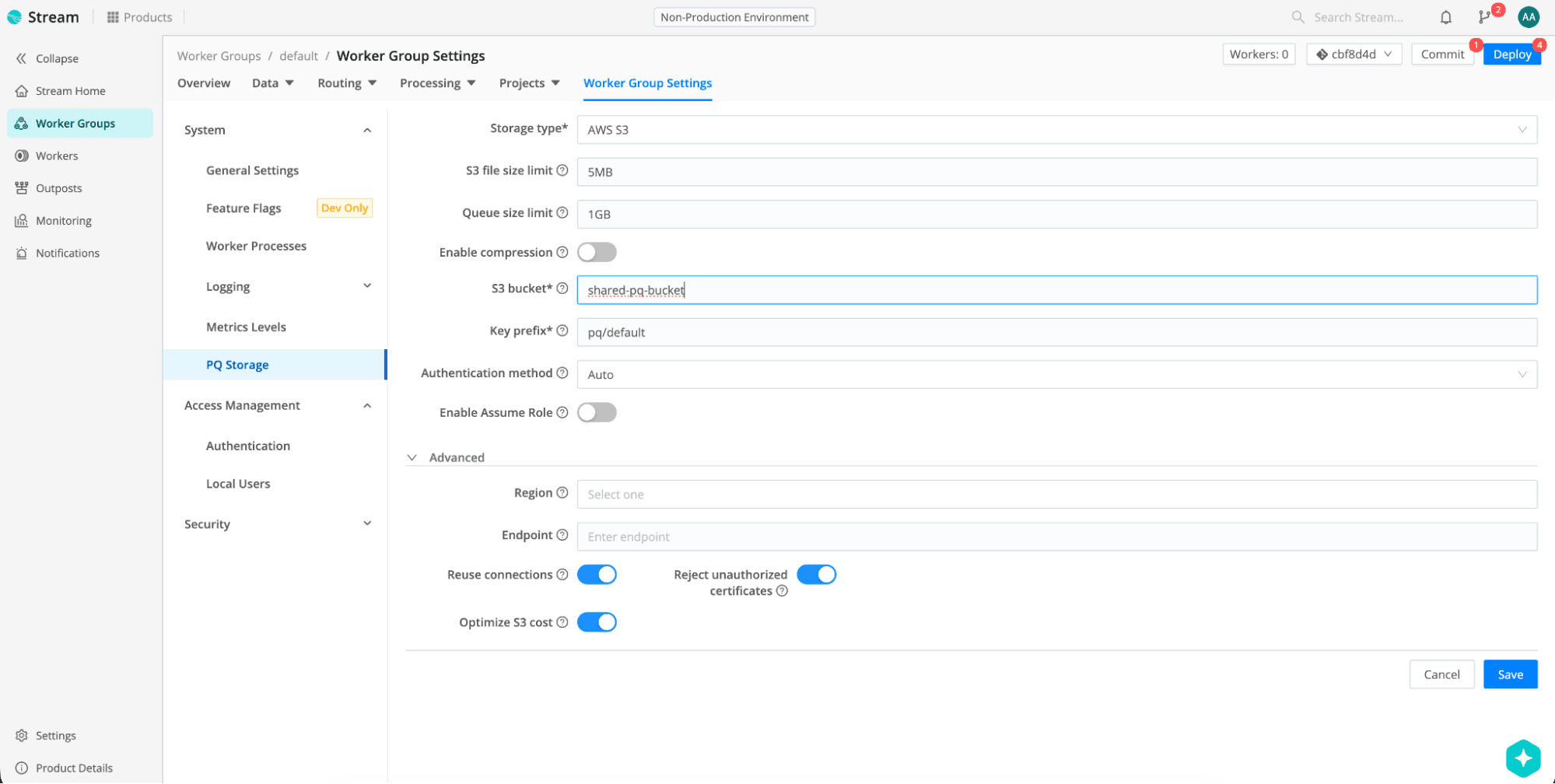
Note: When you first configure Shared PQ storage and deploy config, all workers will automatically transfer the PQ data from local disk to the configured shared storage.
2) Enable orphan management
Orphan management is also configured per Worker Group under Worker Group Settings (PQ orphan management section) or via API.
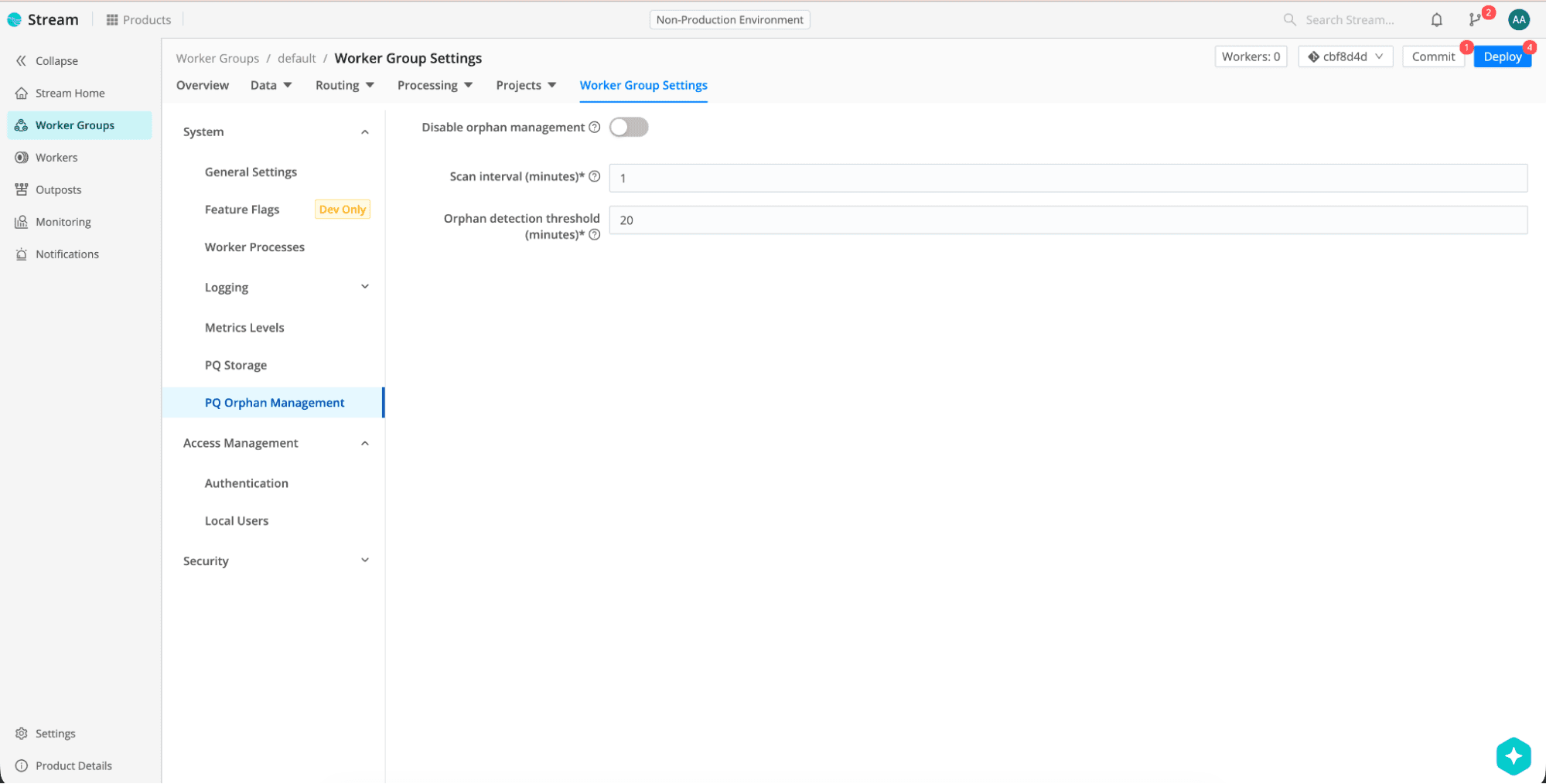
For demos and labs, use a shorter threshold so revival shows up quickly.
In production, we recommend keeping the defaults (scanInterval: 1, orphanDetectionThreshold: 20) for auto-scaling fleets. Use disabled: true during long-planned maintenance when Workers may be offline for extended periods.
3) Start with a realistic pipeline
Configure a datagen source set to a syslog data generator type to represent continuous flow of syslog data ingestion and an Elasticsearch destination to represent the downstream analytics tier.
Enable Persistent Queue on the Elasticsearch destination (Mode: Always is typical for outage demos).
Route traffic to that destination.
4) Mimic Destination failure: Create a persistent queue by stopping Elasticsearch
Stop the ElasticSearch destination and let the persistent queues grow as Cribl Workers begin buffering the data. In this scenario, Elasticsearch is unavailable while Syslog traffic from the data gen continues to send.
Watch queue depth in the UI (Destinations → your destination → Status tab) or via metrics such as pq.queue_size.
5) Raise failure scenario: Remove a Worker while buffering is occurring
Stop one Worker node while backpressure is occurring, then wait at least until your orphanDetectionThreshold + one scanInterval time setting has lapsed. For the demo settings above (2-minute threshold, 1-minute scan), wait at least 3 minutes after the Worker disappears.
This is an unlikely but realistic outage scenario where a worker node and destination simultaneously go down. Luckily for us, we have Cribl and the enhanced feature Shared Storage option which will assist us here.
6) Confirm orphan reassignment
On the Leader host, open the assignment file under the Leader state directory:
<leader-state-dir>/queue-assignments/<group>.json
Example shape:
{
  "active-worker-guid-1": {
    "dead-worker-guid-A": ["0", "1"]
  },
  "active-worker-guid-2": {
    "dead-worker-guid-B": ["0"]
  }
}
Outer keys are active Worker GUIDs; inner keys are dead Worker GUIDs; values are Worker Process IDs assigned to drain those orphans. You can also watch the pq.orphan_detected metric which should spike when the Leader assigns orphan work, then return toward zero as the drain of the persisted queue completes.
This is where the magic happens, the queued data is still operationally reachable by the other nodes in the group and gracefully drains the data that was written by the node which went down.
7) Restore Elasticsearch and verify drain
Start the destination again and confirm the backlog drains:
Validate through:
Destination Status tab (queue size trending down)
Shared storage inspection (NFS mount or S3 prefix emptying)
Metrics:
pq.queue_size,pq.shared_storage_bytes_out
At this point, we can clearly see the difference between "we buffered the data" and "we actually recovered it” after a Worker was in the middle of the operation then abruptly went down.
Observability and troubleshooting
Metrics to watch
Following is an example metrics API invocation that aggregates every metric from the table above for one Worker Group. Adjust splitBys if you want per-Worker or per-Source/Destination breakdowns.
curl -sS -X POST \
  -H "Authorization: Bearer $TOKEN" \
  -H "Content-Type: application/json" \
  "$LEADER/api/v1/system/metrics/query" \
  -d "$(cat <<EOF
{
  "earliest": "1m",
  "where": "__worker_group == \"$GROUP\"",
  "aggs": {
    "cumulative": true,
    "splitBys": ["__worker_group", "output", "input"],
    "aggregations": [
      "last(\"pq.orphan_detected\").as(orphanDetected)",
      "last(\"pq.queue_size\").as(queueSize)",
      "last(\"pq.disk_buffered_bytes\").as(diskBufferedBytes)",
      "last(\"pq.health\").as(pqHealth)",
      "sum(\"pq.shared_storage_bytes_in\").as(sharedStorageBytesIn)",
      "sum(\"pq.shared_storage_bytes_out\").as(sharedStorageBytesOut)",
      "sum(\"pq.shared_storage_api_errors\").as(sharedStorageApiErrors)"
    ]
  }
}
EOF
)"
Log signals
Internal logs may include Revived PQ Worker Process when a Worker is assigned to drain another Worker's queues. Filter Leader/Worker logs for persistent queue, orphan, or revival-related logger names during investigations.
Common symptoms
Clear PQ on shared storage
Clear PQ (per Source or Destination in the UI) wipes both the live queue and any in-progress revival drain for that same Source/Destination ID on each Worker. Without that dual clear, a revival could replay old data after you thought the queue was empty.
The takeaway
Shared PQ storage is not just a new storage option. It is a resilience feature for distributed data pipelines. It addresses a specific and expensive operational problem: queued data that survives a downstream outage but becomes stranded when the Worker that wrote it disappears.
By moving PQ storage to a shared backing store and pairing it with orphan management, Cribl allows surviving Workers to recover and drain buffered data that would otherwise remain tied to lost infrastructure. For customers operationalizing persistent queues in distributed Worker Groups, that is the difference between "we buffered the data" and "we can actually recover it when infrastructure changes underneath us."