
If you've ever configured TLS certificates from scratch, you know the pain: Google it, copy-paste some OpenSSL commands, something doesn't work, Google it again, and an hour later read a Stack Overflow thread from 2014 written by someone who seems personally offended by the question. Good times.
Recently I needed to set up TLS between a Stream Worker and Edge Node, a pretty standard "I want my data encrypted in transit for reasons" ask. The kind of thing that sounds like it should take ten minutes. Bestie, it did not take ten minutes. But now that I've done it, I'm here to save you the trip to Stack Overflow that ends in disappointment. You're welcome.
Before we get too far into a slightly over humorous tutorial let’s be clear: we’re setting up TLS certificates for on-premises Stream Workers and Edge Nodes. If you are using cloud managed (cribl.cloud) Stream Workers, preset certs are already created for ease of use and can be configured as in the following picture:
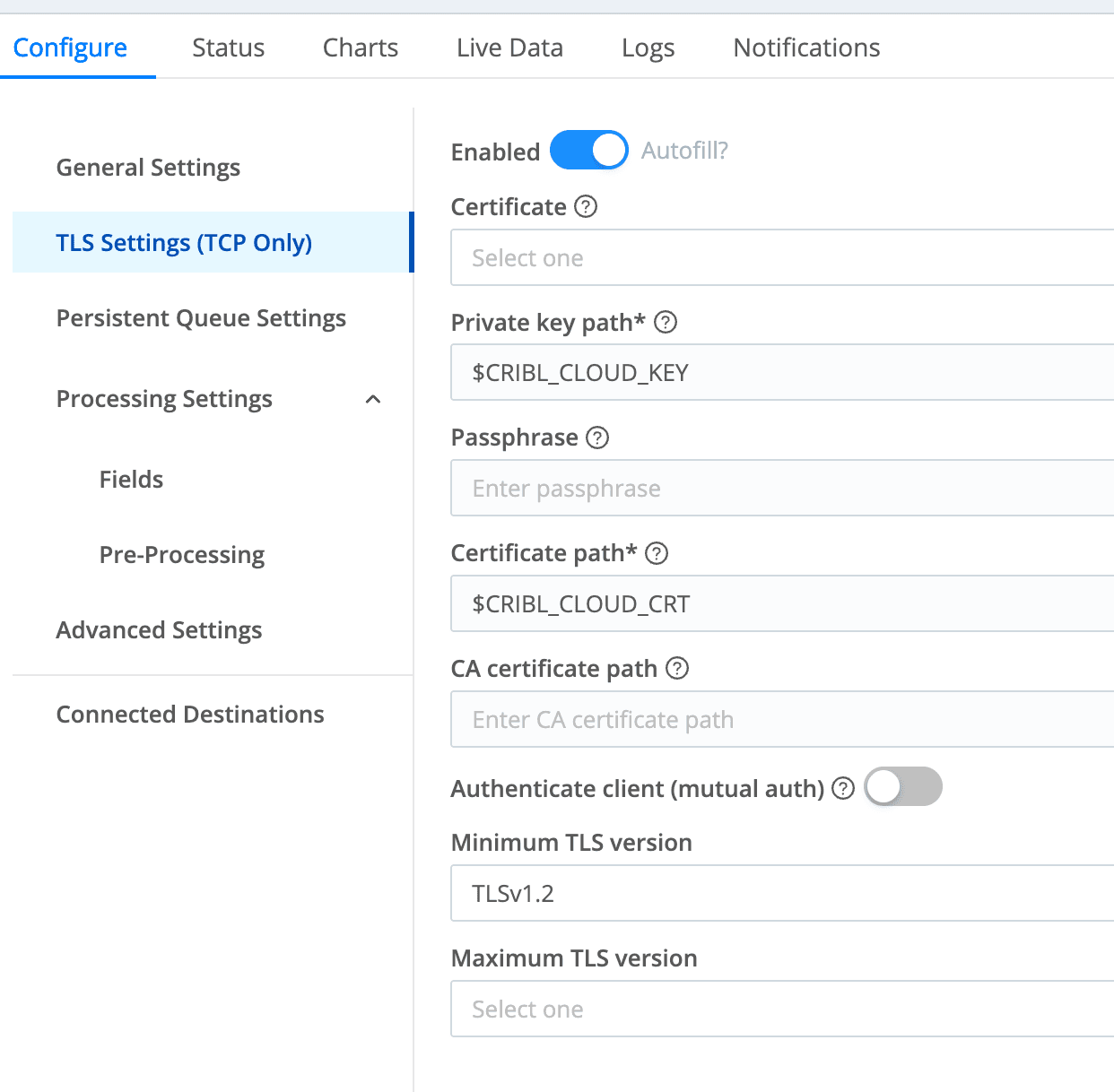
The goal: You ever wonder why we’re here?
What do we want? Encrypted, trusted communication between a Cribl Stream Worker (the Destination) and a Cribl Edge Node (the agent shipping data to it)! When do we want it? Soon!
Here’s what we need to accomplish in this tutorial fun blog:
Set up a Certificate Authority (CA) that both sides trust
Create a signed certificate for the Worker Node
Put the right files in the right places with the right permissions (the easy part?)
That's it. Three bullet points. We got this? I mean, we got this! Insert the laugh of someone who has stayed up more than 24 hours and had too many energy drinks and thinks they actually understand this all 🫠
Step 1: Become your own grand parent Certificate Authority
First, let’s create our own internal CA. This is the "trust anchor" that both the Worker and Edge Node will trust certificates from.
openssl genpkey -algorithm RSA -out ca.key -pkeyopt rsa_keygen_bits:4096
openssl req -x509 -new -nodes -key ca.key -sha256 -days 3650 -out ca.crt \
  -subj "/CN=My Cribl Internal CA"
Congratulations, you are now a Certificate Authority. With great power comes great responsibility headache.
Note: The -days 3650 gives you roughly ten years before this expires, which is great because you will forget how to do this by the time it expires on a Saturday morning in 2035.
Step 2: Generate the Worker's key and CSR
Next up, let’s generate a private key and Certificate Signing Request (CSR) for the Stream Worker Node:
openssl req -nodes -new -newkey rsa:2048 \
  -keyout worker.key \
  -out worker.csr \
  -subj "/CN=cribl-mini-worker"
Step 3: Define your comicSANs (subject alternative names)
This is the step that Every step will bite you if you skip it, but let’s take extra care here. Modern TLS validation cares about SANs; the Common Name (CN) alone isn't enough anymore, not in this economy. Create a file on your Worker called worker_ext.cnf:
authorityKeyIdentifier=keyid,issuer
basicConstraints=CA:FALSE
keyUsage = digitalSignature, keyEncipherment
extendedKeyUsage = serverAuth, clientAuth
subjectAltName = DNS:cribl-mini-worker,IP:192.168.50.2
Swap out DNS:cribl-mini-worker and IP:192.168.50.2 for whatever hostname and IP your Worker Node actually lives at (or don’t, I’m not your parent). If the Edge Node can't match the SAN to where it's connecting, it will reject the cert faster than Alex G. when I asked them to prom… I‘m sorry, that was weird. Let’s just move on.
Step 4: Sign the certificate
Now we use our CA to sign the Worker Node's CSR with the extensions defined just now:
openssl x509 -req \
  -in worker.csr \
  -CA ca.crt \
  -CAkey ca.key \
  -CAcreateserial \
  -out worker.crt \
  -days 825 \
  -sha256 \
  -extfile worker_ext.cnf
The -days 825 is worth noting: Apple devices cap certificate trust at 825 days, and while you're probably not shipping syslog from a MacBook (or maybe you are, Cribl Edge supports it now!), it's a reasonable default that avoids surprises.
Step 5: Verify your work
Trust, but verify. No seriously:
openssl x509 -in worker.crt -text -noout
openssl verify -CAfile ca.crt worker.crt
The first command lets you eyeball the cert details (check the SANs on that one!). The second confirms the chain of trust is intact. If you see worker.crt: OK I’m proud of you. Great job son!
Step 6: Package if needed
Some configurations want a single PEM bundle. I don’t judge, if that's your situation:
cat worker.key worker.crt > worker.pem
chmod 600 worker.*
The chmod 600 is not optional. Leaving private keys world-readable is the kind of thing that will get you a “quick meeting” with your manager and someone from HR you’ve never heard of on a Friday at 4PM.
Edit: chmod 600 can also lead to problems if you are doing all this as root. If you do run into that as an issue, a good fix is to run chmod cribl:cribl /opt/cribl/certs/worker.* that way the Cribl user that you totally set up when you installed Cribl the right way can read the certs. You should also replace /opt/cribl with whatever working directory you configured for Cribl when you installed it.
Step 7: Put the files where they belong
Certs and TLS are usually the hard part. Moving files on Unix based systems is relatively straightforward. You got this! We believe in you! No I’m not projecting, you’re projecting!
On the Edge Node, all you need is the CA certificate. Drop ca.crt into:
/opt/cribl/certs/ca.crt
Then, in your Edge Destination configuration, reference it at that path. Cribl Edge simply wants to know "who do I trust?" and the therapist CA cert answers that question.
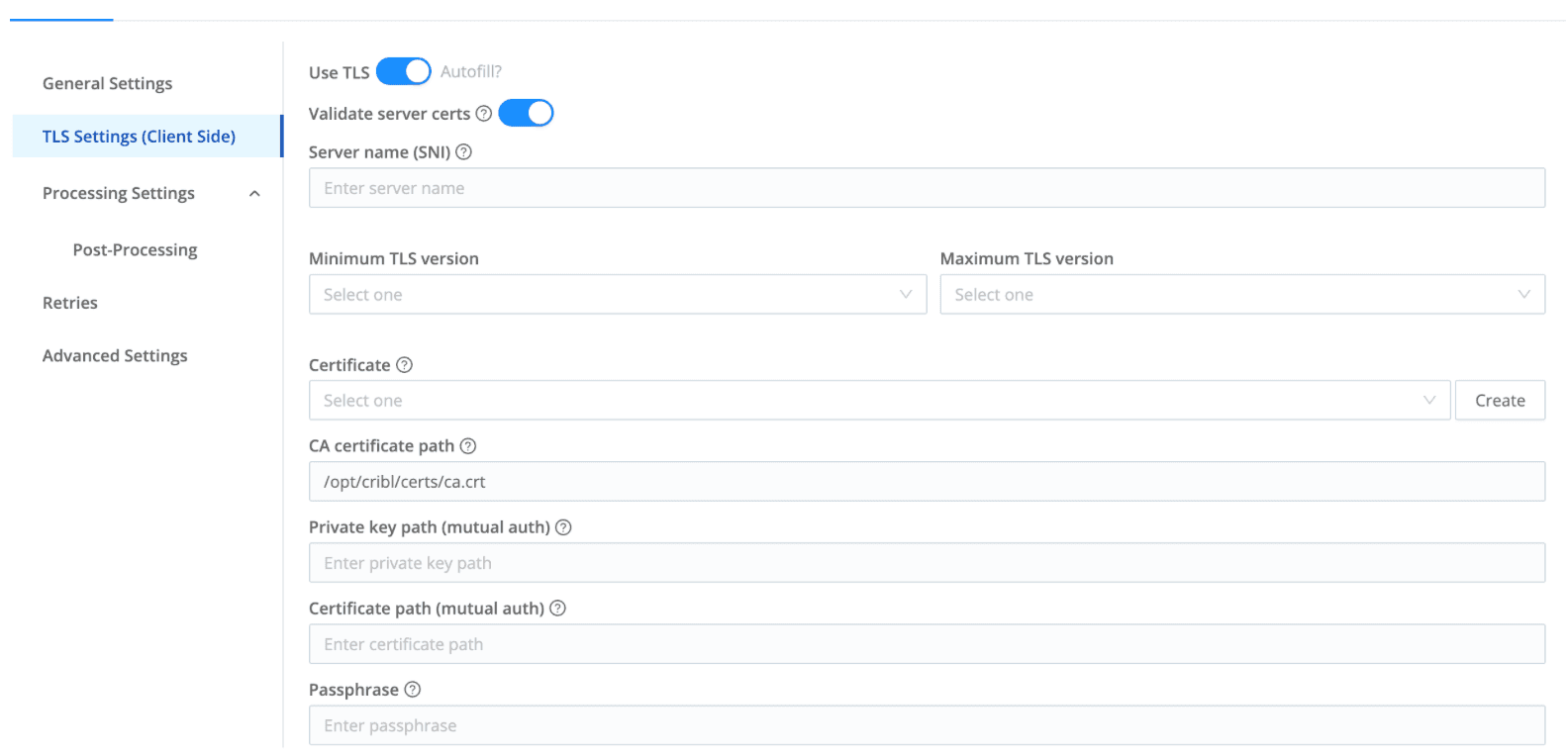
On the Stream Worker, navigate to the Worker Group settings and create a security certificate entry:
And then, and I cannot stress this enough (as someone who works on L1 calls):
Commit and deploy.
I know. I know. But I've personally spent twenty minutes troubleshooting a "broken" TLS setup only to realize I never committed the damn config. It's the telemetry equivalent of "is it plugged in?" So let me say it one more time for the people reading this over your shoulder: commit and deploy your changes, or so help me I will turn this Cribl around and go home.
Wrapping up
TLS certificate management is one of those tasks that nobody I know wakes up excited about. It's not flashy. There's no drag-and-drop UI for it (yet, looking at you, Cribl product team). But once it's done, it's done (for at least 825 days), and your data is flying between Cribl Edge and your Worker Nodes encrypted and authenticated, which is the kind of thing that helps auditors smile and security teams sleep at night.
The OpenSSL commands look intimidating the first time, but once you break them down (or have AI explain them to you), it's really just: make a CA, make a cert, sign the cert, put files in the right spots. Four steps in a six step trenchcoat. Now go encrypt your data in flight. Excelsior!