
In May, we made it possible to search your Azure Blob Storage in place with Azure BYOS for Cribl Lake. Your data stays in your tenant, under your keys, governed by your policies. Then security teams asked the next question, and it's a good one: who opens connections to my storage, and over what network?
If you run a regulated Azure environment, you already know the rules. Public network access is off. Vendors don't get inbound access. Every path to a storage account gets reviewed, documented, and defended in an audit. Until now, Azure Storage Locations in Cribl Lake relied on management calls from the Cribl control plane, and Search reads over Azure's public endpoints. For a lot of teams, that was a non-starter.
That changes now.
What is it?
Starting in Cribl v4.20, Azure Storage Locations support two new capabilities that keep Cribl's access to your storage on your terms:
Cribl Outpost support moves every Azure management call for a storage location into your network. Container creation, lifecycle and retention policies, and validation all run from an Outpost you deploy, not from the Cribl control plane.
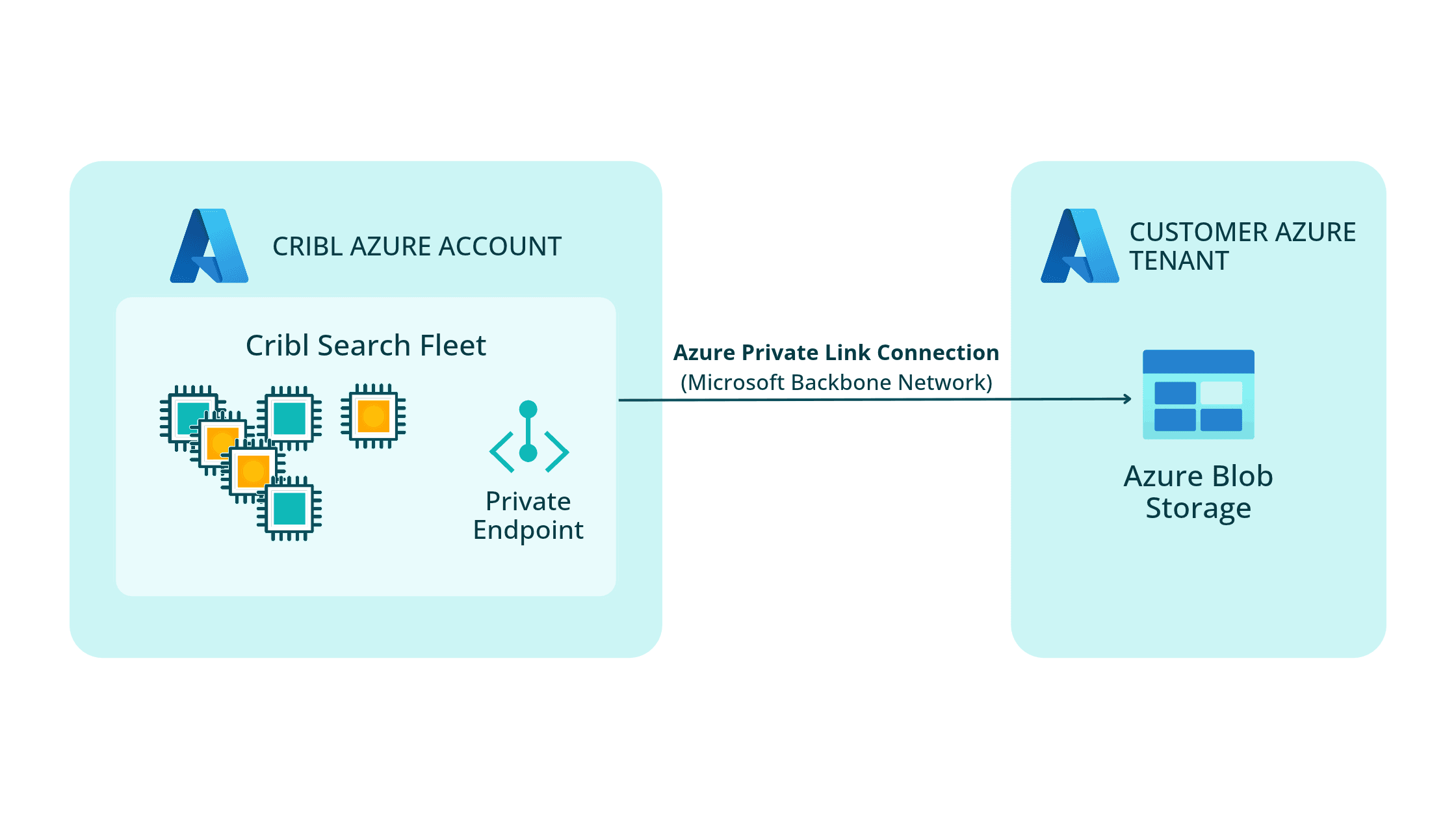
Azure Private Endpoint support lets Cribl Search read your data over a private connection that you approve. Queries travel the Microsoft backbone, not the public internet.
Both are opt-in, per storage location. Existing storage locations keep working exactly as they do today, with no migration required.
Why you should use it
Security reviews for telemetry storage tend to come down to a few questions. Here's how these updates answer them:
No inbound access. The Outpost only ever connects outbound to the Cribl control plane. Nothing from Cribl opens a connection into your environment.
No public internet on the read path. Search reaches your storage account over a Private Endpoint, so query traffic stays on the Microsoft network.
No new identity to manage. The same Cribl service principal you already consented to, the same RBAC grants, and short-lived Entra ID tokens. No storage keys, no SAS tokens, no credentials stored on the Outpost group.
You control the off switch. The Private Endpoint connection doesn't carry a single byte until you approve it, and you can reject or remove it at any time.
You no longer have to choose between a fully managed experience and a locked-down network. You get both.
How Cribl Outposts work
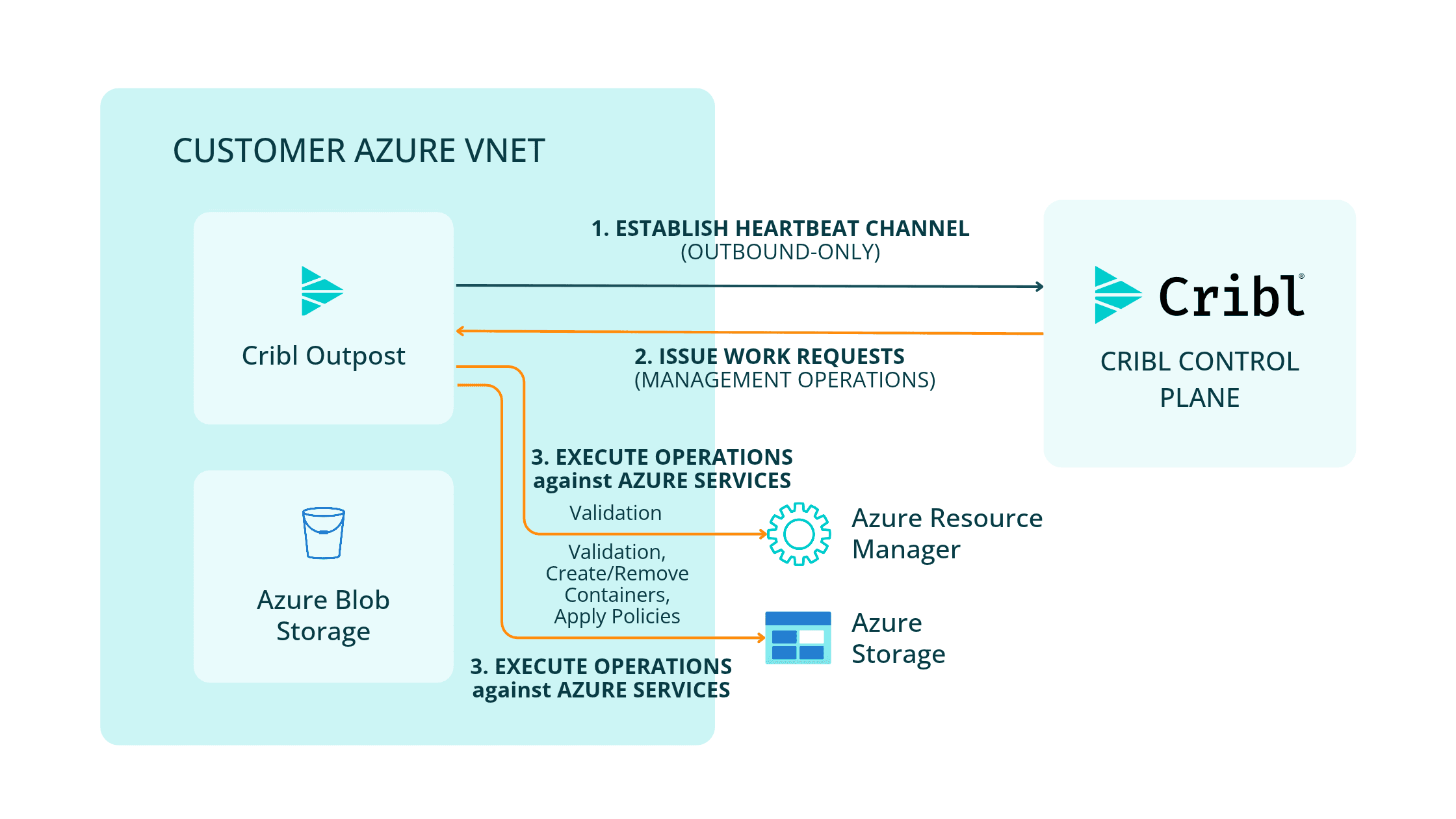
If you run Cribl Edge or Stream in hybrid environments, you may already know Cribl Outpost. It's a lightweight relay that shifts the network connection point from the Cribl.Cloud control plane into your environment. Outposts will run the Azure management operations for Azure Storage Locations from within your Azure vNet.
Here's the flow:
You deploy an Outpost inside your Azure network, in the same region as your storage account.
The Outpost opens an outbound connection to the control plane and holds it over the existing heartbeat channel.
The control plane decides what needs to happen. When you create, update, or remove a storage location, the control plane works out the required Azure operations, sequences them, and handles rollback if anything fails partway through.
The Outpost executes those operations against Azure from inside your network: creating and removing containers, applying lifecycle and retention policies, and validating access.
A few design choices are worth calling out for your architecture review:
The Outpost is stateless. The control plane stays the system of record for configuration. If an Outpost restarts, there's nothing to recover.
Validation happens on save. When you bind a storage location to an Outpost, Cribl validates the path end to end and rolls back automatically if something is misconfigured.
It carries management traffic only. Your telemetry never flows through the Outpost. It's a narrow, auditable path.
Plan for one Outpost per region. Deploy an Outpost in each region where you have storage accounts bound to it.
How Cribl Search uses the Azure Private Endpoint
The Outpost group handles management. The Private Endpoint handles the reads.
When you enable Private Endpoint support on a storage location, Cribl creates a Private Endpoint in the Cribl-managed Azure network where Search runs for your Cribl.Cloud organization. It targets exactly one storage account, the one identified by the Azure Resource ID you provide. Nothing gets deployed into your vNet.
Because the request crosses tenants, it lands on your storage account as Pending. It carries a Cribl request ID in its description so your team can confirm where it came from. Approve it under Storage account > Networking > Private endpoint connections, and Search starts routing queries over the private connection automatically. There's no separate configuration inside Cribl Search.
This matters for two reasons:
The connection is one-directional. Per Microsoft's Private Endpoint documentation, connections can be established in only one direction. Cribl Search can reach your storage account; the endpoint doesn't give anything a path back into your network.
It's the control that actually works. IP firewall rules can't restrict traffic from Azure services in the same region. A Private Endpoint gives you a network control you can enforce and audit.
Authentication doesn't change. Search uses short-lived OAuth tokens issued through Workload Identity Federation, the same model Azure BYOS has used since launch.
One thing to be clear about: the Private Endpoint covers the Search read path. Cribl Stream writes to your storage account continue to use your existing network path, such as hybrid Stream Workers running in your vNet.
To get set up, you'll need:
An Azure Storage Location in Cribl Lake with admin consent completed
A deployed Outpost Group, if you're enabling Outpost support
The storage account's Azure Resource ID
Someone on your team with Owner, Contributor, or Storage Account Contributor on the storage account to approve the connection
Summary
Azure BYOS gave you control over where your data lives. Outpost and Private Endpoint support give you control over how Cribl reaches it:
Management calls run from inside your network, over an outbound-only connection
Search reads travel a private, one-directional connection that you approve and can revoke
Identity stays the same, with short-lived tokens and no stored credentials
Your storage. Your network. Your rules.
Get started
Outpost and Private Endpoint support for Azure Storage Locations are now available in Cribl.Cloud. These capabilities aren't available in Cribl.Cloud Government, which doesn't offer Azure BYOS.
Read the docs: Set up Azure Blob for Cribl Search (Private Endpoints) and Cribl Outpost
New to Azure BYOS? Start with how to search your Azure data in place
Talk to your Cribl account team about your Azure security requirements, or start with a free Cribl.Cloud account