Your SIEM is the foundation of your multi-tiered security architecture, powering real-time threat detection, incident response, and compliance enforcement. But the cybersecurity environment is shifting. Regulations, growing telemetry volumes, aggressive threats, and staff shortages are pushing security teams to rethink their SIEM architectures. Overstressed SOC analysts drown in noise, breach indicators slip through, and outdated SIEM vendors struggle to keep up. You want to migrate. The question is how to run a SIEM migration efficiently, effectively, and without degrading your security posture.
This whitepaper walks you through eight strategic steps to guide your SIEM migration, setting your organization on course for an effective detection, response, and research program. It also shows how Cribl's AI Platform for Telemetry helps you de-risk and accelerate the migration, modernize your security data strategy, and decouple your SIEM, and your data, from vendor lock-in.
This guidance is built for leaders and key technical stakeholders responsible for the migration project and the long-term success of the detection, response, and research program, which may include the SIEM, data lake, threat hunting, and UEBA platforms.

This guidance is tailored for leaders and key technical stakeholders to ensure the successful execution of a SIEM migration project and the long-term success of an organization’s entire cybersecurity detection, response, and research program, which may include the SIEM, data lake, threat hunting, UEBA data platforms, and more.
Why migrate to a new SIEM?
Short answer: legacy SIEMs cannot keep pace with modern threats, modern data volumes, or modern budgets. Cyberattacks are rising while skilled security analysts remain in short supply. Telemetry data is growing at a 28% CAGR, creating large implications for storage and analysis. At the same time, businesses juggle more security events and devices than before, straining SIEM systems and burying analysts in false alarms and irrelevant alerts.

Companies want to replace their SIEM for cost, functionality, ease of use and better data management.
Source: IDC’s Worldwide Views on SIEM Survey, January 2024.
Even though companies invest heavily in these systems, they often feel stuck with their existing tools due to budget constraints and vendor lock-in. Older SIEMs come with several significant drawbacks:
High storage costs: As businesses adopt modern security approaches like zero-trust policies and cloud-based services, they generate massive amounts of security data. Older SIEMs store logs indiscriminately, leading to rising storage costs without adding meaningful security benefits.
Inability to track complex attacks: Legacy SIEMs often fail to connect the dots when attackers move across different systems. Hackers may use stolen credentials to access networks in unrelated ways, making it harder for security teams to see the full picture. This fragmented approach increases the chances of missing serious threats.
Failure to detect new threats: Many traditional SIEMs depend on basic rules and third-party alerts to identify risks. However, these outdated methods struggle to detect new and evolving cyber threats, making organizations more vulnerable.
Slow, manual investigations: Older SIEMs lack automation for critical security tasks. As a result, security teams must manually piece together attack timelines and incident reports, which is time-consuming and inefficient. This slows down response times and increases the need for skilled analysts—who are already in short supply.
It is clear why enterprises want better options. You cannot simply hit a switch and jump from one product to another. The business must stay protected. By using a telemetry pipeline like Cribl Stream, your security team can migrate to a next generation SIEM while meeting three core requirements: preserving full security posture throughout the migration, porting only optimized data to the new platform, and maintaining control over data ingest and data quality. Before switching, stakeholders must also consider how these changes affect existing workloads and plan accordingly.
How Cribl de-risks a SIEM migration.
Any SIEM migration is a complex process. The data is often intricate, and SIEM content is vendor-specific, meaning that transitioning to a new platform requires time and training. Furthermore, security teams may not be the only users of the SIEM’s capabilities. Years of effort have gone into legacy SIEM platforms, and it’s not unusual for the scope to extend to non-security teams that utilize the data for operational purposes. These non-security workloads must be considered, and a decision needs to be made regarding where these workloads will exist post-migration. A SIEM migration requires extensive planning, and it is essential to develop a strategy around the process to ensure it is done correctly the first time and to minimize rework.
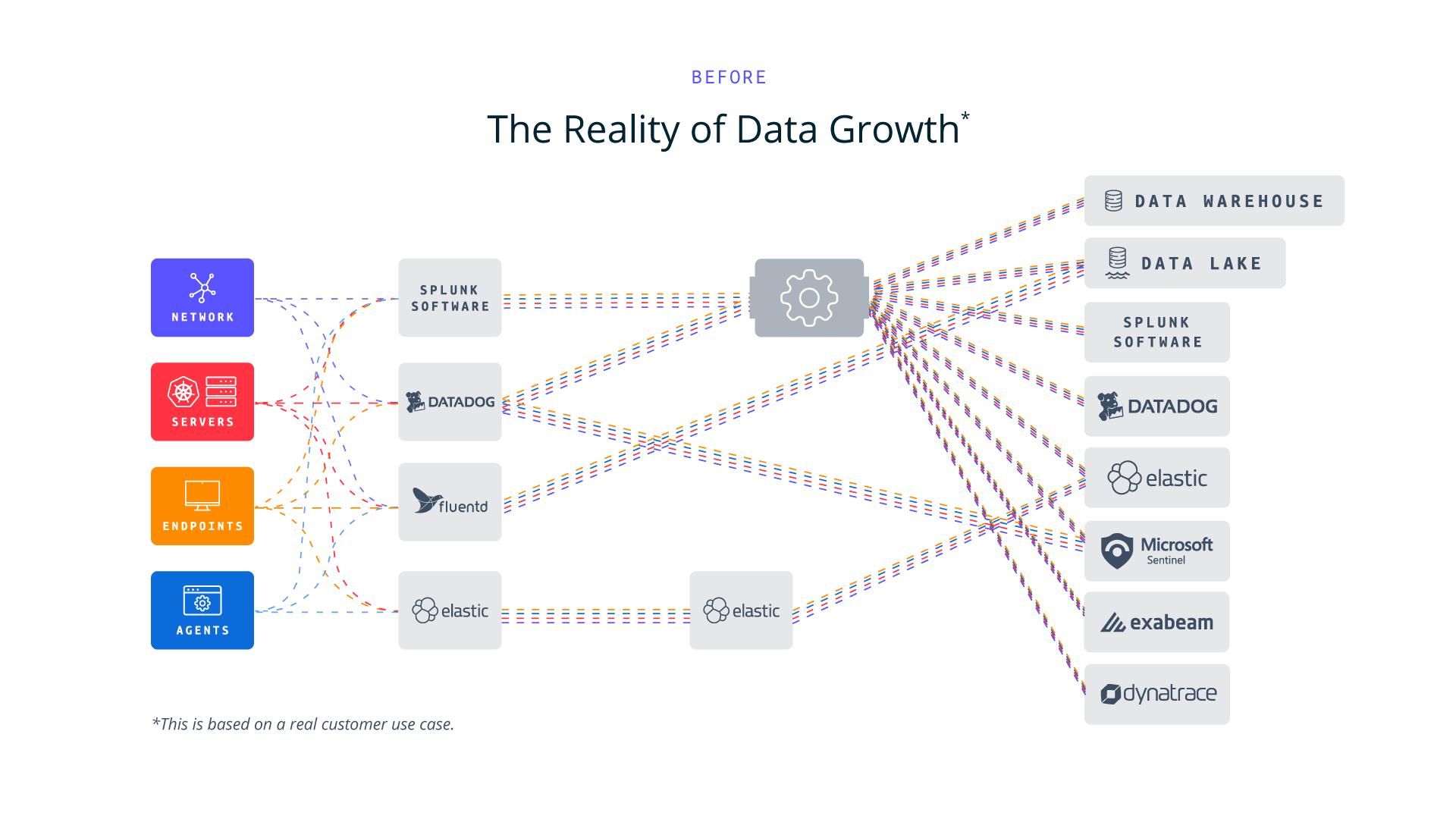
As organizations strive for greater agility and efficiency in their security operations, a modern data architecture—particularly when enabled by a telemetry pipeline—provides a flexible and scalable foundation. This approach allows teams to optimize their existing SIEM deployments, accelerate the adoption of new security tools, and seamlessly transition between platforms as their needs evolve. By decoupling data ingestion from specific SIEM solutions, security teams gain the freedom to adapt quickly to changing threats, improve resource utilization, and enhance overall system performance, regardless of their current SIEM infrastructure or future technology choices.
Cribl de-risks a SIEM migration because security telemetry is collected and governed once on a shared, open foundation, independent from the SIEM itself. Teams can feed the legacy and new SIEM in parallel, validate detections on full production data, and cut over on their own schedule.
With Cribl Detect, organizations can further streamline migration, with the broader Cribl platform helping transition detection and investigation directly into Cribl. Detect uses OCSF, an open schema, and includes rule translation packs, helping accelerate the migration of security telemetry and detection content from the old SIEM.
This enables the business to maintain its security posture in the legacy SIEM while cloning the full production dataset to your new SIEM. This powerful capability enables the migration team to build content in the new SIEM and thoroughly test everything without risk to its security posture. No ugly hacks or hard cutovers are required. No testing with sample data. The team knows its new content will work, materially lowering risk when the SOC cuts over to the new SIEM. Moreover, modern telemetry pipelines like Cribl Stream give teams a robust user experience that will accelerate every aspect of collecting and managing data, so less time is spent on data collection and more time is spent on getting value from the data.

A top SIEM challenge is that data ingestion is too complex and expensive.
Source: IDC’s Worldwide Views on SIEM Survey, January 2024.
The Eight-Step Checklist SIEM Migration
Step 1: Define SIEM Priorities
Setting clear SIEM priorities is crucial for a successful migration. These priorities define success criteria and guide the migration strategy. Before setting strategy, there are some important steps to address:
Collaboration and stakeholders: Since SIEM migration impacts multiple areas of an enterprise, collaboration with stakeholders is essential to identify critical data, systems, and security assets—such as intellectual property, customer records, financial data, personnel files, and network infrastructure. Recognizing the organization’s “risk assets” ensures protection against significant business risks.
Risk and Compliance: Align SIEM priorities with risk management frameworks and regulatory requirements. Engaging executives early helps integrate business objectives with IT strategy, ensuring compliance and efficiency.
Existing Use Cases: Understand all the workloads your legacy SIEM supports and if any non-security teams are involved. These workloads will need to be addressed and cannot be orphaned post-migration.
Decide whether your approach will be phased, modular, or a complete replacement, and factor legacy license renewals into decommissioning timelines. A phased migration enabled by placing a telemetry pipeline like Cribl Stream between your sources and destinations establishes a common data plane and gives your security engineering team control over your data. Full data flow continues to your legacy SIEM with no changes, while a second, optimized copy is cloned to your new SIEM. The pipeline also shares data outside the SIEM to support non-security workloads.
Timeline: Identifying stakeholders and aligning on priorities typically takes four to six weeks, including workload discovery and change controls.
Step 2: Optimizing Use Cases for SIEM Migration
Legacy SIEMs may support dozens or even hundreds of use cases, but not all need replication in a modern SIEM. Newer systems enhance efficiency by reducing reliance on complex correlation rules and increasing automation. When deciding which use cases to carry over, prioritize those that align with the business’s security objectives and address key threats. Do not carry over the technical debit of your legacy SIEM to your new SIEM.
Selecting Use Cases
Prioritize use cases based on business impact, event frequency, and potential consequences. Ignoring business relevance can lead to ineffective outcomes. Common use cases include detecting insider threats, compromised credentials, account activity, high-risk employee monitoring, endpoint analytics, and alert prioritization. Framing these within broader risk management initiatives—such as threat detection, process control, and asset protection—can engage executives who may not be familiar with technical specifics. The MITRE ATT&CK® framework is a valuable resource for mapping adversary tactics and techniques.
Strategic Implementation
Technical teams should focus on protecting critical business functions and sensitive data rather than replicating every previous use case. A phased approach starts with high-priority use cases, integrating others over time as the team gains experience with the new SIEM. Giving engineering time to master the new SIEM is critical to the migration process.
Evaluating how the new SIEM supports each use case ensures a smoother transition. Remember that this work can be done in isolation. A telemetry pipeline will be used to clone your production data to your new SIEM, allowing engineering to fully test your content to ensure it fits your framework and is optimized for your new SIEM. Since the new SIEM is getting the full production data stream, new content can be thoroughly tested for functionality and scalability.

Each use case should clearly define the following:
People: Who will handle tasks?
Process: How will tasks be executed?
Technology: What capabilities does the new SIEM provide?
Use Case Timeline
Depending on alignment with business and security needs, selecting relevant use cases typically takes two to four weeks. While security teams generally understand existing use cases, this period is crucial for assessing new capabilities that the legacy system may not have addressed.
Step 3: Optimizing Data Collection for SIEM Migration
The primary goal of a SIEM platform is to help analysts quickly detect and respond to security threats by integrating telemetry data from various IT and security tools. Effective threat remediation requires collecting and correlating data from multiple sources, including:
Infrastructure
Servers, network devices, firewalls, endpoints, operating systemsApplications
Databases, directory services, cloud environments (public, private, hybrid)Contextual Sources
HR systems, configuration management databasesSecurity tooling
EDR, WAF, CNAPP, XEM, DLP
PHASE A - Assess & Integrate Log Data
Start by evaluating your current log access and aligning data with key SIEM use cases:
Insider threats: Logs from DLP, email management, database activity, PAM, IAM
Compromised credentials: Logs from authentication, IAM, CASB
Account creation and management: Logs from PAM, IAM
Endpoint anomalies: Logs from EDR, MDM, endpoint monitoring
Security alerts: Logs from firewalls, cloud infrastructure, malware scanning, sandboxing, threat intelligence, VPNs, physical access systems
While some logs may contain overlapping data, the telemetry pipeline can handle data quality so the new SIEM is not flooded with confusing or duplicate data. This will improve data quality, leading to better outcomes and saving money. Evaluating how the new SIEM supports each use case ensures a smoother transition. Remember that this work can be done in isolation. A telemetry pipeline will be used to clone your production data to your new SIEM, allowing engineering to fully test your content to ensure it fits your framework and is optimized for your new SIEM. Since the new SIEM is getting the full production data stream, new content can be thoroughly tested for functionality and scalability.
PHASE B - Engage Stakeholders & Secure Access
Since SOC analysts may not control all forms of machine data or telemetry, collaboration with system owners is essential. Standards and business priority are vital so all teams will work with security to accomplish this complex task with as little friction as possible. Priority is critical and should be secured with some sort of mandate from leadership.
PHASE C - Plan Storage & Retention
The telemetry pipeline will enable engineering to align data cost with value by tiering data where it most makes sense. Decoupling is the key. Why lock up your data in your most expensive platform and in a vendor specific format? Critical data that is needed for detections is forwarded to the SIEM, but bulk data sources that are only needed occasionally are kept in data lakes based on object storage so that data is retained as required but stored at the lowest possible cost point instead of in the SIEM. The telemetry pipeline enables engineering to retrieve data as required from these data lakes back into the SIEM when and if needed. All of these functions are enabled and orchestrated by the telemetry pipeline. Ensure your new SIEM’s pricing model aligns with your data collection needs and budget.
PHASE D - Data Collection Agents
Which agent collects endpoint data? It is a nuanced question teams often forget. The legacy SIEM's agent usually will not send data to your target SIEM. A vendor-agnostic telemetry pipeline like Cribl Stream works with the agent you already have, sending data to both SIEMs simultaneously and minimizing displacement costs. Check your license agreement, since decommissioning may require removing the agent and you do not want a settlement surprise. If the agent must go, Cribl Stream supports almost every available data collection agent, and Cribl offers Cribl Edge, an endpoint telemetry agent for log and metrics collection and edge pipelines. One last piece of advice: stage the agent replacement after implementing Stream. One change at a time keeps the rate of change manageable.
Timeline: Mapping log sources to use cases typically takes four to eight weeks, depending on pre-built integrations, use case changes, broader security transformation, and whether you keep or replace your agent.
Step 4: Configuring Log Sources for SIEM Migration
Log source configuration is a critical and often time-consuming aspect of SIEM migration. It involves carefully setting up and optimizing the various data sources that feed your SIEM. This process ensures that your new SIEM receives all the necessary data in the correct format for effective threat detection and analysis. Proper planning and collaboration help streamline this process, ensuring seamless data integration and reliable security monitoring in the legacy SIEM while getting the new SIEM ready for cutover.
Now, let’s dive into the specific steps for configuring SIEM log sources into your telemetry pipeline:
1. Onboard Required Data Sources
Onboard required data sources: Integrate telemetry into the pipeline. Cribl Stream supports numerous out-of-the-box sources plus nearly unlimited custom sources. Expand infrastructure to support ingestion at scale, and dedicate a team to maintain focus and consistency.
2. Develop and Implement Parsers
Field-specific parsers align and optimize your data for the new SIEM. Logs often have unclear naming conventions, making parser development a technical challenge, and Cribl Stream's UX helps engineering normalize data sources faster.
3. Clone and Synchronize Log Data
Clone telemetry to the new SIEM, coordinating with storage, backup, IT operations, and compliance teams.
Validate that all data is in scope and the data is optimized for the new SIEM. Engage your SIEM vendor to validate that data is optimized and being parsed as expected.
Ensure the tiered data storage strategy is implemented and no extraneous data is forwarded to the new SIEM.
4. Telemetry Agent Replacement
Roll out new agents in stages using Stream as the destination.
Minimize change by keeping collection patterns and formats as close as possible to a one-for-one replacement.
Validate formats and adjust Stream configs as required.
Remove the old agent and enable the new agent.
Validate SIEM content and test detections.
Log Configuration Timeline
Configuring log sources is one of the most time-intensive aspects of SIEM migration, typically taking two weeks to six months. The duration depends on:
The number of log sources and their complexity.
Coordination with IT and security teams across multiple locations.
Setting up local collectors for geographically distributed environments.
Replace the existing telemetry agent.
Step 5: Preparing SOC Analysts and SIEM Content for Migration
Your SOC analysts must familiarize themselves with the new SIEM’s capabilities. For example, a modern SIEM platform can:
Prioritize critical security events that require investigation
Provide a user-friendly dashboard to organize daily tasks
Generate reports for audit and compliance purposes
Analyst training is essential when transitioning from a rule-based alert system to one leveraging behavioral analytics and machine learning. Modern SIEM platforms leverage behavior and risk-based detections that require significant training. Yet again, having your production dataset cloned to your new SIEM enables realistic training and process validation without the on-the-job training that is typical when a telemetry pipeline is not powering a SIEM migration.
Training must be a focus for the SIEM migration to be a success and not compromise the company’s
security posture.
Configuring SIEM Content
To ensure effective migration, the SIEM content must support selected use cases, including:
Dashboards & Reports: Customizable for visibility into security trends and compliance
Correlation Rules & Anomaly Detection: Aligning automated threat detection with security objectives
Case Management & Alerts: Ensuring timely and relevant notifications

Compliance Considerations
The GRC team must confirm that the new SIEM meets industry-specific compliance requirements. Risk managers should define these criteria, and dashboards should be sortable by compliance categories to streamline audits.
Content Preparation Timeline
Configuring SIEM content typically takes four to ten weeks, depending on the complexity of the implemented use cases.
Step 6: Optimizing SOC Analyst Productivity During SIEM Migration
Transitioning to a new SIEM requires adjusting productivity expectations for SOC analysts. This includes training on new tools, refining workflows, and updating operational playbooks to align with the modern system’s capabilities.
Boosting Productivity with Faster Search & Automation
Legacy SIEMs often take hours to return searc results, while modern systems deliver results in minutes. With automated response playbooks and real-time threat timelines, analysts can focus on high-priority security incidents instead of manual investigations.
Adapting to New Operational Processes
Migrating to a modern SIEM introduces changes in daily SOC workflows, leading to common questions such as:
Will analysts need to learn a new query language?
Many modern SIEMs offer intuitive point-and-click interfaces, reducing reliance on command-line queries. Some also use natural language processing (NLP) to simplify complex searches.How does the alerting system compare to the old SIEM?
New SIEMs reduce false alarms, allowing analysts to focus on genuine threats rather than unnecessary alerts.
Enhancing Analyst Capabilities
A modern SIEM is easier to use, enabling Tier 1 analysts to handle tasks previously reserved for Tier 2 analysts, such as advanced query writing and rule creation. In contrast, legacy SIEMs often produce excessive or inaccurate alerts, forcing even senior analysts to spend time filtering out irrelevant data. By minimizing noise and automating repetitive tasks, a modern SIEM boosts efficiency across all analyst levels, leading to a more proactive security approach.
Refining Playbooks & Automating Response
During migration, the team must review and refine SOC workflows and incident response playbooks. Automating key response actions—including integrations with third-party vendors, ticketing systems, and IT teams—can significantly improve Mean Time to Respond (MTTR), a key measure of SOC efficiency.
Documenting New SIEM Processes
Comprehensive documentation ensures smooth post-migration operations. While not the most exciting task, documenting new processes for SOC analysts, auditors, and stakeholders is essential for maintaining operational continuity.
Training & Process Adoption Timeline
Basic SIEM training: As little as two weeks
Full adoption of new workflows: Up to four months, depending on how quickly teams adjust to new processes
Operational efficiency improvements: Metrics should be carefully selected to measure alert reduction and analyst productivity gains
Migrating to a modern SIEM improves efficiency, accuracy, and automation, leading to a more agile and effective SOC.
Step 7: Establishing Benchmark Criteria for SIEM Performance
Setting benchmark criteria for your new SIEM ensures measurable and effective performance evaluation. That which cannot be measured cannot be graded for effectiveness. These benchmarks should align with existing frameworks such as:
ISO (compliance standards)
PCI DSS (payment security)
Operational metrics like search times, Mean Time to Detect (MTTD), and Mean Time to Respond (MTTR)
Benchmark criteria can be visually represented in a heat map to score use cases. Initially, SOC managers may observe many areas marked in red, indicating weaknesses that need improvement. Over time, as teams get more skilled, data quality improves and ML models learn, these areas will shift to yellow, reflecting gradual improvements. Eventually, as analytics mature and demonstrate effective security coverage, these areas will turn green, indicating that the SIEM is successfully meeting business objectives.
Tuning plays a crucial role in benchmarking. This process includes Red Team attack simulations to test and fine-tune the system. Regular tuning and testing help identify misconfigurations or weaknesses that could impact detection accuracy. Many modern SIEMs incorporate self-tuning analytics, which further optimize performance over time.
Benchmark Timeline
Setup Duration: Expect two to four weeks, as this process is fully within the security team’s control
Ongoing Review: Evaluate use cases every few months to ensure effectiveness
Attack Simulations: Test regularly to refine benchmarks to align with business objectives
If in-house Red Team capabilities are unavailable, consider hiring external security experts to conduct attack simulations, ensuring a robust security posture.
Step 8: Evaluating the Next Steps in SIEM Migration
The final phase of SIEM migration involves evaluating next steps to ensure continuous security improvements. Unlike legacy SIEMs, which require constant manual adjustments to thresholds and alerts, modern SIEMs leverage behavioral analytics and machine learning to automate threat detection, reducing the need for manual rule adjustments. This shift allows SOC teams to focus on developing new use cases as business and security priorities evolve as long as data quality is high and represents the environment. Data quality makes these advanced processes work, so it is crucial to leverage the telemetry pipeline to monitor data drift and quality and take immediate action if an issue occurs. This has to be a continuous process, a proactive process, in order to not have a degraded security posture.
SIEM as an Ongoing Process
SIEM migration should not be viewed as a one-time project but as an ongoing process to maintain a strong security posture. Organizations should continuously review and refine processes, ensuring the SIEM adapts to emerging threats and business needs. Governance is everyone’s job and cannot be forgotten.
Ongoing Process: The evaluation of next steps is a continuous effort, with the level of involvement varying based on changing security landscapes.
Post-Migration Improvements: Regularly assess opportunities for process enhancement, ensuring the SIEM remains effective against evolving threats.
Organizations should initiate a SIEM migration project to jumpstart a broader security data strategy. This approach will prevent past mistakes from happening again, allowing organizations to maintain optimal security operations and improve their overall cybersecurity investment. Effective cybersecurity starts and ends with your data. It must be the focus of your program to ensure long-term success.
How Cribl can help with your SIEM migration
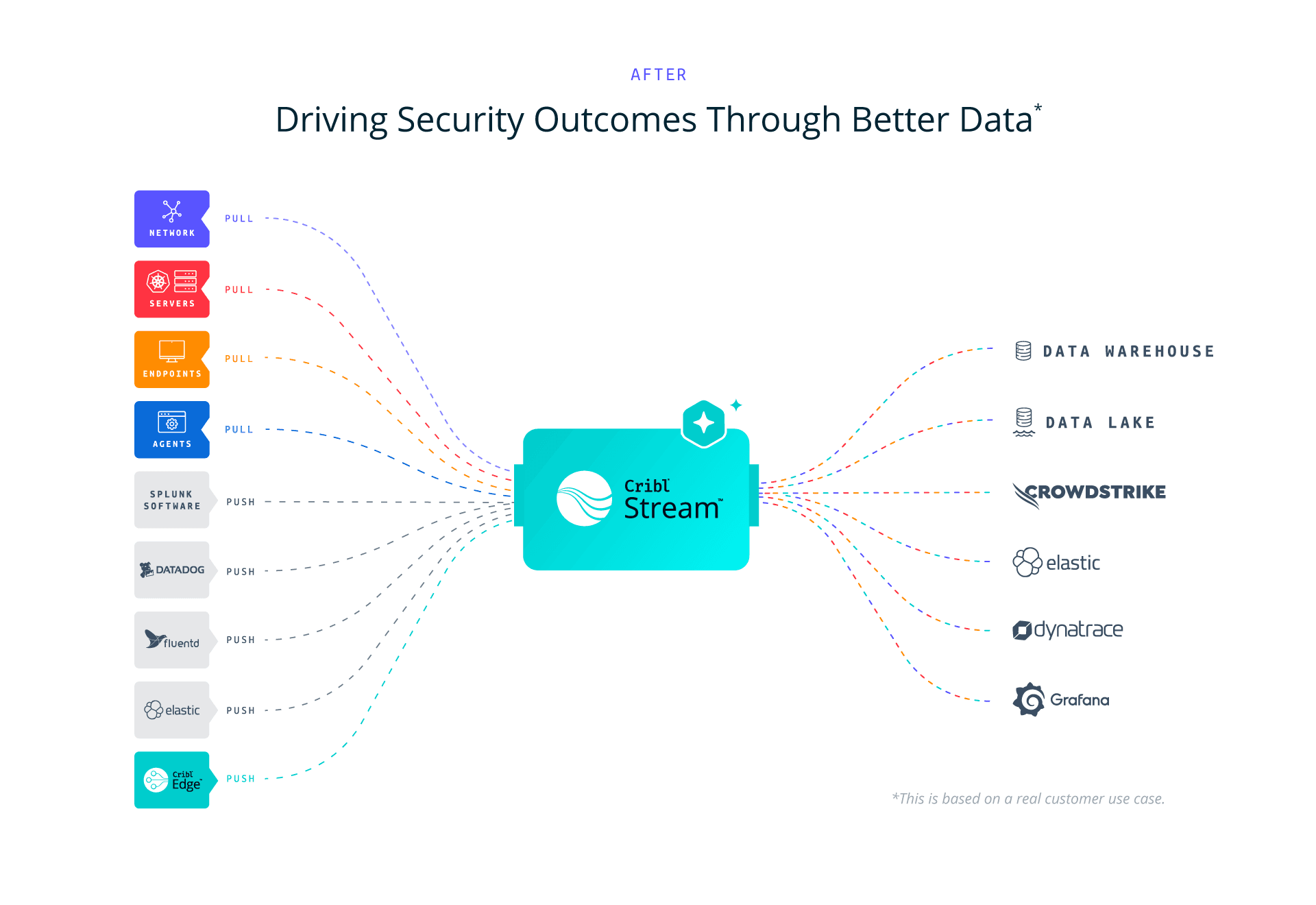
Cribl provides a telemetry platform for this challenge. Our vendor-agnostic platform acts as the central hub between your sources and destinations, giving IT and Security teams choice, control, and flexibility to collect, transform, route, and store telemetry across sources, tools, clouds, and SIEMs, with no lock-in and no data loss.
During a SIEM migration, Cribl Stream feeds your legacy and new SIEM simultaneously from a single data stream, so your security posture does not waver while your team builds and validates content on full production data. Cribl Edge provides endpoint telemetry collection when agent replacement is required. Cribl Lake delivers tiered, open-format storage so bulk and compliance data stays retained at lower cost instead of inflating your SIEM bill, and Cribl Search lets your team query that data wherever it lives.
Trusted by organizations worldwide, including half of the Fortune 100, Cribl turns a high-stakes migration into a controlled, testable, reversible process, and positions your data as a portable strategic asset after cutover day. We offer free training and certifications through Cribl University, a free tier across our products, a community Slack with Cribl engineers, partners, and customers, and hands-on Sandboxes where you can experience a SIEM migration workflow before you commit. Ready to see it in action? Schedule a demo and plan your migration.
Mastering your Siem Migration FAQs
Why should organizations migrate from a legacy SIEM?
Legacy SIEMs have high storage costs, cannot track complex attacks across systems, detect new threats poorly, and require slow manual investigations. With telemetry growing at a 28% CAGR (IDC), these issues compound quickly. Modern SIEMs provide better detection, more automation, and higher analyst efficiency, and companies cite cost, functionality, ease of use, and better data management as their top reasons to switch.
How does a telemetry pipeline de-risk a SIEM migration?
A telemetry pipeline sits between your sources and destinations and sends data to both your legacy and new SIEM simultaneously. Your legacy SIEM continues to receive full production data, so your security posture remains unchanged, while a cloned, optimized copy flows to the new platform. Your team builds and tests detections against real production data instead of samples, so you can schedule cutover with confidence.
How long does a SIEM migration take?
Timelines vary by scope. Defining priorities typically takes four to six weeks; selecting use cases, two to four weeks; data collection mapping, four to eight weeks; log source configuration typically takes two weeks to six months. Content preparation runs four to ten weeks, and full workflow adoption may take up to four months. Several steps can run in parallel to shorten the overall schedule.
Should we replace our data collection agent during a SIEM migration?
No, not at the same time. A vendor-agnostic telemetry pipeline such as Cribl Stream works with your existing agent, sending data to both SIEMs simultaneously and reducing displacement costs. If you must replace the agent, check your license agreement first, then stage the replacement after the pipeline is in place. Making one change at a time keeps complexity manageable. Cribl Edge offers an endpoint collection option if you need a new agent.
Do we need to replicate every legacy SIEM use case in the new platform?
No. Carrying over every legacy use case transfers technical debt. Prioritize use cases by business impact, event frequency, and potential consequences, and map them to the MITRE ATT&CK framework. Modern SIEMs rely less on complex correlation rules, so many legacy detections become unnecessary or much simpler.
What happens to non-security teams that rely on the legacy SIEM?
Years of investment in a legacy SIEM often means non-security teams depend on that data for operational workloads. Identify these workloads early to avoid orphaning them after migration. A telemetry pipeline addresses this by sharing data outside the SIEM and routing the same events to observability tools, data lakes, or analytics platforms so every team can continue working without disruption.