
What is threat hunting?
Threat hunting is the practice of actively searching your environment for threats that security tools may have missed. It is not reactive or based on alerts. You examine network traffic, endpoint data, application logs, and behavioral analytics for signs that something is wrong.
You do not wait for an alert. You assume there might be a problem and work to prove or disprove that assumption.
In threat hunting, you take on the role of the adversary. You think like them, trace their steps, and question normal behavior. You apply judgment and look for patterns that automated tools might miss. It is not glamorous, but it is necessary.
The threat hunter's mindset
This part matters because thinking like an attacker improves detection. Threat hunting requires curiosity, a willingness to dig deep, and patience to sift through large amounts of data without jumping to conclusions.
Many threat hunters study offensive security to understand common tactics and patterns. Setting up a lab with monitoring tools and simulating attacks in a safe environment gives firsthand experience connecting attacker behavior to detection signals, which builds instincts for threat hunting.
Example: simulating credential dumping in a lab
To understand what credential dumping looks like in your environment, simulate a mimikatz attack on a test machine while collecting logs with Sysmon and forwarding them through Cribl Stream. Rather than looking only at logs on the host, review them in a log search platform as you would during a real hunt.
Record the time you run the attack and review logs for that window. Check which processes were spawned. Did mimikatz.exe launch directly, or did it use another name? What was the parent process? Which files were created, did any unexpected DLLs load, and was LSASS accessed or dumped to a file? Look at network activity that occurred at the same time.
Analyzing this activity in a controlled setting helps you recognize signals: uncommon Event IDs, unusual process hierarchies, and odd command-line arguments. You train your brain to spot abnormal patterns.
Later, when you see a similar process tree during a hunt, it will stand out. You will know what to look for and have the intuition to tell when something is wrong.
What should you hunt for?
You often do not know exactly what to look for. If we knew every indicator of compromise, we would catch every attacker every time. We do not, which is why hunting is necessary.
Start with a baseline
Before hunting, establish a baseline. Know what normal looks like in your environment and watch for things that do not fit. Start simple and build the habit of spotting odd behavior. You are not aiming for perfection, just for patterns that seem off.
Ask what should be happening here. If someone were compromised, how might they hide? What does normal behavior look like for this environment?
When you understand normal, abnormal activity becomes easier to spot.
How do you build a baseline?
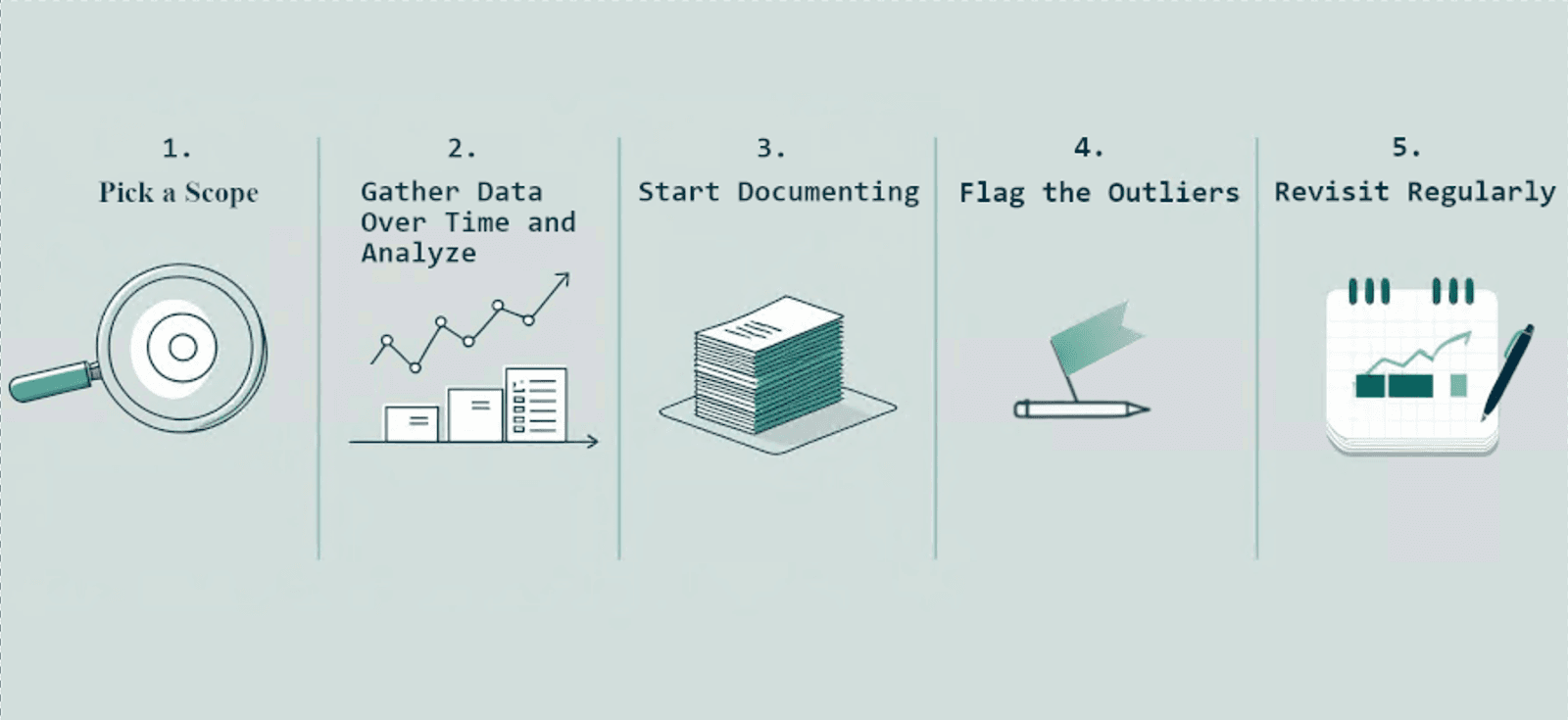
Building a baseline is a five-step loop: pick a scope, gather data over time, document what you see, flag outliers, and revisit regularly. Here is how to approach each step.
1. Pick a scope
Start small. Do not try to baseline your entire environment at once. Choose a specific set of data, such as:
Authentication logs
Application-specific logs (for example, custom web apps)
WAF and network firewall logs
Network flow data (NetFlow, VPC Flow Logs)
DNS and proxy logs
EDR events (process execution, script usage)
Windows Event Logs
Narrowing focus makes the baseline more manageable and anomalies easier to spot.
2. Gather data over time and analyze the patterns
Collect and review logs from the chosen sources across different time periods. Look for consistency in which processes typically run, which accounts appear, and which domains and IP addresses recur. Note scheduled tasks or scripts that run regularly. If a service account runs processes at a specific time, record what it normally runs. Track common parent-child process relationships.
The goal is a clear mental model of how the system behaves when nothing is wrong.
3. Start documenting
Record the patterns and observations. Capture common parent-child process relationships; svchost.exe spawning rundll32.exe might be normal on one system and unusual on another. Note internal-only domains and IP ranges so external activity raises a flag. Document normal remote desktop and VPN usage, typical users, connection times, and originating IPs so unexpected patterns are obvious.
Also write down things that seem strange. Do not ignore oddities because they are hard to explain. Keep the documentation simple and practical, and store it in a shared document your team can update and reference.
4. Flag the outliers
Once you know normal, investigate deviations. Examples include an interactive login from a service account, a service account login from another country, a script running from a temp folder, a new process, or an outbound connection to a country you do not do business with.
Not every outlier is malicious, but each one deserves a look. Flag them, investigate, and learn from them. Curiosity helps threat hunters; chasing oddities improves instincts.
5. Revisit regularly
Baselines change as new code is deployed, applications are added, business hours shift, and people move roles. Review and refine baselines on a schedule.
How do you investigate an anomaly?
You found something unusual. Now what?
Investigating an anomaly means gathering facts, asking questions, and following clues. You do not need to classify it immediately as malicious or benign. Start with five questions:
What account is associated with this event? Identify the user or service account to understand its role.
When did it happen? Pin down the time or time window to correlate with other activity.
Where did it happen? Determine which system, application, or network component was involved.
What else was going on around that time? Look for concurrent events to build context.
Is this normal for this system or user? Assess whether the event fits expected behavior.
These questions guide which logs and context to pull next.
Gather context and expand your search
Check other sources for related information. What else occurred around the same time? Is the same IP address accessing other hosts or accounts? What other activity comes from this account? Do the same commands appear on different machines?
Follow breadcrumbs until the activity forms a coherent story.
Decide on action
Not every anomaly requires a full incident response. Based on findings, possible responses include:
Documenting it as a false positive
Notifying the responsible team
Adding a detection rule for future occurrences
Escalating and bringing in additional resources if it is malicious
Many interesting events turn out to be benign, and that outcome still improves your detection and baselines.
Over time, you will get faster at separating odd-but-normal from genuinely harmful activity. That is how you improve your threat hunting skills. If you want to see how time itself becomes a hunting surface, see temporal hunting: time as a threat hunting surface. [citation needed]
Why threat hunting has to become a habit
Threat hunting is ongoing work that should be on your calendar. It improves defenses, deepens understanding of your environment, and sharpens incident response.
If your first few hunts do not find anything, that is still progress. Each hunt builds familiarity, improves data hygiene, and helps your team learn tools and techniques. Over time, you will move faster, ask better questions, and uncover more meaningful signals.
Treat threat hunting like regular exercise for security skills. You are building a more proactive and resilient security program.
The hunt is only as good as the data you can search
Before you start baselining, make sure your logs are searchable. Threat hunting depends on collecting and querying data from many systems, and that is where many programs stall. Gathering data efficiently is hard, and drowning in noisy logs is worse. Cribl Stream filters out irrelevant data, enriches events that matter, and routes data to the destination you choose, whether a SIEM, data lake, or analytics tool.
Once you have a cleaner feed, you need affordable, accessible storage for months of history. Cribl Lake provides low-cost, full-fidelity storage that keeps history within reach instead of aging out of an expensive SIEM. It integrates with Cribl Search so you can query that data quickly. Cribl Search can query data where it lives, whether in object storage, cloud services, or existing tools, so hunters spend time investigating instead of moving data.
Cribl's Data Engine for IT and Security is designed so telemetry supports the people hunting through it. You get the choice, control, and flexibility to collect from any source, keep what matters, and search all of it without vendor lock-in. For a walkthrough of how we ran a hunt on our own data, read how we used Cribl Search for threat hunting.
So get curious, ask questions, and keep hunting.
Threat Hunting 101 FAQs
What is threat hunting in cybersecurity?
Threat hunting is the proactive practice of searching your environment for threats that automated security tools missed. Rather than waiting for an alert, you assume a compromise might exist and examine logs, endpoint data, network traffic, and behavioral signals to confirm or refute that assumption.
How is threat hunting different from threat detection?
Threat detection is reactive and alert-driven: a tool matches a rule or signature and notifies you. Threat hunting is human-driven and based on hypotheses. The hunter uses curiosity, intuition, and knowledge of attacker tradecraft to find activity that no rule would catch.
What should a beginner hunt for first?
Start by building a baseline of normal behavior in a narrow scope, such as authentication logs or EDR process events. Once you know what normal looks like, hunt for outliers, for example interactive logins from service accounts, scripts running from temp folders, new processes that did not exist last week, and outbound connections to countries you do not do business with.
What data sources are most useful for threat hunting?
Useful sources include authentication logs, Windows Event Logs, EDR process execution data, DNS and proxy logs, WAF and firewall logs, and network flow data such as NetFlow or VPC Flow Logs. The key is collecting those logs in a platform where you can search them quickly and correlate across sources.
How does Cribl support threat hunting?
Cribl Stream filters out noise, enriches events, and routes telemetry to chosen destinations. Cribl Lake stores historical data at lower cost while retaining full fidelity. Cribl Search lets you query that data in place, whether it is in Cribl Lake, object storage, or other systems, so hunters spend time investigating instead of moving data.