
As an organization, you likely have many choices on where to store, analyze, and correlate your data. Those choices may change or iterate over time, so having an easy way to route data is needed. Enter Cribl Stream, which can route your data where it needs to go and save some effort, time, and money. It can help with organizational initiatives like migrations and consolidations, but can also help with smaller-scale initiatives and your day-to-day tasks of simply getting data in. Its flexibility allows you to get data where it needs to go faster and more efficiently.
In this blog, we look at the options for building routes in Cribl Stream, the use cases around routing, and some potential benchmark savings or improvements. The benchmark data presented here is from one or more existing Cribl customers and the benefits they have derived. Keep in mind your mileage may vary.
Most customers start with Stream in front of a single SIEM or analytics tool, using it as a smarter pipe into that one destination. The real power shows up when you let Stream route that same data to multiple destinations at once (your SIEM, low‑cost storage, and other tools like observability or analytics platforms) from a single pipeline.
Cribl Edge provides the same powerful routing capabilities as Stream, allowing you to implement these use cases directly at the data source or edge of your environments.
Routing overview
Stream is an observability pipeline that allows you to route data to one or more destinations. You can route high-value data to your systems of analysis while simultaneously sending data to low-cost storage for long-term retention, and feeding o11y platforms – all without duplicating the collection. And, you can shape, transform, or reduce that data while it’s in flight. Not every system needs data in the same format, so you can quickly adjust and trim data as required for a given tool.
Within Stream, a route is simply a filter that determines where data needs to go. It comprises a JavaScript filter, pipeline or pack for processing, and a destination or output.
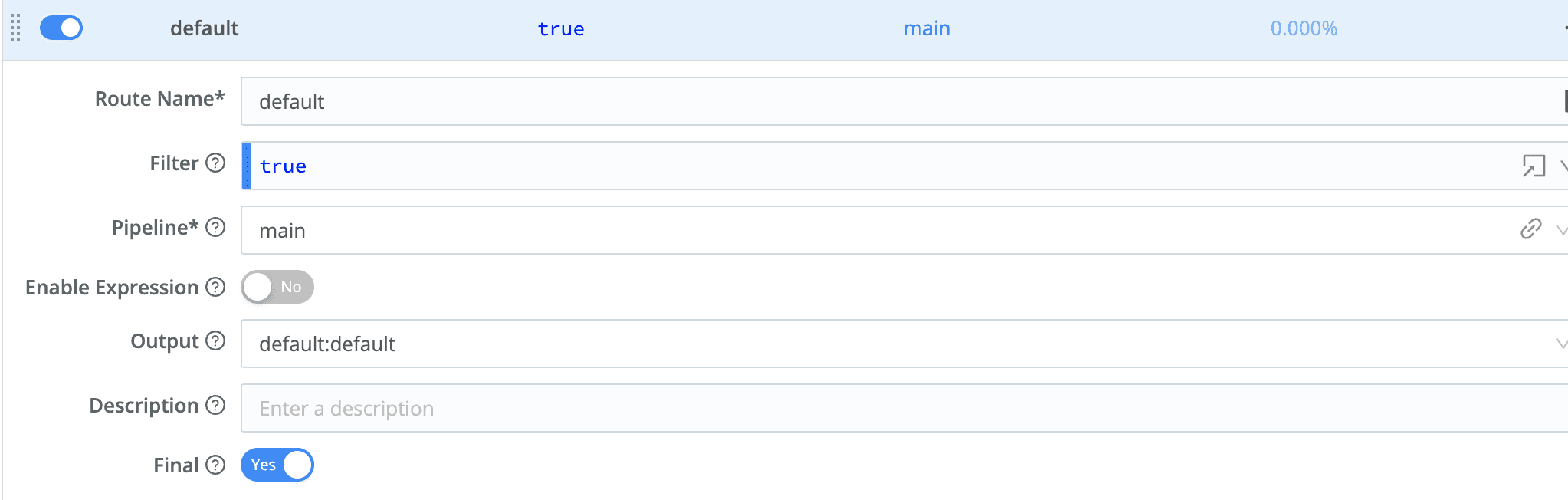
On the “Data Routes” page (shown above), you can create routes to filter, clone, cascade, and funnel data to packs and pipelines and order the routes as needed. With the JavaScript filter, you can make your logic as custom as you need. For example, only pick a specific subnet of hosts from a given Stream Source for a given route. If all you need are connections between sources and destinations – possibly with a pipeline or pack in the middle – Cribl’s Quick Connect page is a visual option to the “Data Routes” option. See below for a screenshot of a Quick Connect view.
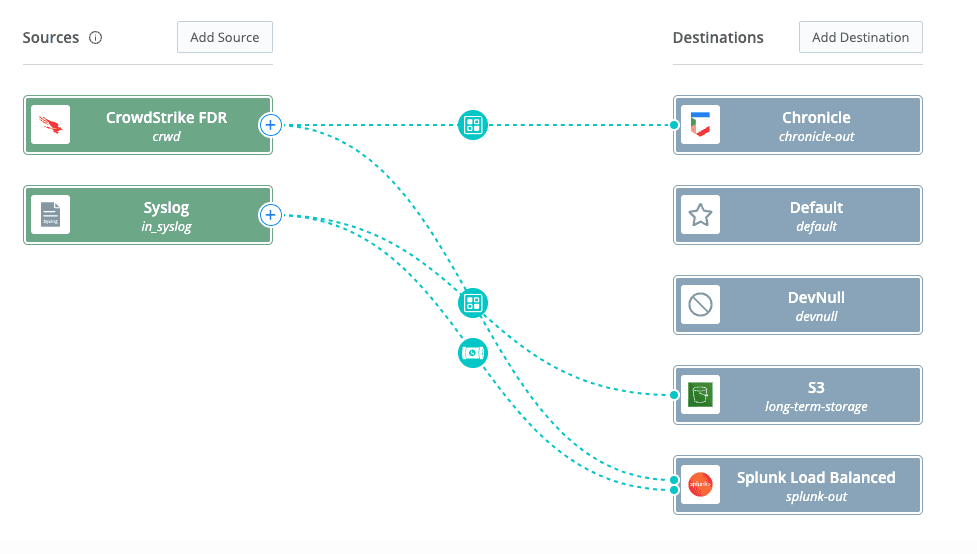
Now that we know how to build routes at a high level, let’s discuss the potential benefits and ROI for various use cases that use Stream for routing.
Routing potential benefits & ROI
Use case #1: Routing to low-cost storage for retention
With license costs for IT Analytics tools, SIEMs, and other tools increasing yearly, analysts are looking for ways to offload some of their long-term data into low-cost storage. Cloud providers offer low-cost object storage that typically meets this need and is often at least an order of magnitude cheaper than storing within your analysis system. Stream enables you to filter and route data to its appropriate destination, including low-cost storage wherever it may reside.
For example, you may send firewall logs to your SIEM and cloud object store. However, you can shorten the retention period for that data in your SIEM to match the timeframe you need for most searches (typically 30 days). In this case, your object store will help retain your logs if you need them for compliance or other reasons.
Benefits:
Reduction of retention in your system of analysis
Average of 10:1 cost savings in storage (depending on storage tiers & environment)
Can leverage out-of-the-box life cycle management policies in popular cloud environments to further reduce and tier your long-term data
Use case #2: Leverage existing collection tier
Metric and log collection tiers are expensive, not only to administer but also to maintain. They can encompass hundreds, if not thousands, of agents (in larger environments), and that scale can be challenging to manage. Now, imagine that, on top of that, you need to maintain a collection tier for each analytics tool in your environment. It can get quite messy and fast!
Stream is designed to decouple sources and destinations, breaking the one-to-one relationship between the collection agent and analytics tool. The message here is that you can leverage whatever you have today to send to multiple destinations, with Stream in the middle, making any necessary shaping or tagging changes for the various tools. Furthermore, without the nth agent installed on your infrastructure, you should also be able to rest easy at night, knowing there aren’t a handful of agents competing for resources.
Benefits:
Reduction in collection tier infrastructure and maintenance costs
Quick time to onboard data into other platforms (typically on the order of 45% reduction in the level of effort -LOE) and drive time to market
Reduction in effort while migrating or evaluating new tools
Use case #3: Speed up getting data in processes
I am calling all administrators out there! What is your least favorite task that causes you nightmares at night? It’s probably the art of “getting data in” or GDI. As an administrator, GDI took up over 75% of my time each day. With all the different data formats and how dynamic data can be, managing it was an art form.
Stream attempts to make this process easier. First off, everything can be done in the user interface. Setting up sources, capturing sample data live on the wire, and building appropriate pipelines for your data are all accomplished in the UI. The UI can serve as a “sandbox” for building and testing your pipelines before deploying them to production. No more bouncing servers with each change you make or trying to decipher an outdated data sample provided to you. Stream also enables you to move more quickly when you already have onboarded sources that simply need to go to a new destination. With a quick route to the new destination, data administrators can clone the data there, speeding up the GDI process.
Benefits:
Benchmark 45% reduction in effort for getting data in
Use case #4: Routing data for consolidations or migrations
Migrations and consolidations can be rough! Consolidating multiple environments or migrating to new ones with different sources and destinations can be time-consuming and high-risk. It typically requires coordinating sources and destinations during change windows and hot cutovers, which can cause issues if anything is missed. Let’s not forget the nightmare rollback process if something were to go awry.
Stream lets you speed up migrations and consolidations while keeping the risk low. How? It allows you to route data from your sources to multiple destinations simultaneously. This is huge for consolidation or migration projects because you can send data to both your old and new tools at the same time. By routing data to both places, you get the time you need to make sure the data looks good in your final destination before you flip the final switch.
Benefits:
Speed up migrations by months (depending on size/scope of migration)
Derisk migrations/consolidations
Easily enables “warm migrations”
Use case #5: Cross domain routing (leveraging compression)
Networks are limited! We can’t always fit as much data as we would like into our networks, and at times, compression becomes our ally when shipping data. This can often be an issue at sites with remote or limited access, but it can still be an issue even when larger network links are already bogged down. Either way, Stream has a potential solution to this.
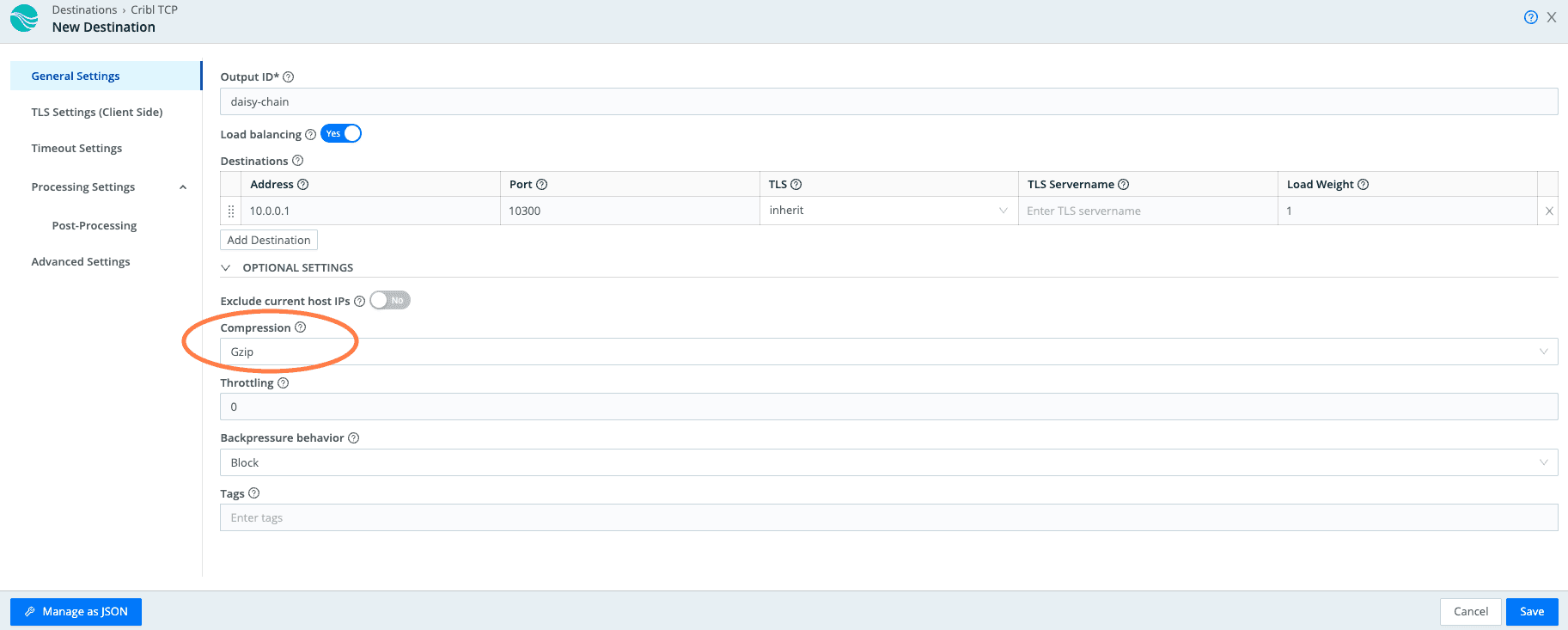
Because of Cribl’s ability to organize workers into worker groups, you can create and then daisy chain them. By leveraging the Cribl Internal sources and destinations (Cribl TCP and Cribl HTTP), you can send data from one worker group to another across your domains. In doing so, you can leverage Gzip compression for data traversing from one worker group to another. This means you can now compress data from one site to another, saving network bandwidth in the process.
Benefits:
Compression rates of 8:1 (average)
Reduction of egress costs
Reduced network load
Use Case #6: Tiering data for multiple Systems of Analysis
The legend of having one tool to solve an organization’s problems is just a myth. Trends show that organizations typically have dozens of tools, if not more, within their IT and security environments. However, not all tools are created equal – each is designed to handle different data and purposes. Ultimately, having a data pipeline to front end these tools will make it easier to tier your data. Some data will be destined for pricier systems of analysis, while others will be for long-term storage on the odd chance you’ll ever need it. Stream allows you to tier your data and gain visibility into those data flows. While tiering data, customers typically achieve a 20-40% reduction in data volume in their systems of analysis, freeing up space for data deemed critical to operations.
Benefits:
Average licensing cost reduction average of 20-40% for systems of analysis (i.e., SIEMs, Monitoring tools), sometimes higher
Use case #7: Enable your data consumers to self service their data feeds
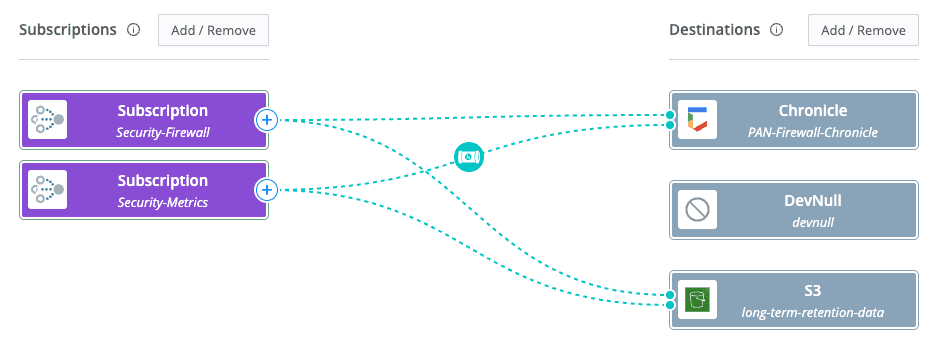
Ever get stuck trying to manage multiple data consumers in your environment? The security team may have one requirement for a specific data set, while the IT team may have another. All these stakeholders want their data isolated from the impacts caused by other teams. Stream enables the creation of data feeds and subscriptions more easily and quickly than traditional methods. With Stream Projects, you can create isolated data spaces for your data consumers to manage their data, including routing and transforming it. Each team can then manage its own data flows without affecting another team’s data. Ultimately, this gives every team the ability to engineer their data while still maintaining governance at the global data level.
Benefits:
Enable data consumers to manage their data
Speed up TTV (time to value) of your data – gain operational insights faster
Federate data more quickly in your organization
Can save 100s+ of hours of effort across analytics/security admins across your organization
Use case #8: Future flexibility & eliminating vendor lock-in
Business is all about making tough decisions. Needs and requirements change over the years, and what worked one day may not work the next. Having the flexibility to be agile in your tool selections is essential and can reduce risk and costs in the long term. Businesses move at a certain pace, and having data agility to keep up is critical. Vendor lock-in can sometimes hold organizations back from implementing new strategies. Oftentimes, migrations become costly, complex, and time-bound. Stream lets you pivot to new tools and techniques as quickly as possible, enabling you to create data routes to a variety of tools. It also transforms that data into an optimal form for each platform, increasing the value you get from them.
Benefits:
FREEDOM!!!
Speed up cloud migrations & vendor POC assessments
Rehydrate systems of analysis with historical data, allowing for training of analytics and security models from day 1
Align business tools with business strategies
Conclusion
In summary, Cribl Stream allows organizations to build, maintain, and manage routes to various destinations in their environments. In doing so, you can ensure the correct data is sent to the right destination in the correct format and, at times, offload that burden – allowing your data consumers to self-serve. It will enable you to reduce costs while simultaneously breaking down existing data silos in your organization, making you more data-agile.
If you've been running Stream in front of a single destination, you're only seeing part of the picture. The real ROI kicks in when you start routing that same data to multiple tools simultaneously – your SIEM, low-cost storage, observability platforms – without duplicating collection or adding complexity. Ready to see what that looks like in practice? Explore our interactive Routing demo and try it for yourself.